Your support team keeps answering a billing question that's already on the FAQ page. A customer searches for a refund, finds nothing, and opens chat. Meanwhile, the chat agent retrieves an older policy, and someone arriving from search lands halfway through an answer without the condition that makes it accurate.
That's a website FAQ page design problem, not just a writing problem. The FAQ needs to work as a browsable page, a searchable reference, and a dependable source for extracted answers. Start with unresolved questions, then build the content and interface around helping people finish their task.
Table of Contents
- How to Collect the Questions Your FAQ Should Answer
- How to Write Answers That Still Make Sense Out of Context
- How to Group Topics and Choose a Layout
- Making Answers Readable and Findable for Every Visitor
- Connecting Your FAQ to Chat and AI Agents
- Measuring Answer Discovery and Iterating Each Month
- Launching in Three Passes and Confirming Before You Publish
How to Collect the Questions Your FAQ Should Answer
Can customers get an answer to the question they're asking today, using the words they type? A stale FAQ often answers a different question: what the company wanted customers to know at launch.
Pull customer language into a shared planning sheet before drafting headings. Keep the original wording alongside your edited question so internal terminology doesn't gradually replace it.
Question sources and what each one reveals
| Source | What It Reveals | How to Export |
|---|---|---|
| Site search queries | Exact words visitors type, including typos | Export the query report from your site search tool as CSV |
| Support tickets | Problems customers need help solving, in their own words | Export recent tickets from the helpdesk, filtered by tag |
| Live chat transcripts | Follow-up questions asked after a weak answer | Export transcripts and copy the first customer message |
| Zero-result searches | Questions your current search doesn't resolve | Filter the search report for queries with zero results |
| Sales call notes | Objections raised before purchase | Search CRM notes for recurring phrases such as pricing, security, or setup time |
Use this collection workflow to bring customer conversations into the planning process.
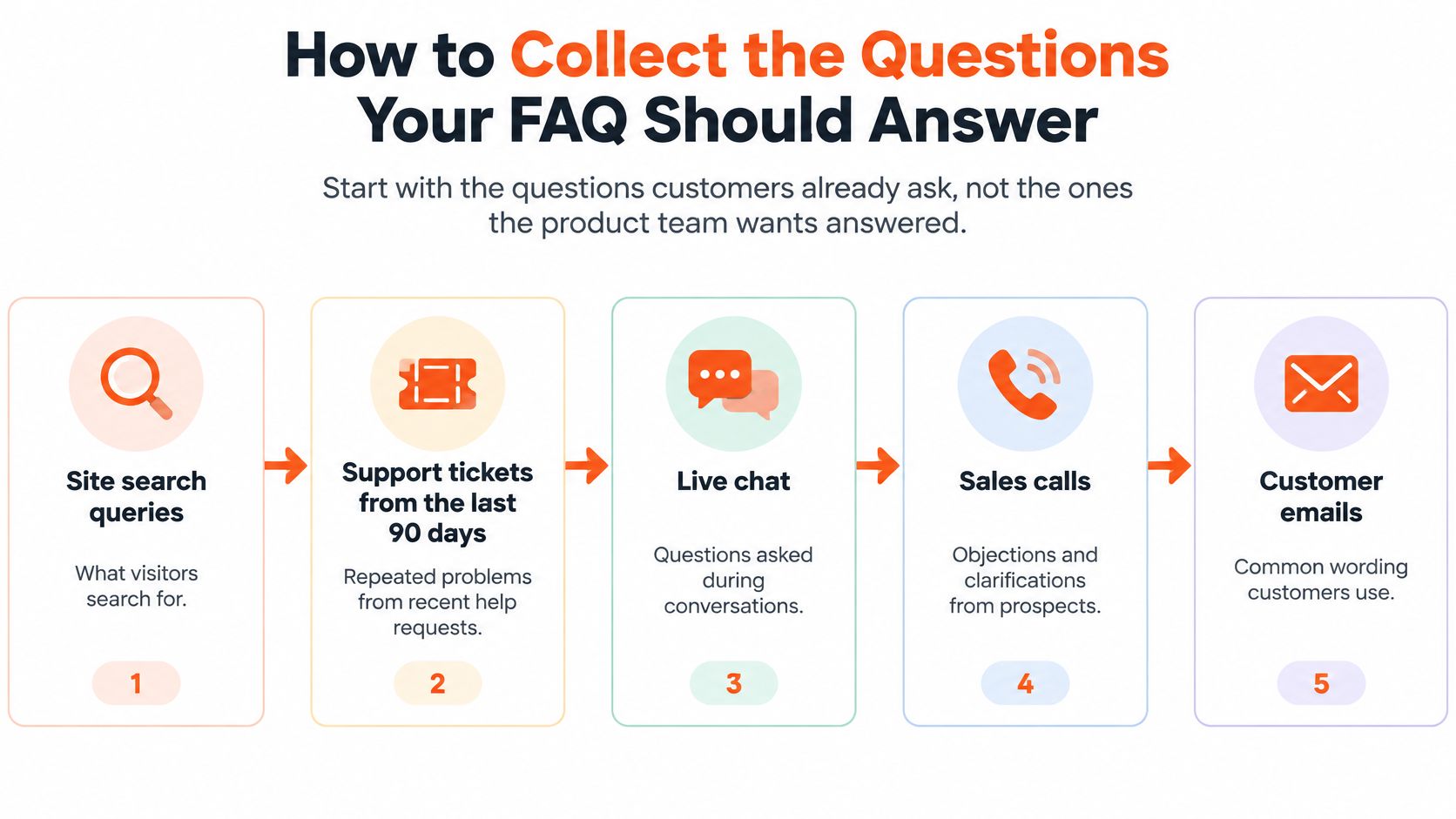
Turn raw messages into question families
- Export the original language. Put each search query or opening customer message in its own row. Remove names, account identifiers, and other personal information before sharing the sheet.
- Normalize synonyms without erasing meaning. Group cancel plan, stop subscription, and end billing together. Keep request a refund separate because stopping future charges doesn't necessarily reverse an existing payment.
- Cluster by intent. Place those families under task-based groups such as setup, billing, security, and troubleshooting. A question about changing an invoice address belongs with billing, not a vague general category.
- Count recurrence across sources. A cancellation question appearing in tickets, chat, and search deserves attention even when its wording differs. Track both frequency and source coverage; a security question can also deserve priority because a wrong answer carries serious consequences.
- Write recognizable question labels. Prefer customer wording, with technical terminology where useful: Why is my AI agent giving outdated answers? can introduce content about re-indexing.
- Validate the grouping and wording. Ask participants to locate an answer, explain their search strategy, and describe whether the label matches their question.
A Weave usability study found that participants generally succeeded when FAQ wording matched their search terms but used trial-and-error when expected keywords were absent; its guidance supports validation with five to six moderated participants across desktop and mobile.
Finish with a candidate sheet containing the question, intent group, original phrases, source coverage, and proposed owner. Don't write every candidate immediately. Resolve duplicate intent and prioritize questions that block a purchase, account access, or successful product use.
How to Write Answers That Still Make Sense Out of Context
Shortening an answer until it becomes a slogan makes it easy to scan and easy to misunderstand. An unconditional yes on the page may become an unconditional promise when a search engine or chat agent extracts it.
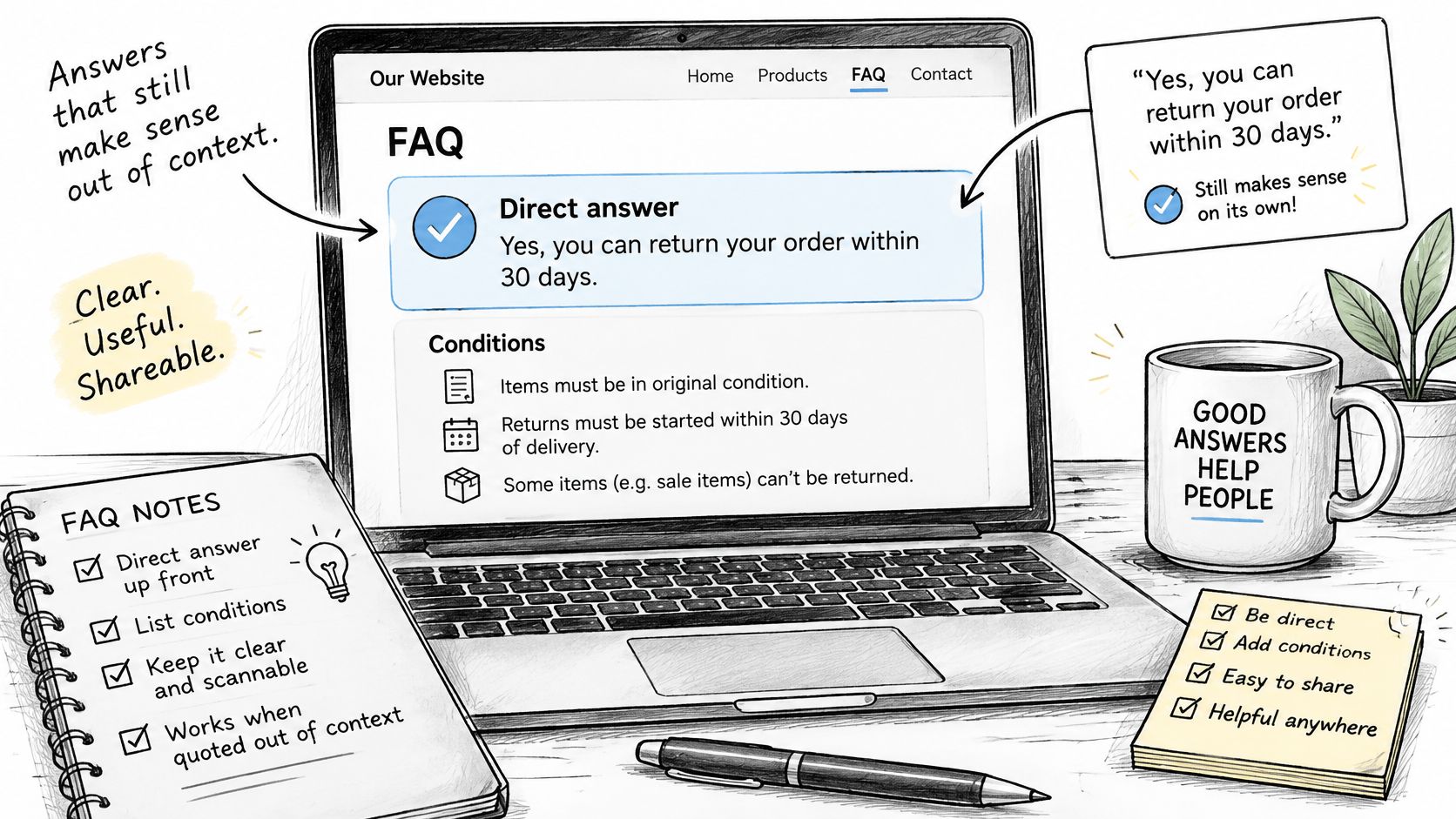
The illustration below is a useful reminder to keep clarity, structure, and completeness together.
HubSpot's guidance on FAQs for answer engines emphasizes standalone context, explicit limitations, and authoritative evidence. That's a better editorial standard than making every answer shorter.
Build an answer that survives extraction
Use a repeatable structure, but let the complexity of the question determine the length:
- Direct answer. State the outcome and name the product, feature, or policy. Avoid opening with a pronoun that only makes sense beneath the question.
- Applicable conditions. Include relevant plan, country, product version, permissions, or eligibility requirements beside the claim they qualify.
- Action and exceptions. Explain what the reader should do next and when that action won't solve the problem.
- Authority and maintenance. Link to the governing policy or detailed procedure, record the last-reviewed date, and assign an accountable owner.
Consider a hypothetical retrieval-based support agent. An answer to Why is my AI agent giving outdated answers? might begin:
The agent may be retrieving the last indexed version of your content rather than the current page. After changing the source, refresh its index and confirm that the revised passage is available before testing the answer again.
The next paragraph should distinguish an indexing problem from inaccessible pages, conflicting documents, or incorrect source selection. Don't promise that re-indexing fixes every outdated response.
Keep detail without burying the answer
Put the immediate decision first, then place the procedure beneath it. If the procedure needs extensive troubleshooting, develop it into knowledge base articles rather than forcing everything into the FAQ.
A video can supplement the written procedure, but it shouldn't be the only route to essential instructions.
Label uncertainty specifically. Say that eligibility hasn't been confirmed for a particular plan and provide a safe next step, rather than implying universal coverage. Trigger a review whenever the underlying policy or workflow changes, not just when the editorial calendar says it's time.
How to Group Topics and Choose a Layout
Choose the layout after you understand the questions and answer lengths. Question count helps, but the better threshold is whether readers can still recognize, compare, and find the available answers.
Layout to use by number of questions
| Questions on the Page | Recommended Layout | Why It Works | Common Failure |
|---|---|---|---|
| A short set that's easy to scan | Fully visible answers, grouped by topic | Readers can compare answers without opening controls | Hiding short answers in accordions for no gain |
| A medium set with longer answers | Topic groups with jump links and selective collapsible answers | Question headings remain scannable while lengthy detail stays compact | Overlapping categories that split an intent across groups |
| A large set that overwhelms the page | Topic hub pages with a search field at the top | Each topic has a focused destination | A long page without useful search or question-level links |
| Billing, security, or account recovery at any size | Plain visible text for critical steps | Readers can access consequential instructions directly | Critical steps buried in closed accordions |
These are implementation choices, not universal numerical cutoffs. A compact FAQ with lengthy procedures may need separate topic pages sooner than a larger collection of brief definitions.
Nielsen Norman Group's FAQ guidance recommends topic chunking, clear navigation to individual questions, fully clickable accordion controls, and expand/collapse options. The important distinction is between reducing visual clutter and hiding the information architecture.
Implement accordions in a usable order
Start with descriptive topic headings and question-level anchors. Add jump links near the top so visitors can bypass unrelated material, and preserve stable destinations when you reorganize the page.
Then build the disclosure controls:
- Use a real button. Place it within the question heading and make the full question row activate it, not just a small chevron.
- Expose the state. Keep
aria-expandedsynchronized with the panel and connect the control to its answer. - Support keyboard use. Enter and Space should operate the button, and the focus outline must remain visible.
- Preserve accessible content. Make expanded answers available to assistive technology, and don't leave interactive elements focusable inside collapsed panels.
- Allow comparison. Let readers keep relevant answers open together and provide an expand-all control.
Don't automatically close the answer someone is using when they open a related question. That behavior saves space at the cost of comparison, especially for plan differences or cancellation options.
Test the narrow-screen experience
Check the page on an actual phone, not only a resized desktop window. Long question labels should wrap cleanly, touch targets shouldn't overlap, and a sticky header shouldn't cover an anchored question.
Ask someone to compare related answers and return to the topic list. If they repeatedly lose their place, change the navigation or disclosure behavior before adjusting decorative styling.
Making Answers Readable and Findable for Every Visitor
An FAQ can pass basic keyboard checks and still be exhausting to use. A reader under stress may have to decode jargon, remember hidden instructions, and guess whether a category contains the answer.
Cognitive accessibility means reducing that effort without removing necessary detail. A 2025 quantitative study in the Journal of Accessibility and Design for All reported that accessible design increased positive readability ratings to 87%.
Reduce interpretation before adding decoration
Write instructions in the order the reader will perform them. Name interface controls exactly, explain unfamiliar terms on first use, and keep the relationship between a question and its answer visually obvious.
- Use descriptive headings. Recover access after losing your authenticator is more useful than a generic troubleshooting label.
- Keep navigation predictable. Don't move search, contact options, or topic navigation between related help pages.
- Make critical instructions directly available. Provide a visible-text alternative when a disclosure interface makes account recovery or security procedures harder to follow.
- Give readers control. Avoid unnecessary motion, unexpected expansion, or focus movement that interrupts reading.
Practical rule: Remove the need to remember an instruction while searching for the place to carry it out.
Test both collapsed and expanded states with browser find, keyboard navigation, zoom, and a screen reader. Also check the answer as plain text, where color, icons, and layout can no longer explain its meaning.
Make search forgiving and results informative
Place a clearly labeled search field near the top. A 2024 study cited by Cludo found that 43% of people landing on a homepage went directly to the search box, supporting prominent search access rather than a buried search icon.
Configure synonyms based on true intent. A search for money back should retrieve the appropriate refund answer, but it shouldn't automatically substitute an unrelated cancellation procedure.
Show the matching question and a useful answer snippet. Preserve the query in the field, offer relevant alternatives when nothing matches, and keep contact support available without making it the only recovery path.
For external findability, give the page a clear primary heading, nest topic and question headings logically, and use a descriptive URL slug. Link the FAQ from relevant product screens, navigation, and the help center.
Add FAQPage structured data only when it represents the questions and answers users can access on the page. For implementation details, the FAQ markup advice from AnswerLion is a useful companion to checking that published text and structured content agree. Markup isn't a substitute for readable content, and it doesn't guarantee enhanced search treatment.
Connecting Your FAQ to Chat and AI Agents
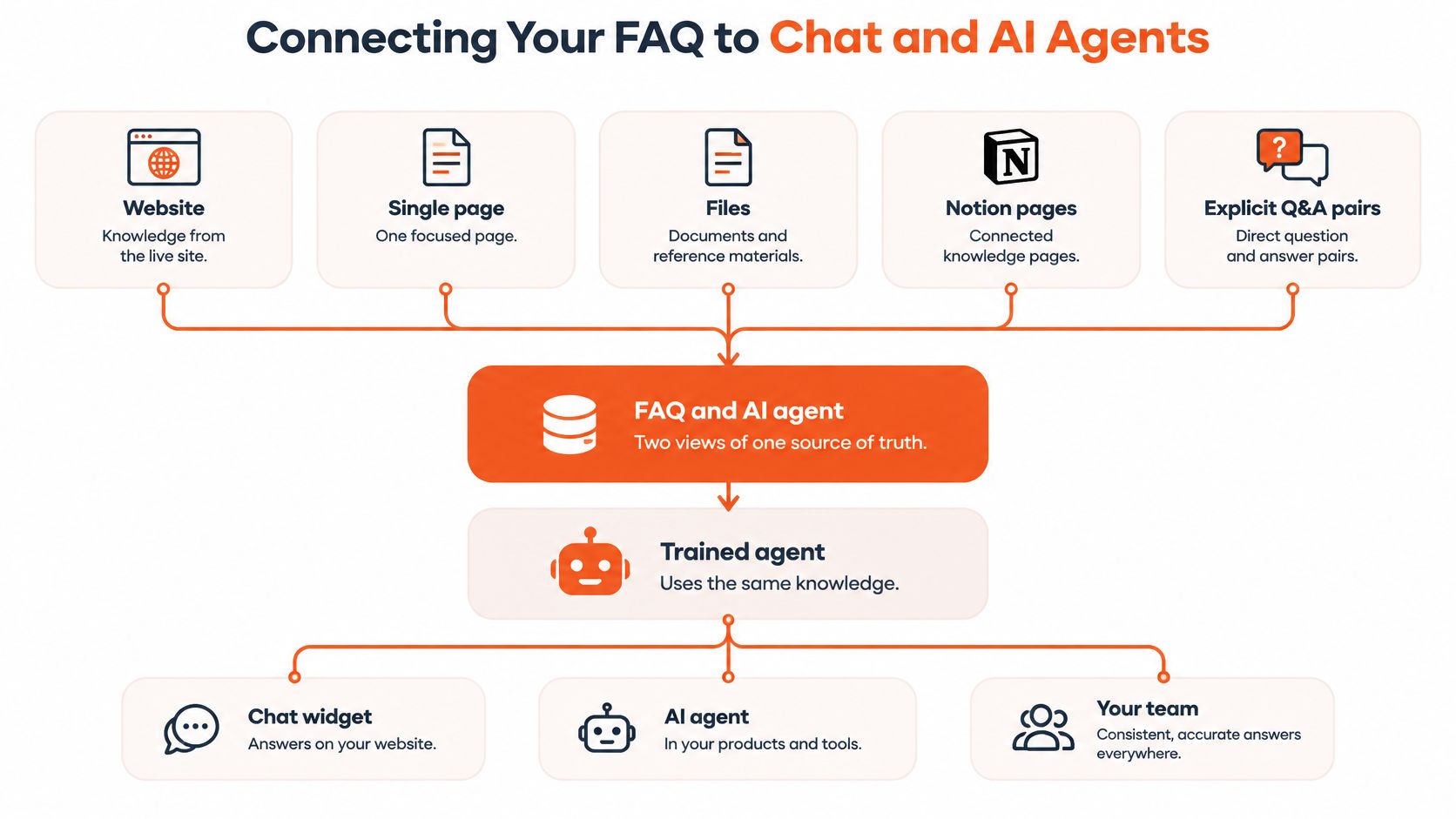
Treat the published FAQ and the agent's knowledge as connected views of the same approved material. Copying answers into separate systems creates competing versions, especially when someone updates the public policy but forgets the support response.
In AgentStack, our agent knowledge can come from a website, a single page, files, Notion pages, or explicit Q&A pairs. The same trained agent can answer on your website, in email, in Slack, and on the phone, with deployment options that include a web widget and help page.
This diagram shows the relationship between the knowledge inputs and the trained agent.
Give each source a clear role
Keep the published FAQ as the public reference. Use explicit Q&A pairs where an answer needs carefully controlled wording, and use crawled documentation for supporting procedures and explanations.
That arrangement still needs editorial governance. If a Q&A pair conflicts with a policy page, someone must resolve the disagreement rather than expecting retrieval settings to decide which promise is correct.
- Define authority. Identify which document governs a policy and which documents merely explain it.
- Connect revisions. When a source changes, refresh the relevant knowledge and test the affected questions.
- Separate explanation from action. An answer about updating an invoice isn't evidence that an agent can change the billing account.
A corrected source doesn't necessarily become available everywhere immediately. Confirm that ingestion has completed and that the agent retrieves the revised material before treating the change as deployed.
Adapt delivery without changing meaning
A chat reply can be shorter than a page answer, but it must retain the condition that determines eligibility or the next step. Link to the specific FAQ entry rather than sending the customer to the help-center homepage.
For a live chat widget for your website, test whether customers can open that reference without losing their conversation. On voice, state the direct answer and immediate action, then offer additional detail rather than reading an entire procedure aloud.
A different channel needs a different presentation, not a different policy.
Review unanswered conversations for the underlying failure. The agent may lack content, retrieve the wrong passage, or need clarification before answering. Only the first problem necessarily calls for a new FAQ entry; the others require better retrieval or conversation behavior.
Measuring Answer Discovery and Iterating Each Month
FAQ metrics, signals and actions
| Metric | What It Signals | Action When It Moves |
|---|---|---|
| Answer-find rate | Share of searches that end on a relevant answer | Rewrite question and heading wording for the affected group |
| Zero-result searches | Queries for which search returns no matches | Add an entry or synonym after checking that the question is in scope |
| Query reformulations | Readers rewording a search after an unsuccessful attempt | Add the reformulated phrase as a synonym or question title |
| Escalation rate after FAQ view | Readers who still contact support after viewing an answer | Add the missing condition, next step, or useful destination |
| Median time-to-answer | How long readers take to reach the answer that resolves their task | Improve placement, labels, or result relevance |
| Accordion opens per solved task | Disclosure controls used before completing the task | Show comparable answers together or clarify headings |
Page views tell you that people arrived, not that they succeeded. A 2024 usability-statistics review by Wingify reported that 79% of users leave a website and search elsewhere when they can't find what they're looking for.
Define success before instrumenting events
A result click isn't automatically a resolution. Combine search and click events with a lightweight helpfulness prompt, task testing, or conversation outcomes where you can connect them responsibly.
Record escalation within the same session after an FAQ view. Measure time-to-answer from the initial search to the selected answer only when you have a defensible signal that it resolved the task; otherwise, label the metric time-to-result-click.
Keep event definitions stable so changes remain comparable. Exclude staff testing, avoid collecting sensitive query content unnecessarily, and separate mobile results from desktop when an interaction could explain the difference.
Turn reporting into an editorial routine
Review zero-result queries and reformulations weekly. Assign each recurring issue a cause: missing content, missing synonym, misleading title, poor ranking, or an out-of-scope request.
Revise topic organization monthly when customers consistently look in the wrong place. Audit accuracy, ownership, review dates, and authoritative references quarterly, while treating policy changes as immediate review triggers.
Connect these tasks to customer experience and analytics, rather than maintaining a dashboard nobody owns. Each issue needs a proposed fix and an observable outcome.
When comparing layouts or labels, apply the discipline of running reliable landing page experiments: define the hypothesis, choose the task outcome, and avoid changing several unrelated elements together. Don't declare a winner just because a variant generated more clicks.
Suppose customers repeatedly reformulate stop paying as cancel subscription, then find the correct billing answer. Add the original phrase to search coverage and consider changing the question label before commissioning another article.
If customers reach that answer but still contact support, inspect what's missing. They may understand cancellation perfectly and still need to know whether an outstanding invoice remains payable.
Launching in Three Passes and Confirming Before You Publish
A single launch mixes content, navigation, and agent behavior into the same release. When customers struggle, you can't tell which part needs fixing.
Stage the release around distinct risks
- Publish a focused pilot. Choose high-priority questions from the planning sheet and check whether visitors understand the page's purpose. Then give people realistic tasks on desktop and mobile, without telling them which category or search phrase to use.
- Connect and test the agent. Test each configuration against representative supported, unsupported, and ambiguous questions. Save only the model and prompt that pass all three types; an agent that answers easy questions but invents certainty for ambiguous ones isn't ready.
- Revise from actual use. Inspect failed queries and completion signals after the pilot has generated useful activity. Fix recurring failures before expanding coverage, and investigate low-use entries before retiring anything consequential.
Use realistic test questions rather than copying FAQ headings into the test script. Include requests that require clarification and requests the agent should decline or hand off.
Confirm readiness before publication
- Content accountability. Every answer has an owner, a review date, and applicable conditions.
- Functional navigation. Question links, search results, disclosure controls, and support routes work.
- Knowledge consistency. Published answers and agent responses agree on policy and exceptions.
- Safe recovery. Visitors can reach a person when self-service doesn't resolve the issue.
Keep the review routine active after release. A useful FAQ isn't finished when it's published; someone remains responsible for correcting the answers customers can't use.
AgentStack offers a live walkthrough with a solutions engineer and a live agent built on your own docs, with no credit card or commitment. Visit AgentStack to test how your FAQ content answers real support questions before you roll it out across customer channels.