A customer is locked out on a Friday afternoon. Your help center has an article that should fix it in two minutes, and they still open a ticket. That gap between having content and having content that works is where support teams lose hours every week.
Good knowledge base articles are maintained assets with an owner, a narrow job, and a measurable outcome. This guide is for support leads and documentation owners who want theirs managed that way. It covers how to build each article around one real question, how to score whether articles resolve issues, how to catch outdated or conflicting content before readers do, when an AI assistant should abstain instead of guessing, and how to route the questions no article answers into a maintenance queue.
Table of Contents
- Why Most Knowledge Base Articles Fail Their Readers
- Planning Each Article Around One Real Question
- Structuring Articles That Readers Can Scan
- Measuring and Scoring Whether Articles Work
- Keeping Articles Accurate When Sources Disagree
- Choosing a Setup for Multi-Channel and Multilingual Support
- Building a Maintenance Routine You Can Sustain
Why Most Knowledge Base Articles Fail Their Readers
Run a ticket audit on any help center that's been live for a year and the same scene surfaces. A customer searched for how to reset a two-factor setting. The top result carried an internal feature name they'd never heard, they skimmed three paragraphs on why the feature matters, hit a screenshot from an older interface, and couldn't tell whether the steps applied to their plan. They opened a ticket. The agent pasted the answer from memory, because quoting the article would create more confusion.
That sequence repeats for predictable reasons, and every one of them is visible before the reader ever hits it.
Failure Patterns You Can Spot in an Audit
- Titles that name features, not problems: Readers search in their own words, usually the task or the error they see. A title built around internal terminology won't match that search, and the right article loses to a worse one.
- Missing prerequisites: The reader gets four steps in before learning they need admin access, a paid plan, or a different product version. At that point they don't restart. They leave.
- Stale visuals and silent contradictions: A screenshot from a previous release undermines trust instantly. So does a second article that gives different steps for the same task, which is the failure readers notice and authors rarely do.
An article that makes a reader verify it against another source has already failed. Verification is the job the article was supposed to do for them.
Each failure leaves a trail in your data. Agents quoting a different answer than the published one. Downvotes clustering after a product release. Two articles ranking for the same query with overlapping steps. If you're not watching those signals, your readers find the rot first.
Two Readers, One Standard
Every article serves self-service customers and agents who need a trusted answer to quote. Those readers want different things. Customers want the shortest path to done. Agents want precision they can defend when a customer pushes back. Writing for one group breaks the other. Vague, friendly prose gives an agent nothing to stand on when a customer asks where exactly a setting applies. Dense technical writing loses the customer in the first paragraph.
Clarity is a skill worth treating separately from product knowledge. If your team writes accurately but readers still misread steps, working through guidance on how to write clearer technical documentation helps separate sentence-level problems from structure problems. Failed articles are often accurate. They're accurate in a form nobody can use under pressure.
The root cause is treating articles as finished work. A help center is a maintained asset base, and an article with no owner, no review date, and no way to flag it as outdated will fail readers eventually. The question isn't whether your content decays. It's whether you detect the decay before your customers do.
Planning Each Article Around One Real Question
Don't start with a topic list. Start with evidence of what people already ask and fail to find. Four sources give you that evidence without guesswork, and together they tell you both what to write and how readers phrase the problem.
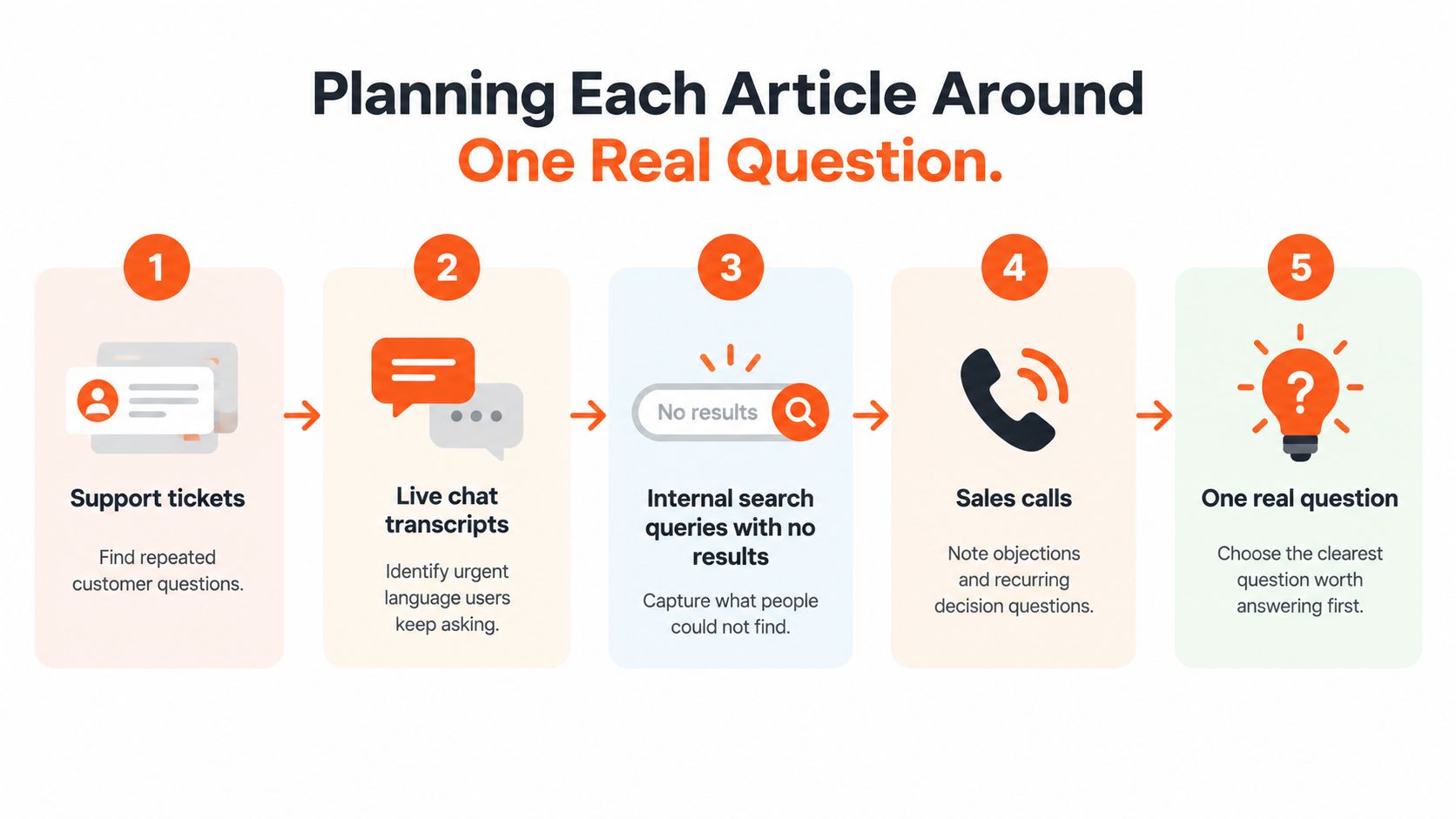
Where Real Questions Come From
- Support tickets: Sort by repetition, not volume alone. The same question asked in different words signals one missing or broken article.
- Live chat transcripts: Chat shows urgency and exact wording. Customers type what they'd type into search, which makes transcripts your best source for titles.
- Zero-result searches: Internal search queries that return nothing are unmet demand in the reader's own language. Each one is a candidate article or a missing synonym.
- Sales calls: Prospects ask decision questions your help center often ignores, such as limits, compatibility, and what happens after cancellation.
From Topic to One Question
Take a billing team drowning in export tickets. One customer can't find the export button. Another gets a CSV with the wrong date range. A third exports successfully but the file won't open correctly in their spreadsheet tool. Three tickets, one underlying intent for the first two, and a separate troubleshooting need for the third.
The vague topic is invoice exports. The key question is narrower: how do I export invoices to CSV for a single month? That question dictates the title, the steps, and the stopping point. The spreadsheet problem becomes a linked troubleshooting article rather than a bloated final section.
Before drafting, settle four scope decisions in writing.
- Coverage: The single task this article completes, stated as an outcome.
- Exclusions: What it deliberately doesn't cover, with links to the articles that do.
- Applicability: Which plan, product version, region, or role the steps assume.
- Ownership: A named person responsible for accuracy after publishing, not a team alias.
Practical rule: Name the owner before you write the first sentence. An article without an owner is already outdated, it just hasn't been caught yet.
One article, one task sounds restrictive, but it's what makes retrieval work. When a customer, an agent, or an AI assistant pulls up an article, they need to know within seconds whether it matches the situation in front of them. A sharply scoped article answers that instantly. A broad one makes them hunt. Resist merging related questions to reduce article count. You're not managing a page budget. You're managing how fast a stressed reader can confirm they're in the right place.
Structuring Articles That Readers Can Scan
Format follows the reader's situation. Someone mid-task needs steps. Someone mid-error needs a diagnosis. Someone comparing options needs reference data they'll return to. Picking the wrong format forces readers to extract what they need from a structure built for somebody else.
Common Knowledge Base Article Formats
| Article type | Best for | Core structure |
|---|---|---|
| How-to guide | Completing a known task | Prerequisites, numbered steps, expected result |
| Troubleshooting | Diagnosing something broken | Symptom, likely causes, fixes in order of likelihood |
| Reference page | Looking up limits, specs, or policies | Scannable tables, definitions, version notes |
| FAQ entry | One quick factual answer | Question as heading, short direct answer |
If you're building out the FAQ format specifically, a structured template for an FAQ document keeps entries consistent enough that readers learn where to look.
Elements That Make Any Format Faster
Whatever the format, five elements decide whether a reader finishes or gives up.
- One-sentence summary at the top: State what the reader will accomplish and under what conditions. Readers who are in the wrong article should know in five seconds.
- Prerequisites before step one: Access level, plan, version, and anything they need open or installed. Burying these mid-article wastes the reader's effort.
- Numbered actions, one action each: Write steps as commands. If a step contains the word and twice, it's probably two steps.
- Expected result after major steps: Tell readers what success looks like so they can catch a wrong turn early instead of at the end.
- An explicit escalation path: Say what to do when the steps fail, and what information to include when contacting support. Silence here produces tickets with no useful context.
Headings should use the wording customers use, pulled from those chat transcripts and search queries, not the wording from your release notes. Keep paragraphs short. Readers scan for the line that matches their screen, and long blocks hide it.
For screenshots, annotate the exact element the reader must find and write alt text that describes the action, not the image. When the interface changes, good alt text and captions let the article stay useful while you replace the visual, and they tell the next editor what the screenshot needs to show. Teams that want a deeper grounding in these habits can write clearer technical docs with Pure Write, which covers documentation technique beyond the help center context.
For troubleshooting articles, put the most common error message near the top, in the reader's exact wording. That's the phrase they searched.
Paste this into your editorial checklist: summary first, prerequisites before steps, one action per step, an expected result the reader can verify, and a named next move when it fails.
Measuring and Scoring Whether Articles Work
Page views tell you an article was found. They say nothing about whether it worked. A high-traffic article can be a high-failure article that customers open, abandon, and follow with a ticket. You need a score tied to outcomes, built from defined formulas rather than editorial opinion.
The scorecard below shows the dimensions worth rating and how they roll up into a single number you can act on.
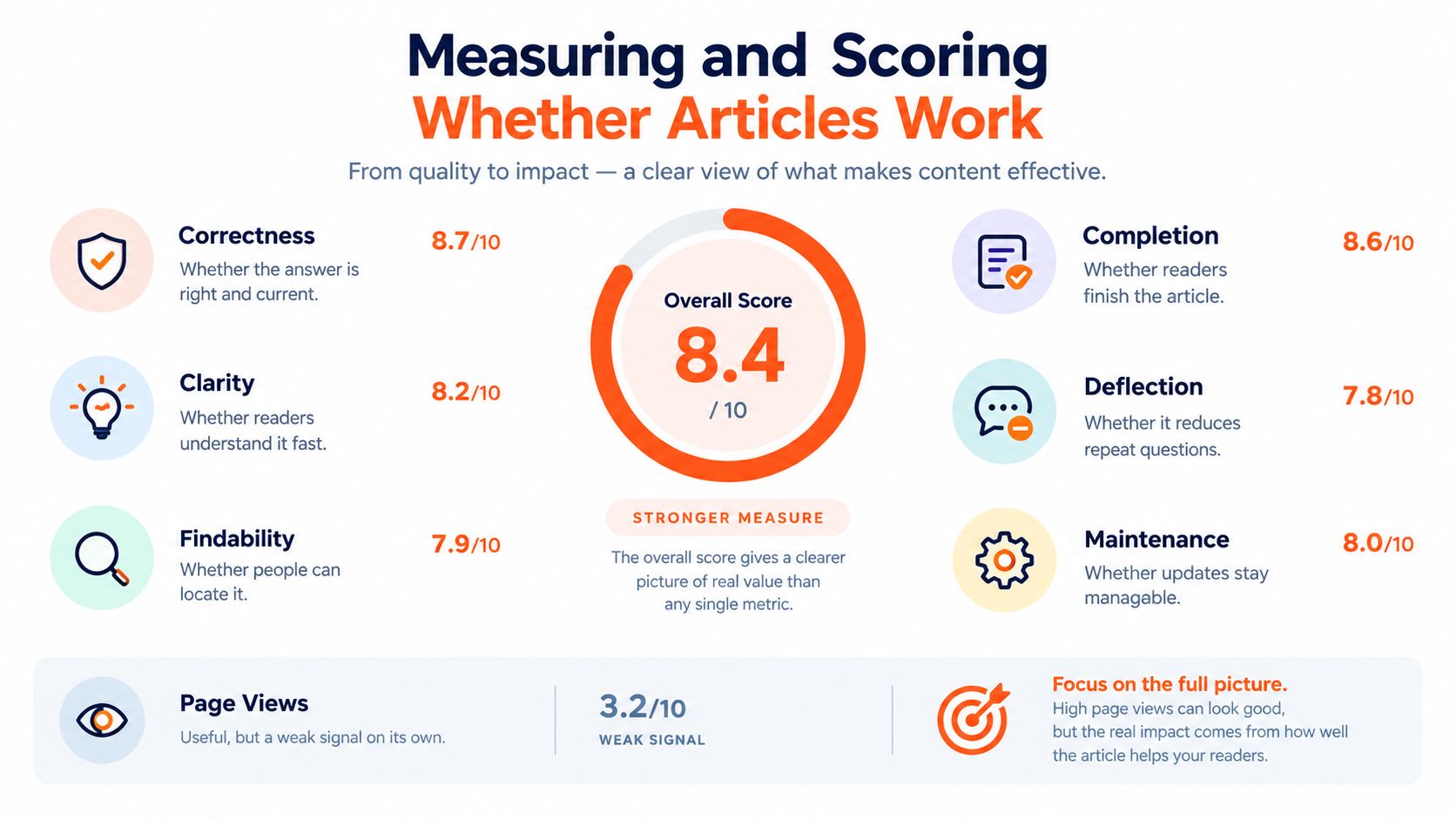
A Weighted Scoring Model
Rate six to eight dimensions on a 0 to 5 scale, then convert the weighted total to a 0 to 100 score with bands of Gold at 85 or higher, Silver at 70 to 84, Bronze at 55 to 69, and At Risk below 55, following a framework for rating knowledge article quality across weighted dimensions. The dimensions that earn their place are correctness, relevance to the user's intent and product version, completeness, clarity, actionability, findability, and maintenance status. Weight correctness and relevance heaviest. A beautifully clear article that's wrong for the reader's version is worse than no article, because it sends them down a path that can't succeed.
Pair the score with outcome signals. Measure view-to-case rate over a defined window after reading, self-service deflection for eligible intents, and differences in first-contact resolution and average handle time when agents use the article. For usage itself, define it precisely: a measurement approach for knowledge article usage rates calculates agent usage as cases with at least one linked article divided by closed cases, and joins assisted interactions by case ID and self-service events by session ID. That precision matters. Without it, every team reports a different number for the same library.
The walkthrough below shows how these signals come together in practice.
If you're surfacing these numbers for a support team, help center insights and analytics is the kind of view that turns article data into a work queue rather than a report nobody opens.
Pitfalls That Corrupt the Score
- Over-weighting vocal feedback: Helpfulness votes come from a self-selected slice of readers. Use minimum sample sizes and smoothing so a handful of angry votes can't bury a sound article, and don't rank low-volume articles directly against high-volume ones.
- Confusing abandonment with deflection: A reader who gives up looks identical to a reader who succeeded if you only count missing tickets. Time on article, zero-result searches afterward, and assisted contact within your window separate the two.
- Comparing unlike intents: A password reset article and a data migration article will never perform alike. Segment by complexity before you judge either one.
Established programs often see meaningful deflection only on well-scoped, eligible intents, so judge each article against comparable intents in your own library rather than a universal target.
Keeping Articles Accurate When Sources Disagree
Most guides assume your source material is true and consistent. It isn't. Your help center says one thing, a legacy PDF says another, a Notion page written during a launch says a third, and the product changed last month. The hard question isn't how to write the article. It's how you know whether an article should still be used, and what your systems should do when sources conflict.
Outdated content is reported as the leading knowledge base challenge, ahead of lack of automation, and organizations cite high-quality accessible content and cross-functional collaboration as equally critical success factors, each cited by 25% of respondents in a 2025 survey of small business AI adoption. That combination points at governance, not writing speed.
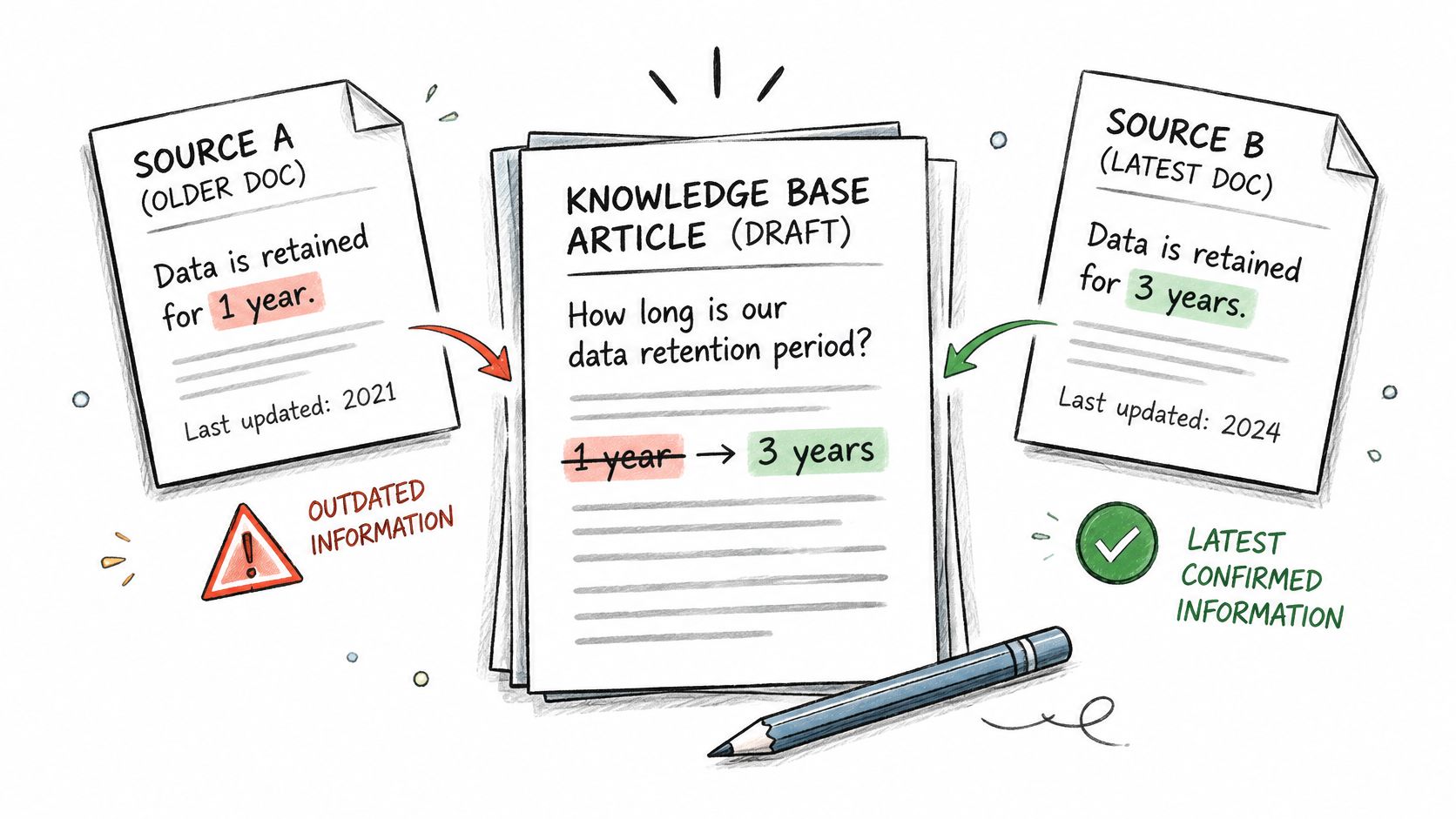
The diagram below maps how a team routes a conflict back to the most current source before republishing.
Why More Articles Can Mean Worse Answers
Publishing volume feels like progress. Under weak governance it's the opposite. A larger repository increases retrieval ambiguity, because search and AI assistants now choose among near-duplicate articles written for different versions. It exposes version conflicts that were previously hidden in separate tools. The result is an answer delivered confidently from a source that stopped being true two releases ago. Deleting and merging articles is quality work, even though it shrinks the number your team reports upward.
Controls That Keep a Library Trustworthy
- A named owner per article: Ownership means one person gets the review task and can be asked whether the content still holds.
- Review cadences tied to product releases: Calendar-based reviews miss changes. When a release touches a feature, every article tagged to that feature enters review.
- Version and region labels with effective-from dates: Readers and retrieval systems both need to know which article applies now, and which one applied before.
- An explicit evidence hierarchy: Current product documentation outranks legacy PDFs. Written policy outranks behavior someone inferred from the interface. When two sources disagree, the hierarchy decides, not whoever answers loudest.
Unanswered-question analytics close the loop. Every question your help center search or AI assistant couldn't answer confidently is a maintenance ticket in disguise. Route those into a queue, cluster them by intent, and you'll find they're rarely random. They concentrate on the same stale, missing, or contradictory content.
That queue also defines when an AI assistant should abstain. If retrieval returns conflicting sources, low-confidence matches, or content past its review date, the correct behavior is to say it doesn't know and hand off to a human, while logging the gap. A guessed answer costs more trust than an honest escalation.
Set removal criteria you can apply without debate. Retire or revise an article when its score sits in the At Risk band across a full review cycle, when its product version is no longer supported, when a newer article supersedes it, or when view-to-case data shows readers consistently need help afterward. Redirect retired URLs to the replacement so old links in tickets and emails don't strand readers.
Choosing a Setup for Multi-Channel and Multilingual Support
One canonical article for every reader is a tidy idea that breaks on contact with reality. A long, screenshot-heavy guide works in a help center. Read aloud by a voice agent, it's unusable. A faithfully translated article can still be wrong if pricing, tax, shipping, data residency, or compliance rules differ in the reader's market. The choice is between a single canonical article and channel-aware, locale-aware variants governed by metadata.
The demand side makes the case. Among more than 500 professionals in North America and Europe, 63% attributed up to half of their revenue growth to localization while 62% struggled to localize effectively, and a separate consumer study across 17 markets found 44% preferred messaging apps, 39% website chat, and 30% email, with 49% expecting 24/7 availability, figures compiled in a 2025 report on localization and content operations. Readers don't arrive through one door, in one language, during your office hours.
Metadata Does the Heavy Lifting
Model locale, product plan, channel, and customer segment as retrieval metadata on every article, not as folder names. Metadata lets a system select the right variant at answer time. The German billing article for the annual plan, formatted as short spoken steps for voice, is a different retrieval result from the English monthly-plan version with screenshots for web, even though both descend from one source of truth.
Three practices keep variants from drifting apart.
- Terminology glossaries: Lock the approved translation for product terms, plan names, and legal phrases so translators and AI systems stop improvising.
- Native speaker testing: Have native speakers complete the task using only the localized article. Fluency review catches awkward phrasing. Task testing catches wrong instructions.
- Measurement by language and channel: Track resolution and escalation rates segmented by locale and channel. A variant that underperforms its source language version has a content problem, not a demand problem.
Managing translations at this level needs tooling support, and language and translation settings for a help center shows how locale handling can sit inside the platform rather than in spreadsheets.
Where an AI Support Platform Fits
This is the point where an AI support platform becomes relevant, because the same governed knowledge has to serve every channel consistently. AgentStack, for example, ingests website pages, uploaded PDFs, Word and Excel files, Notion content, and Q and A pairs, then delivers answers across website chat, email, Slack, and voice, with analytics that surface unanswered questions. Whether that fits your setup depends on where your content lives and which channels you staff. The evaluation question is simple: can the platform respect your metadata, your evidence hierarchy, and your abstention rules, or does it flatten everything into one undifferentiated pool? A platform that can't distinguish a current policy page from a legacy PDF will reproduce your governance problems at machine speed, in every language, around the clock.
Building a Maintenance Routine You Can Sustain
Everything in this guide collapses into a routine small enough to survive a busy quarter. Plan around real questions, structure for scanning, score against outcomes, govern conflicting sources, and design for channels and languages. None of that requires a documentation department. It requires a rhythm.
A Review Rhythm That Holds
- Monthly: Work the lowest-scoring articles first. Your At Risk band is a ready-made queue, already prioritized by reader impact.
- At every release: Review any article tagged to a changed feature before or immediately after the release ships. This single habit prevents most stale screenshots and dead steps.
- Quarterly: Cluster unanswered and low-confidence questions by intent. Each cluster becomes a new article, a revision, or a deliberate decision not to cover that topic in self-service.
Audit in order of pain, not convenience. The article generating the most tickets deserves your first hour, even if it's the hardest one to fix.
When you run your first audit, resist starting with whatever is easiest to edit. Pull the articles most often linked in tickets, the ones with the highest view-to-case rates, and the ones agents admit they don't trust. That short list is where reader trust is being lost today. Fixing a handful of high-impact articles changes ticket volume and agent behavior faster than polishing a large number of rarely read pages.
Assign owners during the audit, not after. An article that comes out of review without a named owner and a next review trigger will be back in the same state within two release cycles. Ownership is the whole maintenance strategy in miniature. Everything else is scheduling.
Your First Step This Week
Export the last month of unanswered or low-confidence questions from your help center search and any AI assistant you run. Identify the three most-cited articles connected to those questions and assign each one an owner with a revision deadline. Then check where your source content lives. If it's scattered across website pages, PDFs, and Notion, evaluate whether your current tooling can ingest those sources into one governed knowledge base and surface the gaps automatically, or whether your team will keep finding contradictions one embarrassed ticket at a time. That single export turns an abstract content problem into three named fixes, and it's the fastest way to learn whether your library's real problem is writing, findability, or trust.
If your knowledge lives across website pages, PDFs, and Notion, and your team keeps discovering gaps only after customers do, AgentStack lets you ingest those sources into one AI support agent that answers across website chat, email, Slack, and voice while surfacing the unanswered questions your articles still need to cover. Start with the three articles your audit flags first, connect your existing sources, and watch which questions stop becoming tickets.