You've inherited an FAQ page that nobody trusts. It has a long list of loosely related questions, links that lead nowhere, and answers copied from product documentation that no longer matches the interface. Support agents still rewrite the same replies in chat, customers keep opening tickets for basic issues, and sales sends prospects to a page with outdated product language.
A useful template for an FAQ document fixes more than the layout. It gives repeated questions a clear home, assigns responsibility for accuracy, records where each answer came from, and creates a natural first tier in your wider support information architecture. The document should be short enough to scan, structured enough to maintain, and connected enough to grow into a help center when the content outgrows it.
Table of Contents
- When an FAQ Document Becomes a Support Lifeline
- What an FAQ Document Actually Is
- Core Components Every Template Must Include
- Walking Through a Complete Sample FAQ Document
- Organizing Sample Questions by Intent Category
- Metadata Fields That Make the Document Maintainable
- When an FAQ Document Should Grow Into a Help Center
- Choosing Where the FAQ Document Will Live
- Review Cadence and Ownership Workflow
- Launch Checklist for Your FAQ Document
When an FAQ Document Becomes a Support Lifeline
In my first week taking over support operations for a SaaS product, I'd start with the inherited FAQ before changing macros, workflows, or staffing plans. The page often looked substantial at first glance. Then the audit exposed the underlying problem: questions covered billing, onboarding, permissions, integrations, and edge-case policies in one unscoped sequence, while screenshots showed an interface from years earlier.
The support queue told the same story. Customers weren't finding answers before contacting the team, and agents were composing nearly identical explanations in chat. New hires had no reliable artifact to study, so every trainer created a personal version of the same guidance. Meanwhile, the public page attracted visitors searching for old product names, which made the content visible without making it useful.
The replacement didn't begin with a redesign. It began with a narrower document scope and a content inventory.
- Scope: The team defined which product area and audience the document served.
- Ownership: One person became accountable for factual accuracy and review dates.
- Question language: Each entry was rewritten using the words customers used in tickets and searches.
- Escalation: Longer procedures moved into deeper documentation instead of bloating the FAQ.
- Traceability: Each answer recorded its source, verification status, and related support context.
Practical rule: An FAQ should be the shortest trustworthy answer to a repeated question, not a storage room for every piece of documentation the team hasn't organized.
The result was a single reference point that support, sales, onboarding, and product could share. Routine questions had a clear self-service destination, agents could cite a canonical answer, and new employees could understand the product's recurring friction without reading a sprawling archive. The format has become mainstream in support operations. A knowledge-base usage overview from AWS describes adoption rising from 67% in 2012 to 81% in 2018, while also citing that 70% of consumers prefer finding answers on a company website rather than contacting support by phone or email.
That history matters because the FAQ isn't just a web page. It's the first maintained layer of a support system.
What an FAQ Document Actually Is
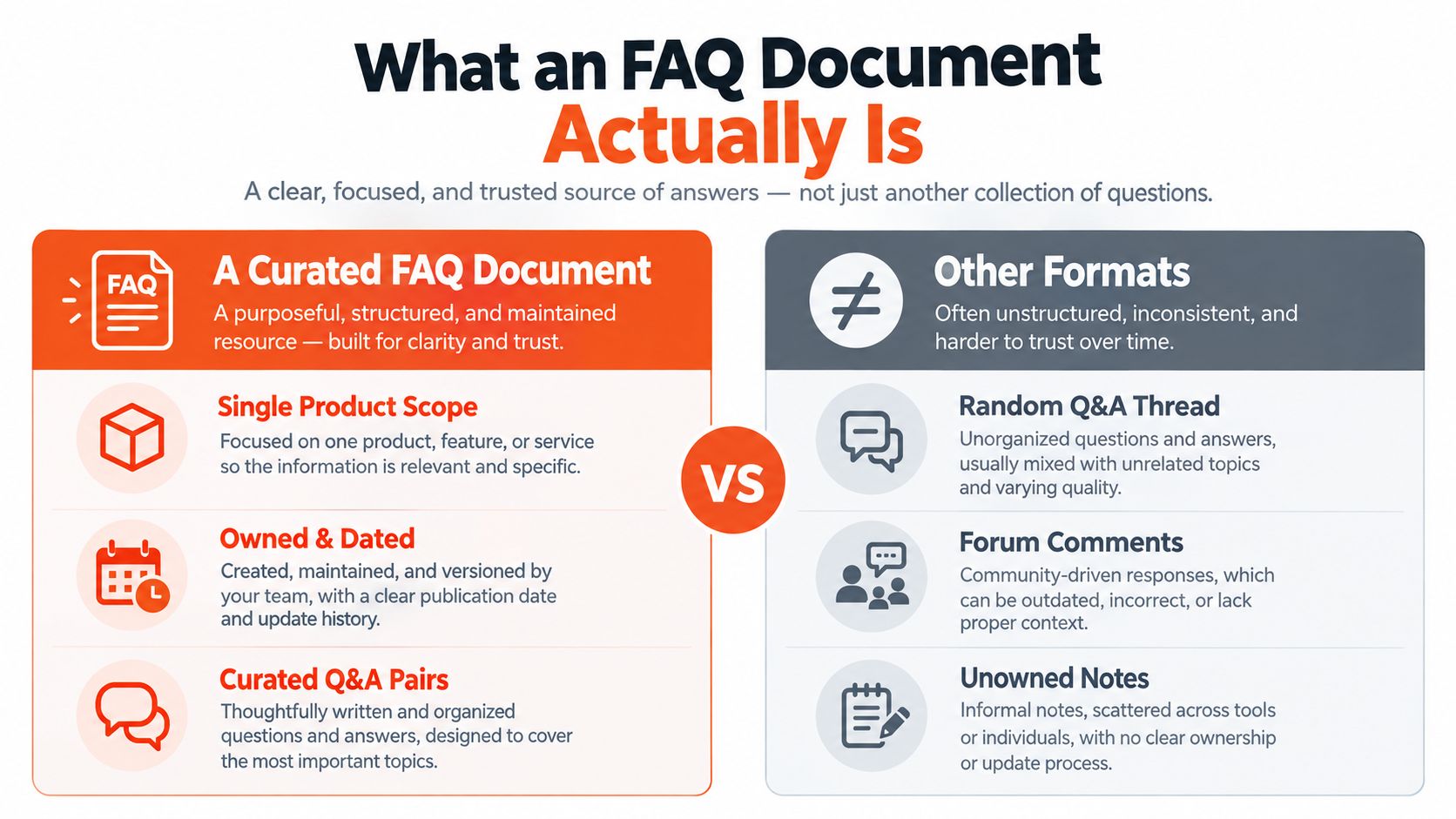
An FAQ document is a curated, owned, and dated set of question-and-answer pairs with a defined scope. The scope might be one product, a feature area, a customer segment, an internal policy, or a specific stage of onboarding. The document earns trust through its operating details, not through its length.
A practical document header should tell readers:
- What product or process does this cover?
- Who is it written for?
- Who maintains it?
- When was it last verified?
- Where should readers go for deeper help?
That definition separates an FAQ from informal information sources. A random Q&A thread may contain a useful answer, but it has no guaranteed owner or review process. Forum comments and chat transcripts preserve context, yet they rarely provide a stable, customer-ready version. Unowned notes can help an agent think, but they shouldn't become the canonical answer.
FAQ document, help center, and knowledge base
A help center is a structured library of articles organized with categories, navigation, search, and publishing workflows. It's suited to procedural guidance, troubleshooting, release documentation, and longer explanations. A knowledge base is broader still. It may include internal runbooks, policies, product notes, onboarding materials, and customer-facing articles that shouldn't all appear in a public help center.
An FAQ is the right starting artifact when questions recur often, answers are short, and readers need immediate orientation. It can then seed a help center. The FAQ preserves the high-frequency questions, while full articles absorb procedures, screenshots, permissions logic, and exceptions.
The format also has a long documentation history. A Usenet FAQ archive search service described through Google Docs records more than 4,300 FAQs, a useful marker of how durable the question-and-answer pattern became across technical and community topics. The lesson for a modern support team is simple: reuse is valuable, but reuse needs structure.
Core Components Every Template Must Include
A practical FAQ template should function as a maintained support tier, not a blank page with prompts. Each field must help someone own, verify, find, or escalate an answer.
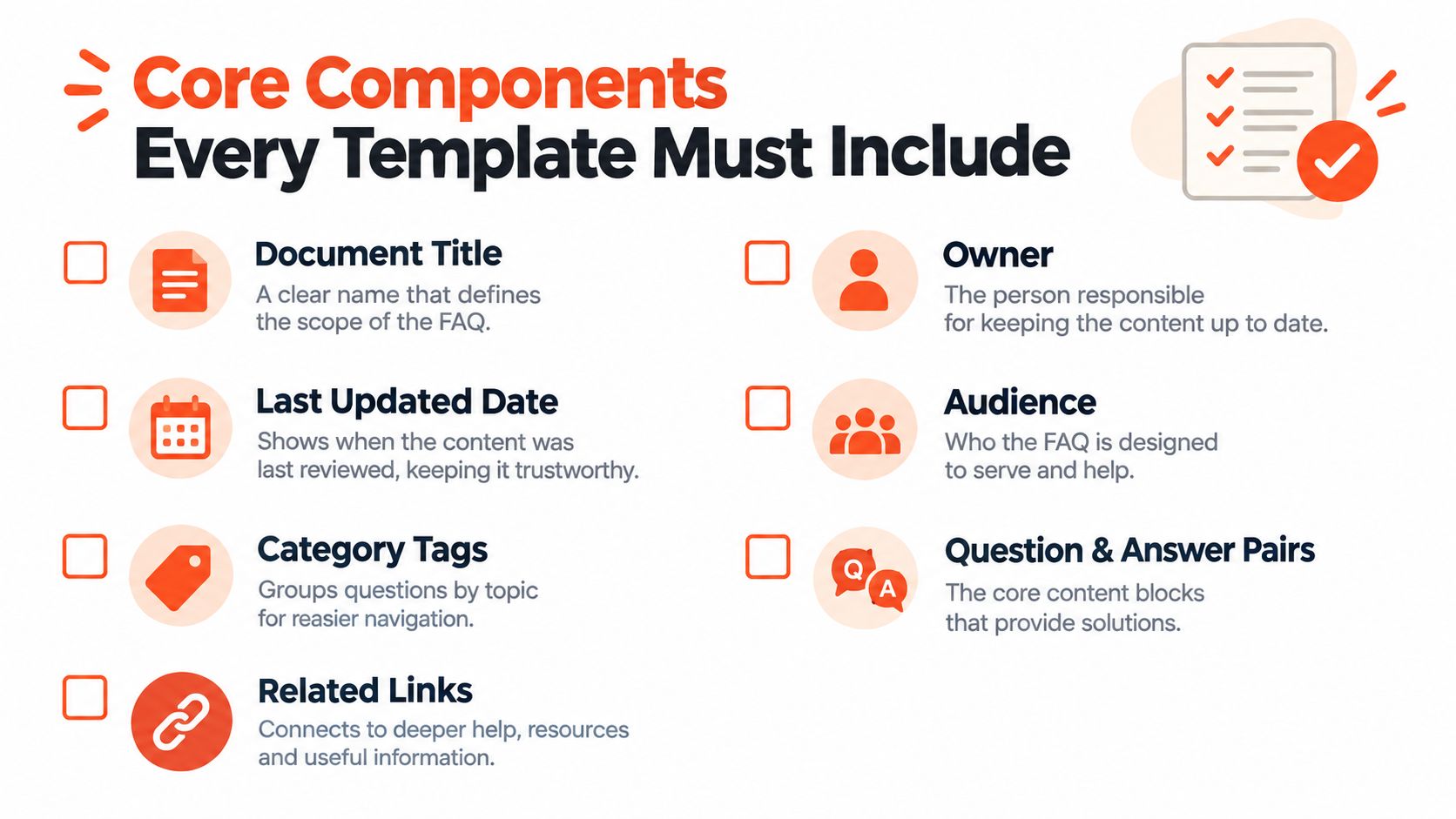
The document header
Open with a compact metadata block:
- Document title: Define the exact scope, such as “Workspace Billing FAQ.”
- Owner: Name one accountable operator, rather than assigning responsibility to an unnamed department.
- Last reviewed: Record when the document was last verified.
- Version: Note meaningful revisions.
- Product or audience scope: Specify whether it serves administrators, end users, prospects, or a particular feature.
- Review cadence: Set the expected review schedule for product and policy content.
- Purpose statement: Explain which questions belong here and where longer guidance lives.
These fields prevent an FAQ from becoming a miscellaneous support index.
The navigation layer
Short documents still need an index. Use category headings, anchor links, or a compact contents list so readers can reach account access guidance without scanning unrelated billing questions. Categories should reflect customer intent, not the internal team structure.
The question-and-answer body
Every entry needs a stable ID, a customer-worded question, a direct answer, supporting resources, and evidence for verification.
Use this pattern:
- ID:
FAQ-BILL-001 - Question: Phrase it as the customer asks it.
- Answer: Give the answer first, then only the context needed to act. The HelpDocs' FAQ template resource recommends concise first responses and natural language instead of internal terminology.
- Related resources: Link to the full article, policy, or relevant product screen.
- Last verified: Record verification for that answer, not only for the document.
- Source or ticket reference: Preserve the evidence behind the wording.
Capture customer phrasing before converting repeated statements into questions. The Uxia VoC template guide provides a practical way to collect that language.
The footer
End with contribution instructions, escalation contacts, related documents, and a change log. Contributors need a clear edit path. Support agents need to know where to send questions the FAQ cannot answer.
Set a length boundary for answers. Guidance from FAQ template recommendations from Chatty treats an answer exceeding about 80 words as a signal to move the procedure into a full help article. Keep the FAQ summary, then link to the deeper explanation. This keeps the document useful as a first support tier while giving complex cases a controlled escalation path.
Walking Through a Complete Sample FAQ Document
A strong sample should look like an operational artifact, not a decorative list. The top block might read:
Document title: Workspace Billing FAQ
Owner: Support Operations
Audience: Workspace administrators
Scope tags: Billing, subscriptions, invoices
Status: Published
Last reviewed: [date]
Review cadence: [cadence]
Purpose: Answers recurring billing questions and routes readers to detailed account and policy documentation.
The purpose statement prevents scope drift. If a contributor wants to add a question about API authentication, the mismatch becomes visible before the document turns into a general support index.
Each entry then carries its own control fields:
FAQ-BILL-001
Question: How do I update my payment information?
Accepted answer: [Direct, verified answer]
Related ticket IDs: [ticket references]
Related article: [canonical billing article]
Confidence: [verified, needs review, or unresolved]
Last verified: [date]
The blank fields are intentional. The owner field establishes accountability, while ticket references let a new agent reconstruct the customer context behind a decision. A confidence flag prevents an uncertain draft from appearing identical to a confirmed policy. That distinction matters when a product change has shipped but documentation and support language haven't caught up.
A second entry might use a different category and source:
FAQ-ACCESS-001
Question: How do I reset my account password?
Accepted answer: [Direct recovery instruction]
Related ticket IDs: [ticket references]
Confidence: [verification state]
At the bottom, include the operational footer:
- Glossary: Product terms and approved naming.
- Related documents: Help articles, policies, and escalation procedures.
- Contribution route: Where agents and customers submit missing questions.
- Version history: Date, editor, changed entry, source, and rationale.
This is what makes a sample reusable. Readers can see why every placeholder exists before they start filling it.
Organizing Sample Questions by Intent Category
Alphabetical order helps the person maintaining a file, but it rarely reflects how customers look for help. Organize questions around customer intent first: Getting Started, billing and account access, product usage, technical troubleshooting, and policy edge cases. Within each category, place recurring questions before uncommon ones.
A customer searching “How do I get started?” should not have to scan an alphabetized list for the letter G. Put the question in a prominent Getting Started category, using support volume and search behavior to refine its position. Agents can then link to the same category in macros, while customers have a route based on their goal rather than the wording chosen by the author.
Track practical outcomes after launch: whether repeat contacts decline, answers are found faster, and searches end with a useful result. Avoid treating category order as permanent. New features, billing changes, and recurring ticket themes can change which questions deserve visibility.
| Ordering Method | Primary Ordering Signal | Deflection Impact | Time to Answer | Search Success Rate | Best Use Case |
|---|---|---|---|---|---|
| Intent category ordering | Customer goal and question frequency | Stronger for recurring demand | Faster scanning within a known topic | Better when labels match user language | Customer-facing FAQs and support macros |
| Alphabetical ordering | First letter of the question | Weak when topics are mixed | Slower for users who don't know the wording | Depends heavily on exact phrasing | Small internal glossaries |
| Thematic ordering | Broad subject grouping | Useful for policy or education | Moderate, depending on category clarity | Strong when users recognize the theme | Compliance, security, and onboarding collections |
Frequency should not override governance needs. Compliance questions may need to remain together for review, even when individual search volume is low. The workable compromise is category-first navigation, followed by frequency-first ordering inside each category.
Use labels customers already recognize, such as “Reset password” rather than an internal term like “credential recovery.” If a question fits multiple intents, assign one primary category and add a cross-reference. That keeps the document easy to scan without copying the same answer into several places.
Metadata Fields That Make the Document Maintainable
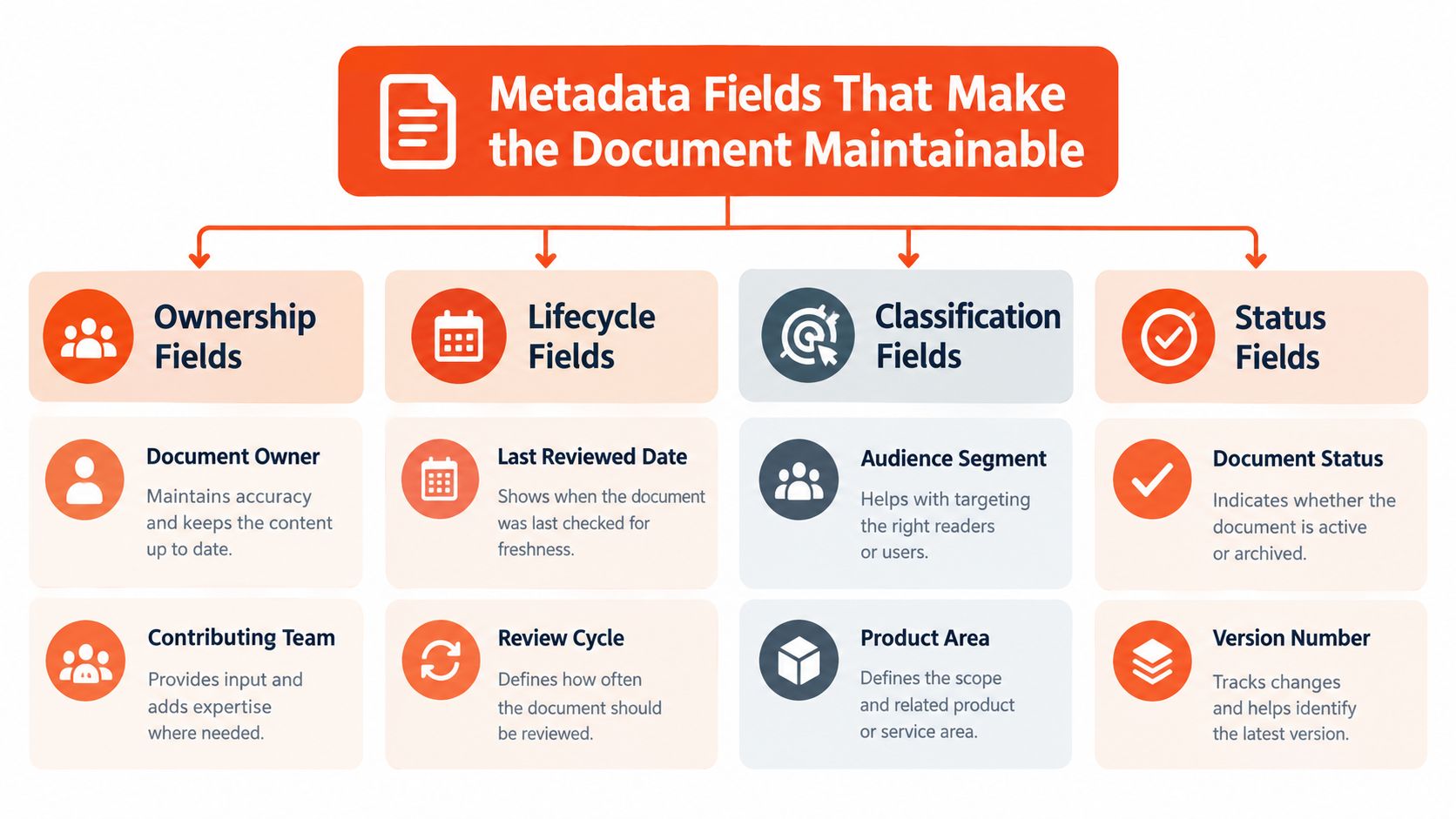
An FAQ document stays useful when its metadata answers four operational questions: who owns it, where it is in its lifecycle, what it covers, and how much confidence the team has in its accuracy. These fields turn a shared document into a managed support tier rather than another file that gets abandoned.
Ownership fields
Record the document owner, contributing team, and escalation contact. The owner maintains the answer, contributors provide subject expertise, and the escalation contact handles cases the FAQ cannot safely resolve. Assigning these roles prevents updates from sitting in a shared queue while unclear guidance remains available to agents or customers.
Lifecycle fields
Include creation date, last reviewed date, next review due, version number, and status. Useful status values include draft, published, needs review, and archived. Review timing should match the rate of product or policy change. Fast-changing material needs more frequent checks than stable policy explanations.
Traceability and quality fields
Add source ticket IDs, related article links, customer segment tags, product area, confidence rating, verifier, and user feedback history. These fields preserve the reasoning behind an answer. A new agent can inspect the originating ticket instead of relying on a polished sentence detached from the problem it solved.
Use one naming convention throughout. Choose last_reviewed rather than alternating among “reviewed on,” “verification date,” and “last checked.” Keep the schema proportional to the document. A short FAQ needs only fields that support accountability, reuse, and escalation. An elaborate form that contributors skip creates less control, not more.
For teams building a broader repository, this guide to building a knowledge base explains how content can extend beyond the FAQ layer. Keep the FAQ metadata focused on ownership, traceability, review state, and the handoff conditions that require deeper documentation.
When an FAQ Document Should Grow Into a Help Center
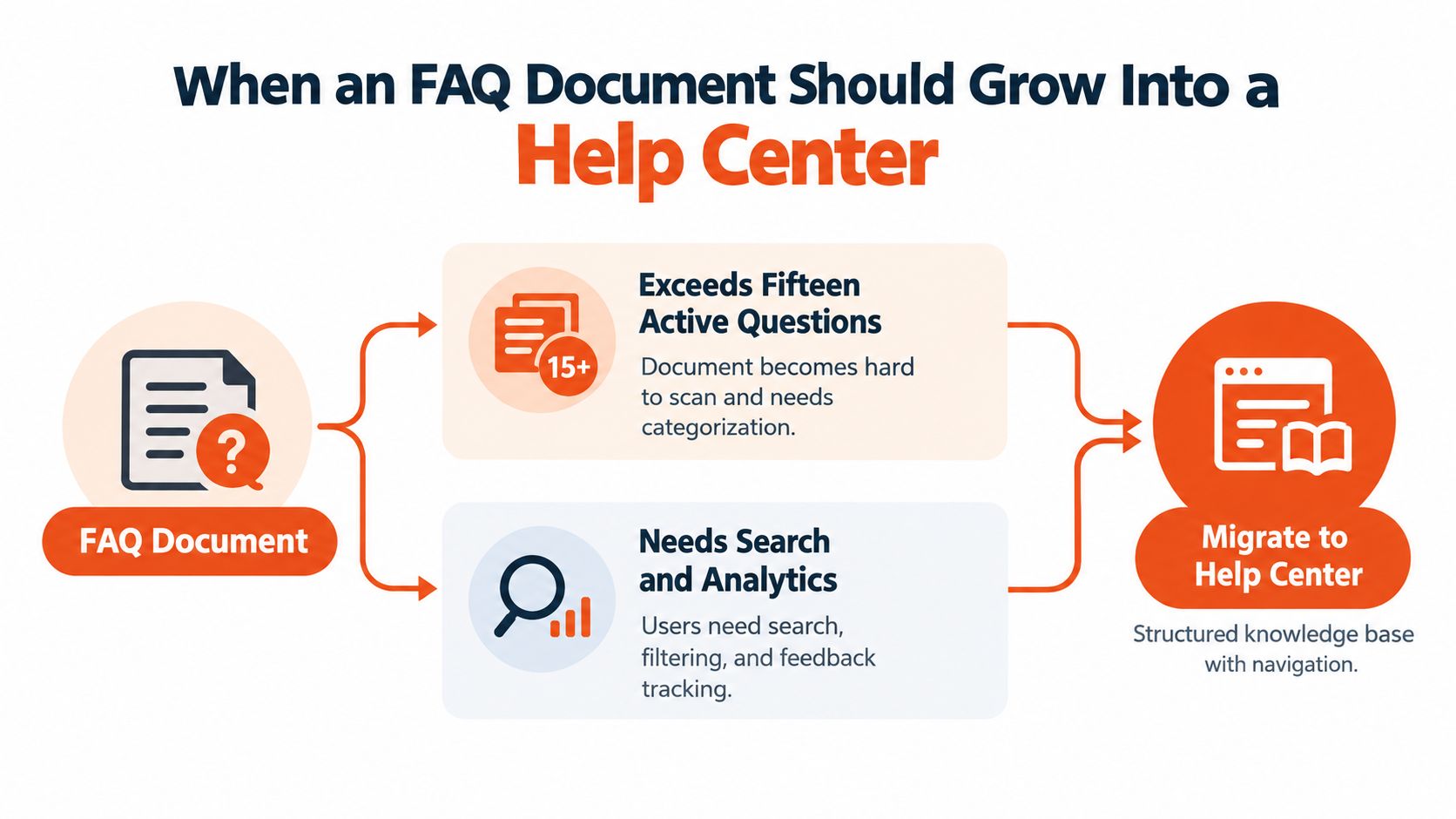
An FAQ needs a planned next tier. Start the transition when the document passes 15 active questions or an answer runs beyond about 80 words. These are practical thresholds, not fixed laws. A longer answer often includes a procedure, exception, screenshot sequence, or policy explanation that readers and agents need to access separately.
Question volume changes the reading experience first. A short list remains easy to scan, while a growing list needs search, categories, and clearer ownership. Long answers also make the FAQ harder to maintain because one entry begins carrying several different support jobs.
Look for these operational symptoms:
- Repeated answers: Several questions lead to nearly identical explanations.
- Routing metadata: Tags and columns start acting like a content directory.
- Cross-reference sprawl: Links overlap and become difficult to audit.
- Ownership expansion: Product, legal, engineering, and documentation teams need publishing access.
- Search behavior: Readers search within the page because scrolling no longer works.
The FAQ is a front door, not the whole building.
A help center adds article-level navigation, search, collections, feedback, analytics, and clearer contribution workflows. Each detailed procedure can also receive a canonical URL that support agents can cite directly. The AgentStack help center article and collection documentation shows how concise entries can connect with structured article collections.
Migration does not mean discarding the FAQ. Keep high-frequency questions as the landing layer, then split long or procedure-heavy answers into focused articles. Link each short response to its deeper destination, and preserve the metadata needed to identify the owner and review state.
Choosing Where the FAQ Document Will Live
The same content behaves differently depending on its delivery format. A public web page is easy to discover and share, but a manually edited page can lose ownership metadata. A PDF is convenient for download and offline circulation, yet search, feedback, and freshness checks become harder once copies spread.
An in-app widget puts answers near the moment of confusion. A help center provides stronger navigation, versioning, analytics, and article relationships. An AI agent is a separate consumption layer. It needs clean question-and-answer pairs broken into retrieval-friendly content, with source controls and escalation rules. Copying a visually designed page directly into an agent often preserves formatting while losing the content boundaries that retrieval needs.
| Format | Discoverability | Analytics | Best Fit |
|---|---|---|---|
| Static web page | Strong for public search and sharing | Depends on site analytics | Small public FAQ with stable answers |
| PDF download | Good for direct distribution | Limited after download | Early-stage teams without a documentation platform |
| In-app widget | Strong at the point of use | Useful when connected to product events | Product guidance and contextual support |
| Help center | Strong navigation and internal discovery | Built for searches, feedback, and article use | Growing support operations |
| AI agent ingestion | Available through conversational queries | Depends on agent analytics and source tracking | Automated support across channels |
Choose based on team size, tool stack, content volatility, and traffic patterns, not on what a larger company happens to publish. If the document changes often, prioritize ownership and review controls. If readers need to compare categories or search for exact terms, a help center will age better than a PDF.
For teams using a structured publishing environment, AgentStack's publishing and access documentation shows the kind of permissions and publication controls to evaluate. AgentStack can ingest websites and documents, add Q&A pairs, index content for retrieval, and deliver responses through channels such as web chat, email, Slack, and voice. Treat that as a delivery option, not a substitute for clean source content.
Review Cadence and Ownership Workflow
Publishing the document is the beginning of the operating process. Assign a primary owner, usually a support operations lead, and a backup reviewer from product marketing or documentation. The product team should have a defined escalation route for answers affected by releases, permissions, pricing, or policy changes.
Use review tiers rather than treating every question identically:
- Highest-demand entries: Review monthly against ticket topics, search behavior, and agent usage.
- Secondary entries: Review quarterly, especially when product workflows change.
- Long-tail entries: Review semi-annually, then archive anything no longer relevant.
Each review should produce evidence. Record the question's deflection behavior, search success inside the help platform, and the average handle time when agents cite the entry. These measures don't need to become a complicated reporting program. They need to reveal which answers resolve confusion and which ones merely redirect customers into another contact.
A diff log keeps edits accountable. Every change should capture the author, date, source ticket or customer wording, affected FAQ ID, and one-line rationale. “Updated billing answer” is weak. “Clarified invoice download path after recurring access question” gives the next reviewer enough context to assess whether the wording still fits.
Set an event-based trigger alongside the calendar. When three or more tickets in one week expose the same unanswered question, create a review task rather than waiting for the next scheduled cycle. The number is a practical workflow rule, not a universal benchmark. Your team can adjust it based on risk and ticket volume.
A review date tells you when to look. A source reference tells you what to verify.
Archive rather than delete obsolete entries. Version history helps agents understand what changed, while status fields prevent outdated answers from appearing in active search results.
Launch Checklist for Your FAQ Document
Run the launch as a sequence of artifacts and acceptance signals. This prevents the common failure mode where a team publishes a polished page without assigning anyone to maintain it.
Day 1
Audit the existing FAQ, support macros, chat replies, sales questions, and search terms. Pull the top 20 ticket topics from your support analytics and create a source inventory showing the question, channel, frequency signal, and current answer location. The support operations lead owns the inventory, and the acceptance signal is a ranked list with duplicates merged.
Day 2
Import the selected Q&A pairs into the template. Complete the title, scope, audience, owner, status, source references, related links, confidence flags, and verification fields for every entry. The content owner can move forward when no published answer lacks an owner or verification status.
Day 3
Assign the primary owner, backup reviewer, escalation contact, and next review date in the header. Add the category index and decide which answers should link to full articles. The acceptance signal is a reviewable document that another team member can work through without verbal instructions.
Day 4
Run a deflection dry test. Ask three new agents to answer five tickets using only the document, then record where they hesitated, searched unsuccessfully, or needed an undocumented exception. The content owner revises gaps before publication, and the test passes when agents can identify the correct entry and escalation path without relying on private notes.
Day 5
Publish the document in its chosen home. Link it from reply macros, onboarding messages, sales enablement material, the support contact route, and relevant product surfaces. Announce the canonical URL in team channels, with the documentation owner responsible for replacing duplicate links.
Day 6
Monitor searches, ticket tags, failed self-service journeys, and agent feedback for missing questions. Add gaps to the change log instead of making untracked edits. The acceptance signal is a short first-week issue list with an owner assigned to every item.
Day 7
Schedule the recurring review and attach the review checklist to the calendar event. Confirm that the owner, backup, escalation contact, and change-log convention are visible to the team. A template for an FAQ document is working when the next update has a clear trigger, a responsible person, and evidence to review.
AgentStack can ingest your website and documents, add structured Q&A pairs, and deliver grounded support responses through web chat, email, Slack, and voice with analytics for unanswered questions. Visit AgentStack to evaluate how an FAQ document could become a maintained source for automated support and human escalation.