A support agent opens a customer's question and finds three possible answers. The pricing page says one thing, an old PDF says another, and a Slack thread contains the update nobody added to the help center. A human agent can ask a colleague which source is current. An AI agent can't rely on that kind of informal judgment. It retrieves what's available, combines the fragments, and may produce a confident answer from outdated material.
That's the central challenge of building a knowledge base for AI support. You aren't writing help articles. You're creating retrieval infrastructure that must collect information from multiple systems, preserve context, identify trustworthy sources, and improve as real conversations expose gaps.
Knowledge management has become a mainstream enterprise capability. A 2026 knowledge management market report states that 73% of organizations use formal knowledge management systems, compared with 61% in 2020. That shift matters for SaaS and e-commerce teams because a formal, searchable knowledge layer gives AI agents something more dependable than a loose collection of documents.
The work becomes manageable when you treat it as an operating system for support. First define who needs answers and which workflows matter. Then choose sources, establish ownership, structure content for retrieval, and create feedback loops that catch stale or missing information. The result should help customers self-serve, help agents resolve cases, and give an AI assistant clear boundaries when the answer isn't present.
Table of Contents
- Introduction Why Most Knowledge Bases Fail AI Agents
- What an AI Ready Knowledge Base Really Is
- Planning Your Knowledge Base Before You Build
- Sourcing Content From Websites Docs and Notion
- Structuring Information Architecture and Indexing That Retrieves
- Tooling Governance and Keeping Knowledge Current
- Measuring Improving and Scaling Your Knowledge Base
Introduction Why Most Knowledge Bases Fail AI Agents
Most knowledge bases fail before the model ever sees a query. The information exists, but it's scattered across public website pages, product manuals, internal documents, Notion pages, ticket macros, and Slack conversations. Each source may be useful on its own, yet the support team has no reliable way to tell the AI agent which version takes priority.
Consider a customer asking how to change a subscription. The public help center might describe the normal workflow, while an internal document explains an exception for annual plans. A recent product update may have changed the available options, but that update lives only in a release note. If ingestion ignores one source or treats every source as equally authoritative, retrieval becomes a guessing exercise.
A traditional help center usually assumes that a person will browse categories, interpret headings, and connect related articles. An AI support agent needs more. It must retrieve the right passage, understand its relationship to nearby passages, distinguish current instructions from historical ones, and ground its response in approved content.
Practical rule: A document repository stores information. A knowledge base creates dependable paths to the right information.
The difference affects every project decision. Your source plan determines what the agent can know. Your information architecture influences what it can retrieve. Chunking controls how much context arrives with each result. Governance determines whether answers remain current after a product release. Analytics reveal where retrieval or content quality breaks down.
The APQC research on knowledge management and employee productivity studied 982 full-time knowledge workers, connecting information access and sharing with workplace productivity. For support leaders, the lesson is practical: organized knowledge improves the work of both humans and machines because both depend on finding usable information quickly.
A complete approach to building a knowledge base therefore moves beyond article production. You'll need a source inventory, ownership rules, searchable structure, retrieval tests, freshness controls, and an analytics loop that turns unanswered questions into better content.
What an AI Ready Knowledge Base Really Is
An AI-ready knowledge base is retrieval infrastructure for an AI agent, not a folder of help articles. It combines governed content with context, metadata, permissions, and a defined path from source material to retrieved passages and final responses. Its inputs may include help articles, documents, internal notes, structured Q&A, screenshots, and product records.
A traditional help center works like a warehouse of labeled boxes. A customer opens a box, reads the contents, and decides what applies. An AI-ready knowledge base works more like a well-run library. Its catalog describes each item, its index points to relevant passages, and its retrieval process can assemble related information without mixing a current instruction with a retired version.
Three ideas make that difference practical:
- Chunking: Documents are divided into meaningful passages instead of being treated as single blocks. A useful chunk preserves one complete idea, such as a setup procedure, eligibility rule, or troubleshooting path.
- Indexing: The system creates searchable representations of those passages and attaches metadata such as product, audience, language, source, version, and publication status.
- Grounding: The agent builds its response from retrieved material, while general model knowledge remains secondary.
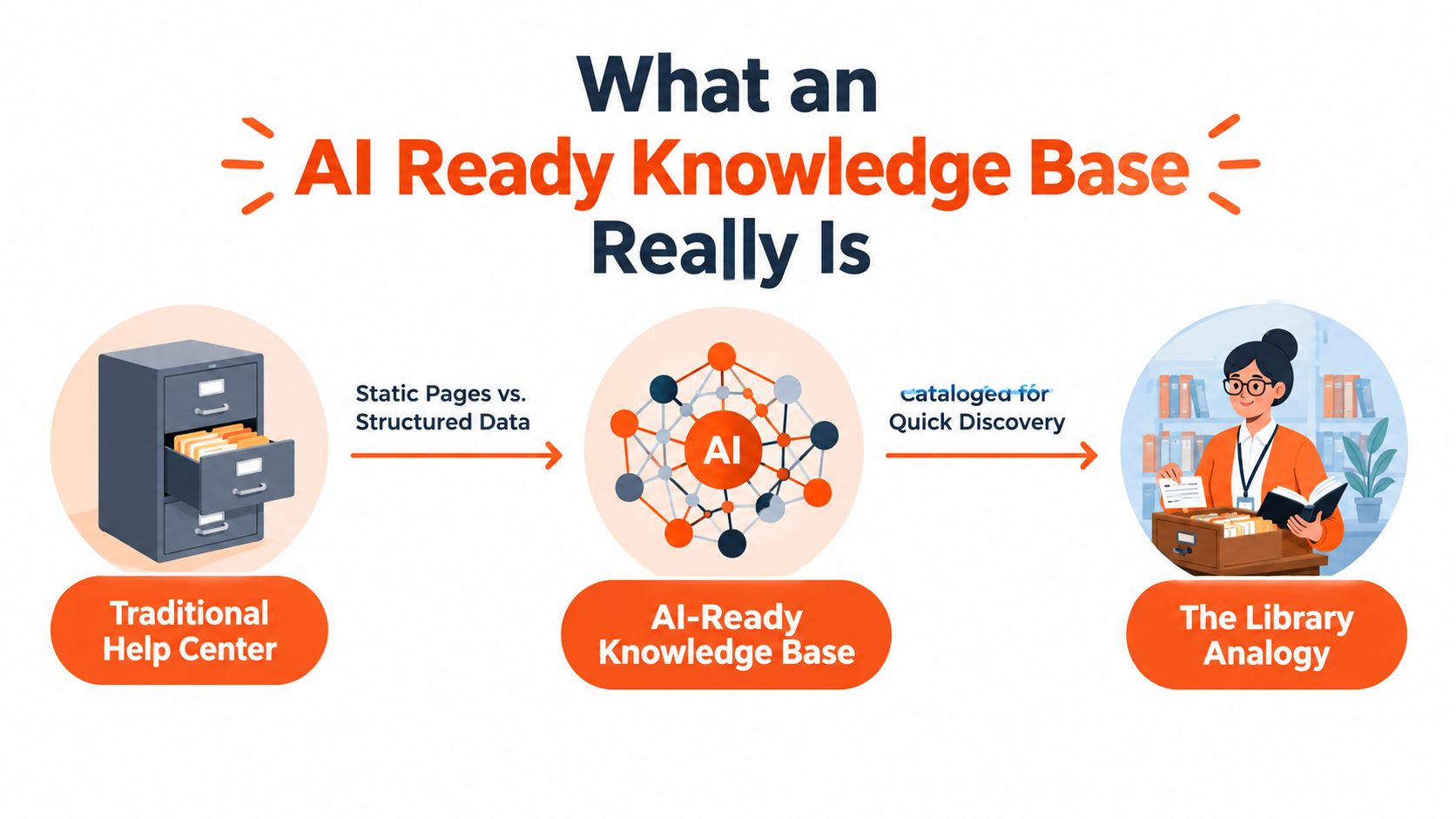
Source handling gives the library reliable intake. Website pages, uploaded files, Notion workspaces, and internal Q&A should enter through controlled ingestion, not by being pasted into prompts or copied into duplicate articles. Preserve each source's identity and update history so a support manager can trace an answer to its origin and identify which version supplied the passage.
Design for every support channel
A customer may ask on a website, by email, in Slack, or by phone. The channel changes, but the underlying knowledge should stay consistent. A shared retrieval layer supports that consistency better than separate answer libraries maintained by different teams.
Human navigation still has a role. Clear categories and article titles help agents inspect, edit, and approve content. Machine retrieval offers another route through the same material, combining semantic similarity, keyword signals, metadata, and ranking logic to find passages that match intent.
An AI-ready base also needs boundaries. It should distinguish public from internal sources, account access from restricted information, and current documents from conflicting or obsolete ones. Without those controls, a larger content set can reduce reliability by giving the agent more irrelevant passages to retrieve.
Formal knowledge infrastructure is becoming standard rather than niche. The adoption change in the knowledge management adoption data shows formal systems moving from 61% of organizations in 2020 to 73% in 2026, a 12-point increase. The important shift is toward searchable, governed institutional memory that AI systems can use responsibly, then improve through analytics on failed or unanswered searches.
Planning Your Knowledge Base Before You Build
A support agent asks for a refund rule, an AI assistant retrieves an outdated internal note, and the customer receives the wrong answer. The failure began before anyone selected a platform. Planning determines which knowledge enters retrieval, who can use it, and how the system learns from missed or weak answers.
Start with the audience. Customers need safe, plain-language guidance about their accounts and products. Support agents may need escalation rules, diagnostic steps, and policy exceptions. Engineers may need API behavior, error details, or release context. Give each group the appropriate source set rather than placing every document in one index.
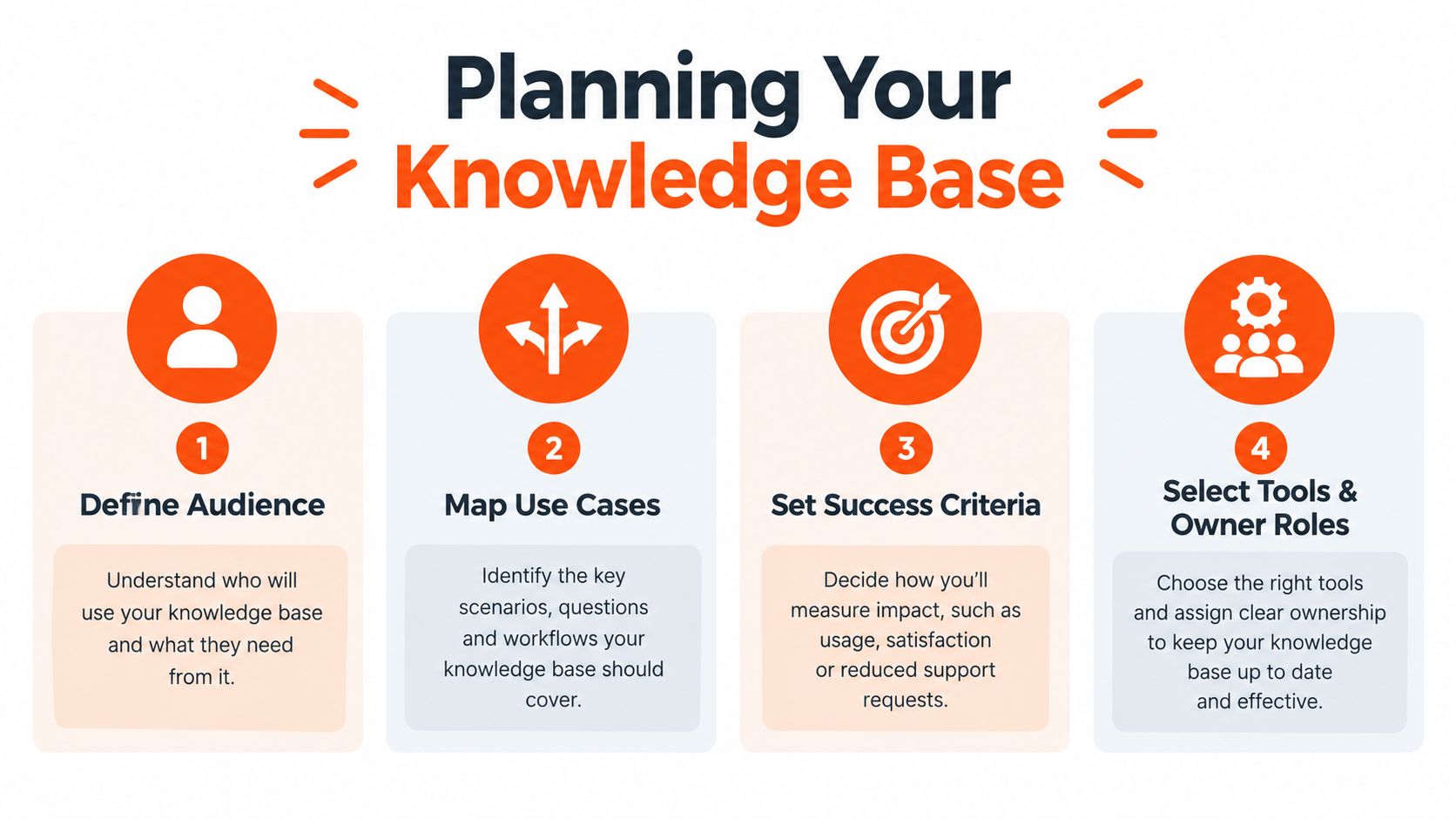
Make four decisions first
-
Define the audience. Separate public knowledge from internal operating knowledge. If an article contains an internal approval rule, mark it as restricted. Access boundaries should be metadata and permissions, not instructions left for a model to guess.
-
Map the use cases. List the workflows the agent must support, such as order-status questions, setup assistance, billing explanations, returns, troubleshooting, and escalation. Assign an owner to each workflow and identify the sources that currently support it. This map later helps you choose useful chunks instead of uploading whole documents without context.
-
Set success criteria. Choose observable outcomes. Track whether customers find usable answers, whether agents avoid searching several systems, whether escalations include the right context, and whether the assistant declines unsupported questions instead of improvising. Search analytics should feed these measures, showing which queries return weak, conflicting, or empty results.
-
Select tools and owner roles. Assign ownership by domain, not just by platform. A product manager may own feature behavior, finance may own billing policy, and support operations may own escalation guidance. The tool should make review, permissions, version history, publishing status, and source freshness visible.
Scope the first release around high-impact questions, not whichever documents are easiest to upload. Review recent tickets, repeated agent searches, unresolved conversations, and common escalation reasons. A small, carefully governed set of answers can produce more useful retrieval feedback than a large unreviewed dump.
Choose a source of truth
Conflicts become expensive when several teams can update the same policy. Decide which system owns each category of information. A public documentation site might own customer-facing setup instructions, a product system might own plan availability, and an internal operations space might own escalation procedures.
Each fact needs a clear authority and a route for updates to reach downstream indexes. Answers can remain distributed across applications, provided the relationships are recorded. One document may explain a policy while another explains how agents apply it. Those links help retrieval preserve the surrounding context.
Use a simple prioritization test:
- Does the question affect many customers or agents?
- Could an incorrect answer create financial, operational, or trust risk?
- Does the answer change frequently?
- Does the workflow generate avoidable escalation?
- Can an owner review the content consistently?
Knowledge management research links easier information sharing with better employee productivity. Planning turns that principle into operating rules by deciding which information receives structure, ownership, freshness checks, and retrieval priority. The result is infrastructure an AI agent can search and improve through feedback, rather than a folder of help articles.
Sourcing Content From Websites Docs and Notion
Your source mix determines the range and reliability of answers. Websites usually contain approved public guidance, documents often contain detailed procedures or product material, and Notion frequently holds internal knowledge that hasn't reached the customer-facing help center. Each source brings value, but each also creates a different maintenance problem.
Compare the main content sources
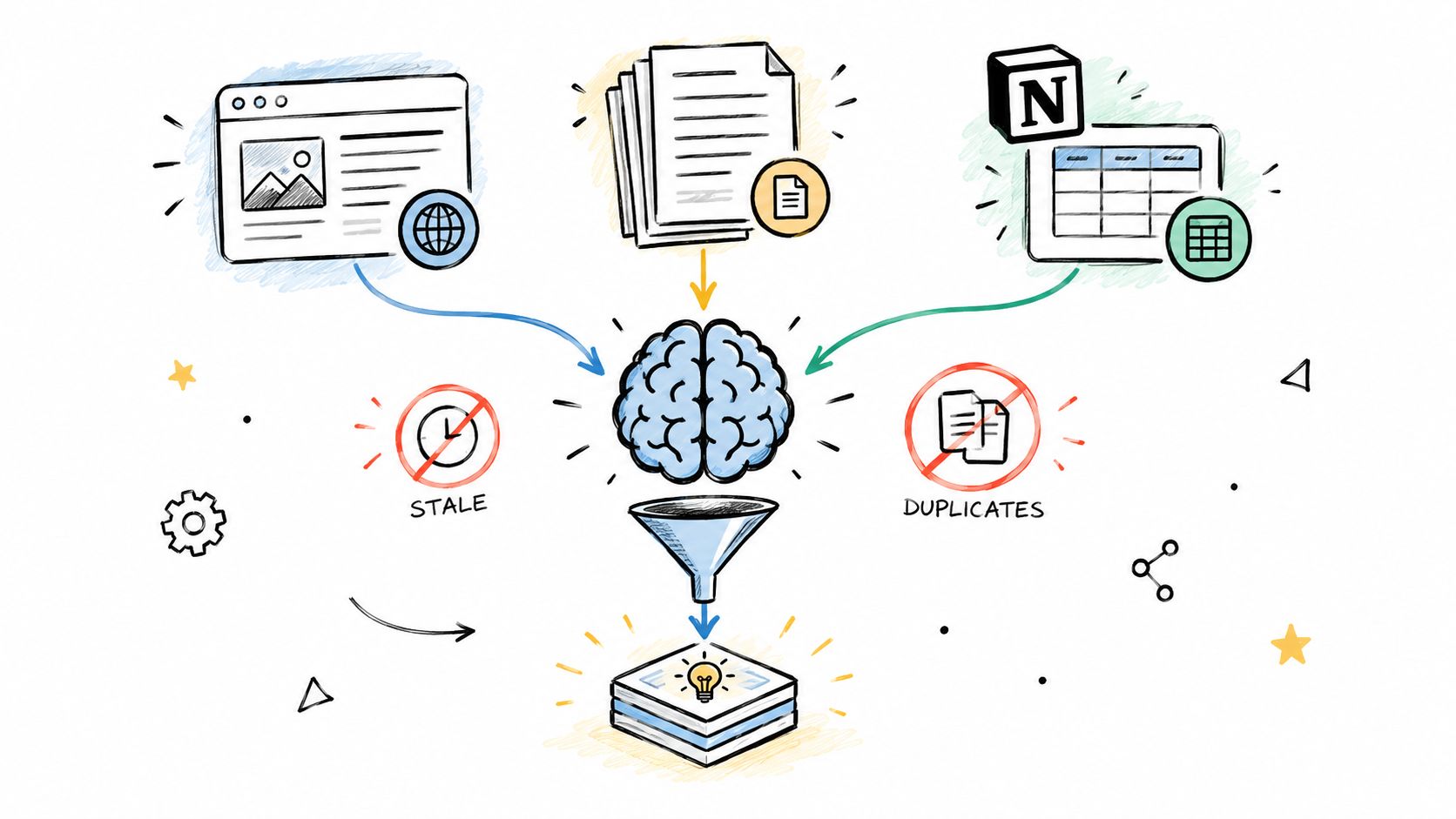
Website content is often the best starting point for public support. Crawling can collect help-center pages, product documentation, policies, and setup guides while preserving links and page relationships. The risk is that navigation pages, duplicated snippets, and outdated URLs enter the index unless you define crawl boundaries and publishing rules.
PDFs and office files can contain valuable material that never appears online, including implementation guides, training manuals, pricing policies, and operational playbooks. File ingestion needs to handle headings, tables, lists, embedded images, and document revisions. A text extractor that loses table structure may turn a precise comparison into a confusing sequence of disconnected values.
Notion and similar workspaces capture practical knowledge quickly. Support teams may document edge cases, incident learnings, and internal explanations there before anyone creates a formal article. The trade-off is uneven writing quality, changing permissions, and pages that mix current decisions with historical discussion.
Use this guide to document ingestion pipelines when you need to examine how files move from upload through extraction and retrieval preparation.
Ingest in an order that reduces risk
Begin with sources that have clear owners and stable publishing status. Public help content is useful for testing customer questions, while a small, reviewed set of internal procedures can test agent-assist workflows. Add informal sources only after you've classified their access rules and identified a person who can resolve conflicts.
Curated Q&A pairs help with edge cases that don't fit naturally into long articles. They can capture a precise answer to a recurring question, but they shouldn't become a substitute for documenting the underlying policy. Give each pair a source, owner, scope, and review status.
A unified system such as AgentStack can crawl websites, accept files, sync Notion content, and add Q&A pairs into a common retrieval workflow. That approach reduces the need to maintain separate indexes for each channel, but it doesn't remove the need for source governance.
One answer may appear in several locations. If the shipping policy changes, update the authoritative source first, identify duplicates, and confirm that connected indexes refresh. Keep source identifiers and timestamps available to reviewers so they can investigate why an agent used a particular passage.
The video below adds a visual explanation of how information can move through an ingestion workflow.
Freshness is a system property, not an editing habit. It depends on synchronization, version handling, duplicate detection, permissions, and a visible path from source change to re-indexing.
Structuring Information Architecture and Indexing That Retrieves
A knowledge base needs two structures at once. Humans need categories, labels, and predictable navigation. Retrieval systems need passages with enough context, useful metadata, and representations that match how customers phrase questions.
Start with a taxonomy that reflects the customer's task rather than your org chart. “Getting started,” “billing,” “integrations,” and “troubleshooting” often map better to user intent than department names. Add metadata for product, plan, audience, locale, source authority, lifecycle status, and effective date where those distinctions affect answer selection.
Separate navigation from retrieval
A hierarchy can help a support manager browse content, but an AI agent may retrieve a nested passage without following the visible menu. Write each passage so it remains understandable when separated from the page around it. Include the subject, conditions, action, and relevant exception within the same logical unit whenever possible.
Chunking is one of the most consequential retrieval choices. A benchmark covering seven arXiv domains found that 256 to 512 tokens generally outperformed 128-token and 1,024-token alternatives, while a sentence-based splitter using a 512-token window with 200-token overlap achieved the strongest reported token-level IoU, about 0.099. Those findings come from the benchmark on chunking strategies for long documents, not from a universal support rule, so treat them as a starting point for testing.
Smaller chunks can work well for direct fact questions because they isolate the relevant sentence. They can also split a procedure from its warning or prerequisite. Larger chunks preserve broader context, but they may contain several unrelated instructions and dilute the retrieval signal.
| Chunk Size | Best For | Risk |
|---|---|---|
| Smaller passages | Direct facts, definitions, isolated policy rules | Context can fragment, leaving the answer incomplete |
| Moderate passages | Setup instructions, product explanations, common troubleshooting | Requires careful boundaries and overlap |
| Larger passages | Broad workflows and complex background | Irrelevant text can increase retrieval noise |
For a support base serving both factoid questions and troubleshooting flows, a moderate range is a sensible default. Test it against real questions, especially queries that require prerequisites, exceptions, or several steps.
Use multiple granularities when content varies
A single document can support more than one retrieval view. One index may contain concise passages for direct questions, while another preserves larger sections for diagnostic flows. At query time, fuse candidate results and rank them using source authority, semantic relevance, metadata, and freshness.
The research on query-dependent chunking reports 1% to 37% retrieval gains from combining chunk sizes such as 100, 200, and 500 tokens with Reciprocal Rank Fusion across named evaluation benchmarks. It also describes a separate enterprise benchmark with Recall@10 values of 0.277, 0.540, and 0.651 across compared configurations. These values show why retrieval quality depends on pipeline design, not only on the language model.
For implementation, create an evaluation set from actual support tickets. Label the passages that contain a complete answer, measure Recall@k, review whether retrieved context supports the final response, and inspect failures by content type. A troubleshooting query may need a broader section, while a billing question may need a precise policy chunk.
A useful internal test asks three questions: Did the system retrieve the right source? Did it retrieve enough surrounding context? Did the answer preserve the source's conditions and limits? Those questions distinguish indexing problems from generation problems.
For a deeper treatment of these trade-offs, consult the guide to RAG chunking strategies.
Tooling Governance and Keeping Knowledge Current
A knowledge base becomes trustworthy through operating rules, not through its initial launch. Decide who can publish, who can approve, which sources are authoritative, and how the system records changes. Without those controls, a polished retrieval layer can still deliver stale or conflicting answers.
Build ownership into the workflow
Assign each content domain an owner and a reviewer. The owner updates the material when the product or policy changes. The reviewer checks accuracy, audience visibility, examples, and links before publication. Add lifecycle states such as draft, approved, deprecated, and archived so retrieval doesn't treat every historical page as current.
Access control needs the same care. Public customer guidance, internal agent instructions, and sensitive operational information should have distinct permissions. Audit logs help teams investigate content changes and answer provenance. For organizations operating across jurisdictions, GDPR features such as data residency, deletion, and export should be part of the platform evaluation rather than a late compliance exercise.
A deployment layer also affects adoption. An embeddable widget can place answers inside the website, while email, Slack, and voice delivery can extend the same knowledge into existing support workflows. Developer access through a REST API or MCP server gives product and platform teams a way to connect retrieval to custom interfaces and actions.
The CSM platform features in 2026 resource is useful when comparing these broader service-management capabilities, especially where knowledge, workflows, reporting, and human handoff need to operate together.
Governance test: If nobody can answer who owns an article, when it was last approved, and which channels consume it, the article isn't production-ready.
Monitor the failure modes people miss
Freshness across many tools is difficult because one changed policy may have several copies. Multi-source reasoning can fail when the agent retrieves related but incompatible instructions. Hallucination detection can miss a fluent answer that subtly combines two products or plans.
The analysis of AI knowledge-base failure modes illustrates why accuracy needs operational context. Even a system that answers correctly 90% of the time would still produce 100 wrong answers per 1,000 queries, so teams need monitoring, escalation paths, and clear “I don't know” behavior.
AgentStack provides one example of an integrated operating model. Its documented capabilities include website and document ingestion, Notion synchronization, automatic chunking and indexing, omnichannel delivery, analytics, audit logs, role-based access control, GDPR controls, and encrypted data handling. Teams should compare those capabilities with alternatives and verify how each platform handles source refresh, permissions, evaluation, and handoff.
For practical governance patterns, see these knowledge management best practices. The important principle is to make maintenance visible, owned, and measurable.
Measuring Improving and Scaling Your Knowledge Base
Analytics should tell you what customers ask, where the agent succeeds, and which questions expose a content or retrieval gap. Track conversation volume, resolution outcomes, sentiment trends, escalations, unanswered questions, and the sources used in responses. A high escalation rate for one workflow may indicate missing content, poor chunk boundaries, weak ranking, or a policy that needs clearer wording.
Retrieval metrics add diagnostic detail. Measure Recall@k to see whether the system retrieves the passages needed for an answer. Review answer faithfulness by checking whether each important claim is supported by retrieved content. Then connect those findings to business workflows, such as repeated billing escalations or agents searching across multiple systems.
A useful improvement loop looks like this:
- Collect failed or uncertain conversations.
- Group them by intent, product, source, and failure type.
- Update the authoritative content or metadata.
- Re-index the changed material.
- Re-run the evaluation questions.
- Monitor whether the same gap returns.
Don't treat language and media as expansion tasks for later. Global support may require linked translations so terminology stays consistent and updates remain synchronized across locales. Emerging multimodal retrieval approaches also point toward systems that can work with text, screenshots, PDFs, and voice, which matters when customers describe a visual interface or send an audio explanation. The guidance on multilingual knowledge-base software discusses these directions and the need to connect translated content rather than manage isolated copies.
Start with one high-volume workflow, establish source ownership, test retrieval on real questions, and publish only after the escalation path works. Then use every unanswered question as a precise request for a better passage, better metadata, or better retrieval logic.
AgentStack brings website crawling, document uploads, Notion sync, Q&A pairs, retrieval configuration, omnichannel delivery, and support analytics into one workflow for AI customer-support agents. Visit AgentStack to connect your sources, test answers against real support questions, and build a knowledge base that stays useful after launch.