A support lead opens Slack and finds a customer asking about a failed deployment. In Microsoft Teams, a colleague is asking for the same answer on behalf of another stakeholder. The AI assistant responds in Slack using the latest incident note, while the Teams conversation receives an older answer because neither platform shares the same context. A human agent then has to reconcile two threads, correct the customer-facing response, and work out which conversation should own the escalation.
This is the normal failure mode of a dual-channel environment, not an edge case. By mid-2025, industry estimates put Microsoft Teams at about 360 million monthly active users, compared with about 79 million for Slack (industry estimates summarized by Medha Cloud). That scale difference makes coexistence common, especially in companies that standardize on Microsoft 365 while keeping Slack for engineering, SaaS integrations, or external collaboration.
Table of Contents
- Why Slack and Teams Coexistence Demands Real Integration
- Authentication and Permission Setup Across Both Platforms
- Routing Messages Between Threads and Shared Channels
- Native Bridges Versus Middleware for Cross-Platform Support
- Escalation Workflows and the Shared Inbox Strategy
- Monitoring Conversations Across Slack and Teams Dashboards
- Avoiding Governance Drift in Dual-Channel Deployments
Why Slack and Teams Coexistence Demands Real Integration
Slack and Teams aren't interchangeable front ends for one shared inbox. They have different channel structures, identity systems, notification behaviors, administrative controls, and expectations around escalation. A message copied from one platform into the other may look complete to a reader while losing the thread relationship, author identity, file permissions, or customer history that made the original message useful.
The practical symptoms appear first in support operations:
- Missed escalations: A request marked urgent in Slack never reaches the Teams-based support queue.
- Conflicting answers: An AI agent retrieves different context because one platform contains the relevant thread and the other contains only a forwarded summary.
- Duplicate work: Two agents investigate the same issue because neither can see that the other platform already owns it.
- Unclear ownership: A Teams guest, Slack member, and internal support agent may represent the same person under different identities.
- Broken discovery: A resolution exists in a private channel that the other platform, bot, or human reviewer can't access.
A support organization can survive separate tools when people understand the boundaries. It struggles when automation implies that a conversation is unified but only forwards isolated messages. That gap is where customers repeat themselves, agents make inconsistent commitments, and sensitive details cross a trust boundary without the right review.
Production rule: Treat Slack and Teams as two governed communication systems connected by an explicit workflow layer, not as two views of the same chat database.
The right architecture starts with the business path. Decide which platform receives an external request, where the canonical ticket lives, which channel owns the escalation, and what context the receiving agent is allowed to see. Teams may handle Microsoft 365-native work, while Slack may remain the preferred environment for developers or external partners. A resource on managed communication services Texas can also help teams assess the broader communication stack when support channels have grown organically.
The goal isn't to force every user into one application. It's to make the handoff explicit enough that the customer gets one answer, the support team gets one ownership record, and administrators can explain who accessed what.
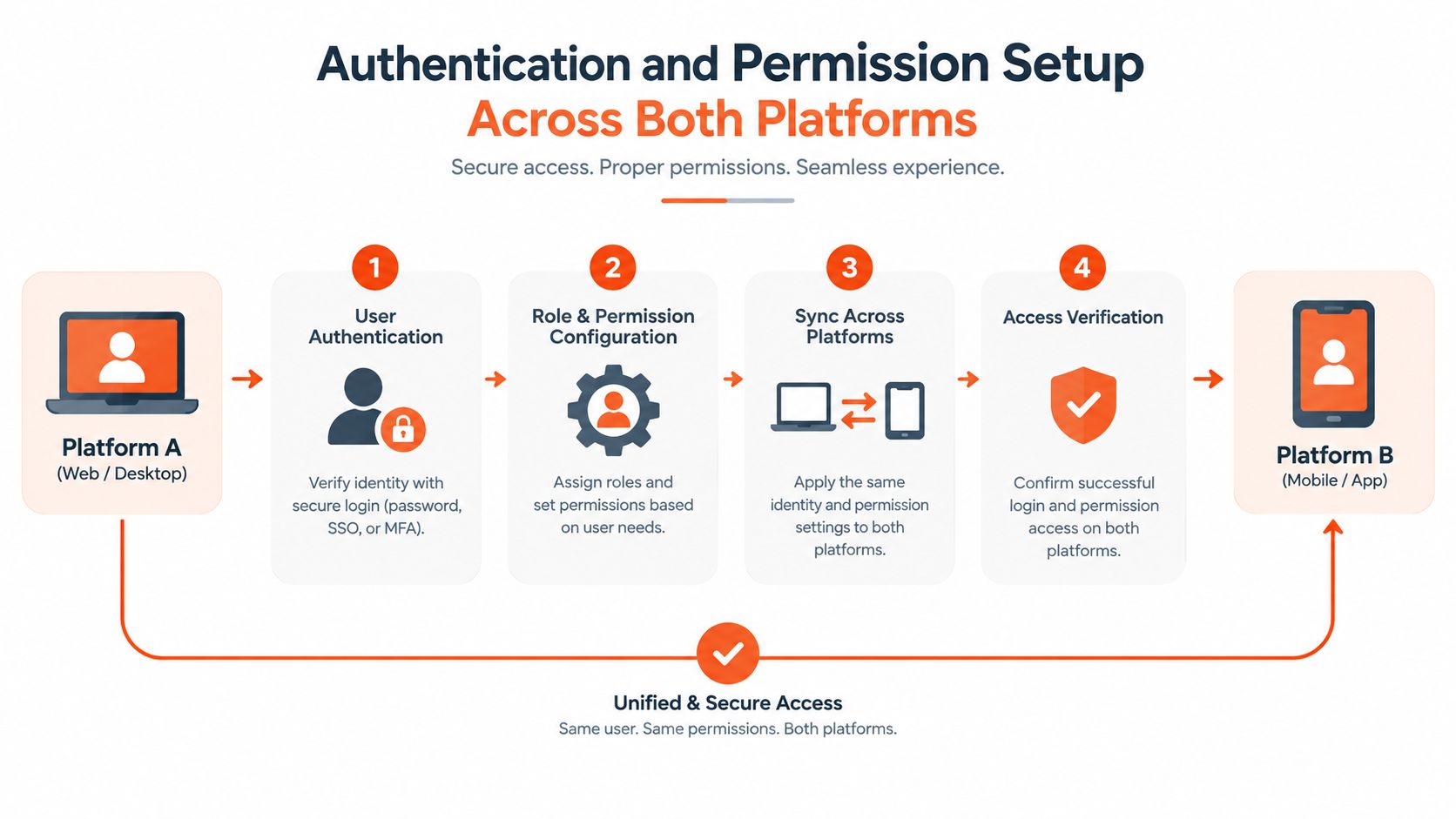
Authentication and Permission Setup Across Both Platforms
Authentication is where many cross-platform deployments appear successful while failing without warning. A bot may be able to post into a channel but lack permission to read thread replies. It may read public Slack messages but have no legitimate access to a private Teams channel. The result is an assistant that looks active but answers from incomplete evidence.
Establish separate trust boundaries
Create the Slack app and Teams application as separate identities, even if the customer experience presents one assistant. In Slack, configure OAuth scopes for only the actions the workflow needs, such as reading approved channel events, posting replies, and responding within threads. In Teams, define the app manifest and Microsoft Graph permissions around the specific teams, channels, chats, or meeting contexts that the assistant must access.
Don't begin with broad administrative permission because it makes the first test easier. Broad access also makes later investigation harder. If a response exposes a private conversation, the team won't know whether the cause was an excessive app scope, a copied message, a guest identity, or a middleware cache.
The API integration requirements guide is useful as a checklist for documenting credentials, event delivery, permission scopes, and failure handling before implementation.
Map people before mapping conversations
Identity mapping deserves its own migration table. Microsoft's guidance requires each Slack workspace user to be mapped to a Microsoft 365 user before migration, and it states that direct messages can't be imported (Microsoft's Slack migration guidance). That limitation matters even in a coexistence project because a forwarded message can preserve text while losing the original identity and conversation boundary.
Maintain a controlled mapping record containing:
- Source identity: Slack user ID, workspace, display name, and account status.
- Destination identity: Microsoft 365 user, tenant, Teams membership, and guest status.
- Authority: The system that determines whether the person may read, post, or trigger an escalation.
- Lifecycle state: Active, suspended, deprovisioned, or awaiting review.
Don't infer access from display names or email-like labels. Use immutable platform identifiers, then test renamed users, departed users, duplicate names, guest accounts, and service accounts.
Test permissions with negative cases
A proper test suite proves what the assistant can't do. Ask it to read a private Slack channel without membership, retrieve a Teams conversation outside its assigned team, post as a deprovisioned user, and carry a file from one platform into a channel where the recipient lacks access. Each denial should generate an audit event that identifies the application, user context, target resource, and reason for rejection.
This approach prevents governance drift before message routing adds more complexity. Permissions should be reviewed whenever channels, teams, ownership, or escalation policies change, not only when the integration is first installed.
Routing Messages Between Threads and Shared Channels
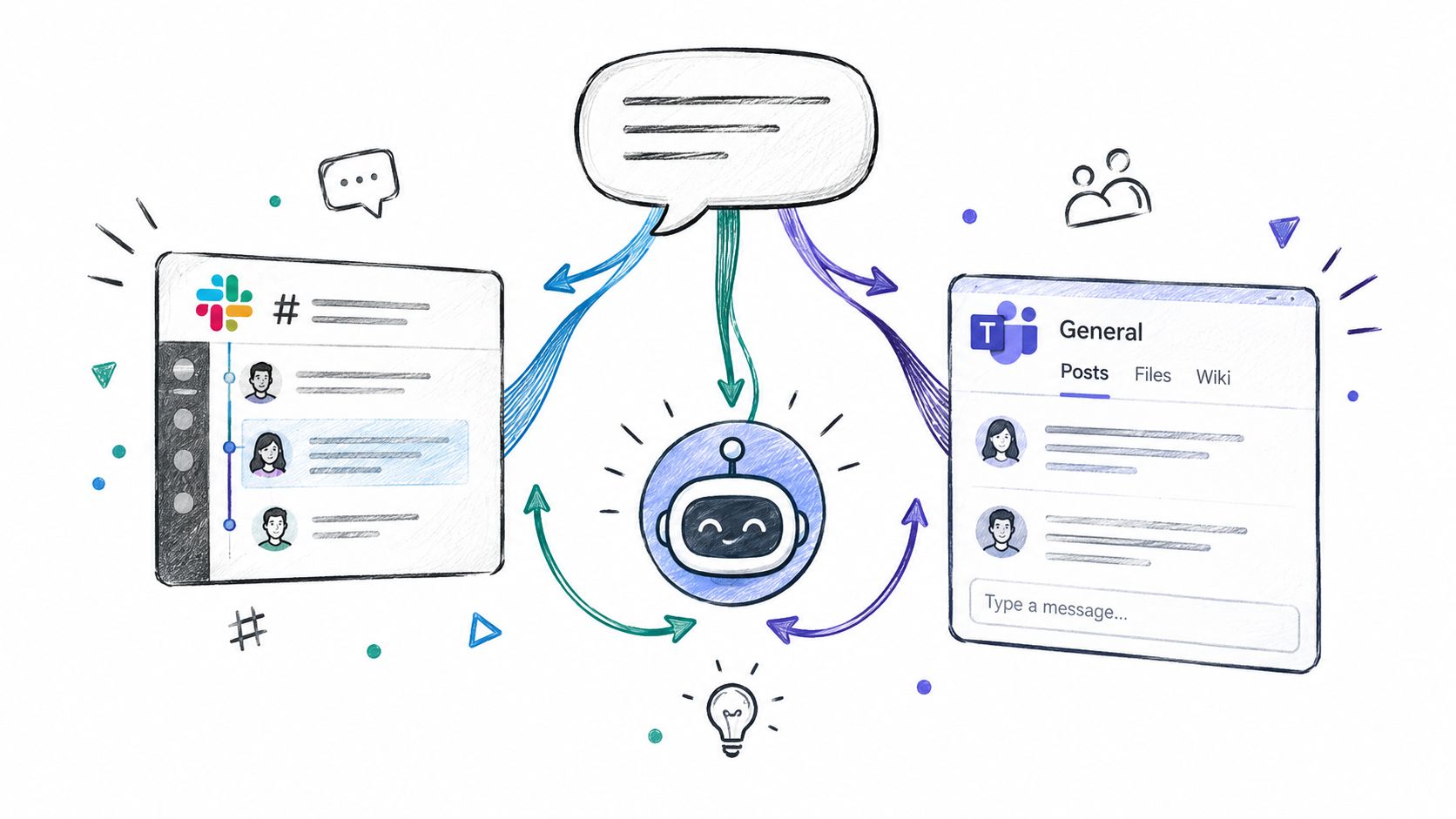
Message routing needs a conversation key, not just a destination channel. A reliable key can combine the source platform, workspace or tenant, channel, thread identifier, and customer or ticket identifier. Store that relationship before posting the first mirrored message so retries don't create a second conversation.
Preserve lineage before content
A Slack thread reply and a Teams channel reply aren't equivalent objects. Your routing service should record the source message ID, parent message ID, destination message ID, and synchronization status. When the same event arrives twice, the service checks the stored relationship and ignores the duplicate instead of posting it again.
A practical event flow looks like this:
- Receive the event through the platform webhook or event subscription.
- Verify authenticity and reject events that fail signature or tenant checks.
- Resolve the conversation key from the parent thread, channel, and support record.
- Apply policy for private channels, attachments, mentions, and sensitive content.
- Retrieve permitted context from the source thread and linked support record.
- Post a transformed reply into the destination thread, with source attribution.
- Persist the mapping and delivery result for retries, audits, and deletion requests.
The transformation step matters. A Teams message may contain formatting or mention syntax that Slack doesn't render in the same way. A file link may work for the sender but fail for a recipient who lacks the original platform account. The safest mirrored message identifies the source, preserves the meaningful text, and links back only when the recipient is authorized to follow the link.
Choose when to mirror and when to escalate
Don't mirror every event by default. Reactions, typing indicators, bot acknowledgements, and internal status changes can create noise or loops. Define event classes such as customer question, agent response, escalation, attachment, resolution, and deletion. Each class should have an owner and a destination rule.
For example, a customer question in a Slack support channel can create a support record and an AI reply in the same thread. If the assistant needs a human, the workflow can notify a Teams escalation channel while retaining the Slack thread as the customer-facing location. The Teams notification should carry the original text, a controlled context summary, the support record ID, and a link or reference that doesn't grant unintended access.
A mirror is useful only when the receiving person knows whether they're reading a live conversation, a notification, or a historical copy.
Use loop protection at both the application and message levels. Mark messages created by the integration, store an origin attribute, and refuse to relay a message back to its source based solely on matching text. Text matching is unreliable because agents edit messages, AI responses may be reformatted, and two users can ask the same question independently.
Native Bridges Versus Middleware for Cross-Platform Support
A native bridge can solve a narrow problem cleanly. Middleware solves the coordination problem, but introduces another service that must be secured, monitored, and maintained. The right choice depends on whether the requirement is meeting access or conversation continuity.
The native Microsoft Teams Calls app for Slack allows users to start and join Teams meetings from Slack. Slack's documentation makes the boundary clear: it doesn't synchronize messages, threads, files, or other conversational data (Microsoft Teams Calls for Slack). That makes it suitable for a meeting handoff, not for a support workflow where an AI agent and human team must preserve history across channels.
| Feature | Native Bridge | AgentStack Middleware |
|---|---|---|
| Primary purpose | Start or join a Teams meeting from Slack | Orchestrate support conversations and actions across channels |
| Message synchronization | Not provided by the Teams Calls bridge | Can be designed around inbound events, thread mapping, and controlled outbound replies |
| Thread and context handling | Remains in the originating platform | Uses a shared conversation record and routing rules |
| AI response consistency | Depends on the separate platform workflow | Can use one knowledge and model configuration across delivery channels |
| Escalation routing | Requires a separate support process | Can connect channel events to human handoff and shared-inbox workflows |
| Operational burden | Lower for meeting access | Higher, because permissions, retries, audits, and data retention need ownership |
A middleware layer should not be added just because “integration” sounds more complete. It earns its place when the organization needs identity mapping, deduplication, context retrieval, policy checks, escalation routing, or analytics across both systems. A platform such as AgentStack can provide a unified API, model routing, an embeddable widget, and omnichannel delivery, but those capabilities still need careful channel permissions and workflow design.
For teams evaluating the mechanics rather than the product label, this explanation of how automation works in practice provides useful context on triggers, actions, and process orchestration. The API integration platform overview is relevant when the architecture requires developer-controlled actions rather than simple notification forwarding.
Use a decision test
Choose a native bridge when the requirement is limited to launching or joining meetings and no message history must cross the boundary. Choose middleware when a support request can start in one platform, require data from another system, and end with a human response in a different channel.
Before approving middleware, ask:
- Can it distinguish a source message from a mirrored message?
- Can administrators revoke access by workspace, tenant, channel, or user?
- Can it preserve thread relationships without exposing unrelated history?
- Can it retry failed delivery without duplicating a customer response?
- Can it export audit records and honor deletion or retention policies?
- Can humans take over without forcing the customer to repeat the issue?
If the answer to these questions is unclear, the integration is still a message relay, not an operational support system.
Escalation Workflows and the Shared Inbox Strategy
An AI assistant shouldn't escalate by posting “please contact support” into a busy channel. That abandons the customer at the exact moment automation has reached its limit. Escalation should create an owned work item, preserve the permitted context, identify the receiving team, and define the next action.
Define the handoff conditions
Use explicit triggers rather than a single confidence threshold. Useful conditions include a request for a human, sensitive account changes, repeated failed answers, high-risk topics, negative sentiment, or a question that requires an internal approval. Each trigger should specify whether the AI may continue responding, whether a human must approve the next message, and which platform owns the customer-facing thread.
A routing policy might look like this:
- Routine question: Answer in the originating Slack or Teams thread and record the outcome.
- Uncertain answer: Ask a clarifying question, then route to a knowledge owner if uncertainty remains.
- Sensitive request: Stop automated disclosure and create a restricted human task.
- Urgent incident: Notify the incident team in the designated platform while keeping the customer thread active.
- Cross-platform request: Create one shared record, then send a controlled notification to the receiving team.
The shared inbox should be the operational source of truth. It needs the original message, relevant thread context, identity mapping, channel, escalation reason, current owner, and response state. It shouldn't automatically copy every private message the assistant could technically access.
A shared inbox platform such as AgentStack's shared inbox software can support a unified human handoff model, but administrators still need to define which conversations enter the inbox and which remain in the source channel.
Keep the customer-facing thread stable
The receiving agent should be able to reply from the workflow that owns the case without creating competing answers. If the customer began in Slack and the specialist works in Teams, the specialist can receive a sanitized Teams task while the response is posted back into the Slack thread through the approved integration path.
That separation protects internal discussion. The Teams escalation channel can contain diagnostic notes that shouldn't be exposed to the customer, while the Slack thread receives only the approved response. Attachments need the same treatment. A support agent may have access to an internal incident file that the original requester must not receive.
Use actions for the work that surrounds the handoff. An escalation may book a meeting, capture a lead, retrieve approved documentation, or create a structured ticket. Each action needs an authorization check and a clear failure state, so a booking failure doesn't look like a completed resolution.
The human agent should see why the escalation happened, what the assistant already told the customer, and what information remains missing. Without that context, the shared inbox just moves the confusion from a channel into a queue.
Monitoring Conversations Across Slack and Teams Dashboards
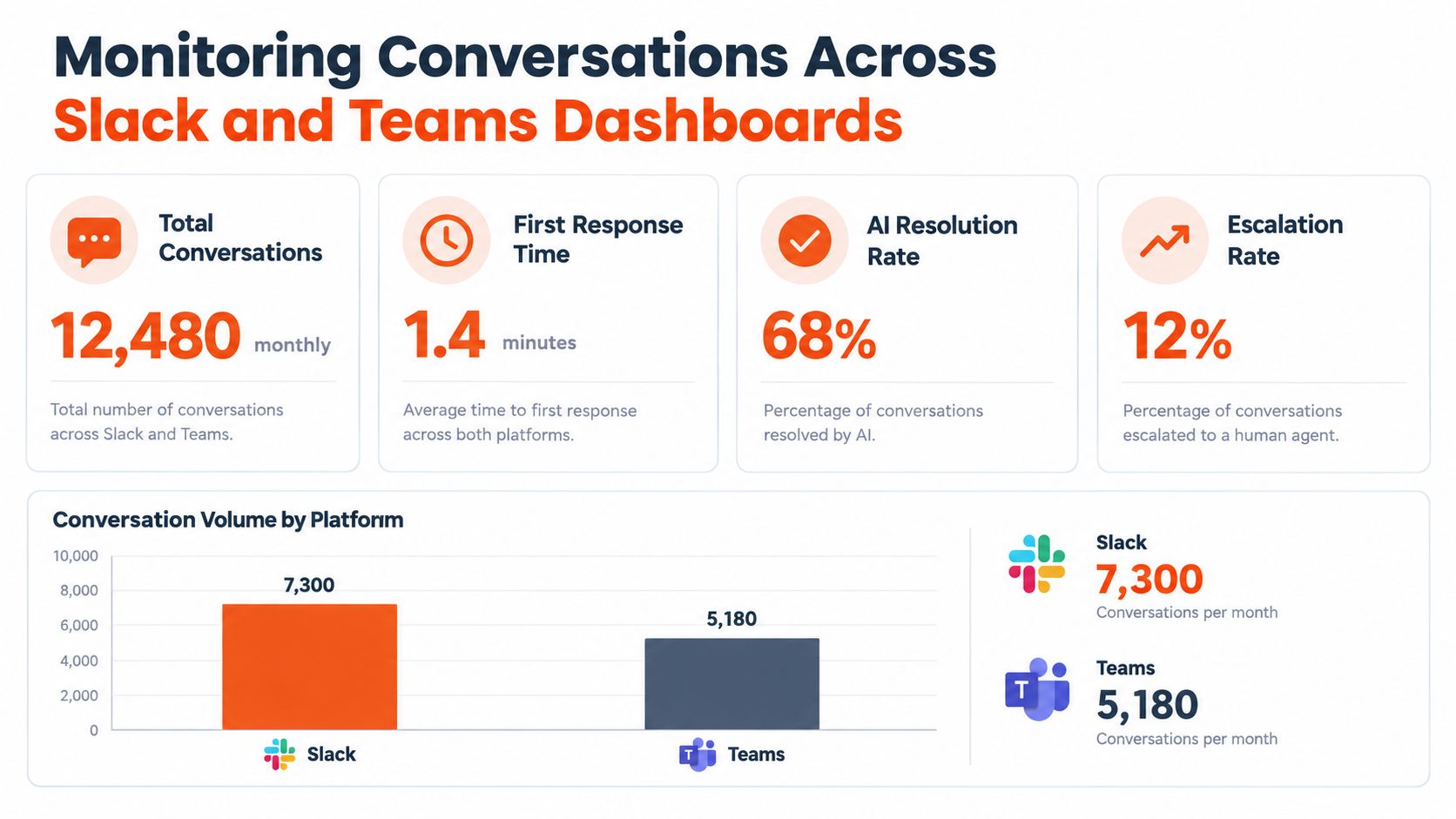
A combined dashboard should answer operational questions, not just display activity. Support leads need to know which conversations remain unanswered, where escalations originate, which answers required correction, and whether one platform is receiving materially different treatment from the other.
Start with a common event schema. Normalize Slack and Teams events into fields such as channel source, conversation ID, user type, intent, response state, escalation reason, knowledge source, and human ownership. Keep the original platform identifiers alongside the normalized values so an auditor can trace an event back to its source.
Build one operational view
A useful dashboard separates four layers:
- Demand: Incoming questions, active threads, reopened conversations, and channel distribution.
- Quality: Answer acceptance, corrections, unresolved intents, sentiment direction, and human review outcomes.
- Workflow: Escalation queues, ownership age, failed actions, duplicate events, and delivery errors.
- Governance: Permission denials, access changes, deleted records, export requests, and policy exceptions.
Don't compare raw message volume as if Slack and Teams represent identical populations. A short Teams channel message may trigger a longer internal Slack investigation, while a Slack thread may contain several bot events that don't represent separate support requests. Compare normalized conversations and outcomes, then inspect the underlying events when a trend changes.
The dashboard should also expose unanswered questions as knowledge work. If users repeatedly ask for information that exists in a document the assistant can't retrieve, the issue is retrieval coverage or permission scope, not necessarily model quality. Assign those gaps to a documentation owner and track whether the next version resolves the same intent.
For practical orientation on using Microsoft Teams with F1Group, review the platform basics before defining channel-level reporting assumptions. The reporting design must match how teams use channels, chats, and meetings.
Alert on failures, not only volume
Set alerts for delivery failures, sudden increases in unanswered requests, repeated escalation reasons, permission-denied events, and messages that remain without an owner. Export audit logs for compliance review, but restrict dashboard access because cross-platform analytics can reveal sensitive customer and employee activity even when message text is hidden.
A single pane of glass is valuable only when it preserves the distinctions that matter. Combine the data for operational decisions, retain source context for investigation, and apply role-based access to both.
Avoiding Governance Drift in Dual-Channel Deployments
Integration isn't a one-time configuration. Slack channels are created, Teams memberships change, contractors leave, guests gain access, and support ownership moves between departments. If the integration's permissions and routing rules don't change with the organization, the system develops governance drift.
Microsoft's migration guidance notes that Slack users must be mapped to Microsoft 365 users, while its migration tool guidance also highlights that direct messages can't be imported (Microsoft's migration tool documentation). Those constraints are reminders that identity and historical context aren't portable by default. A copied conversation can preserve words without preserving the original trust boundary.
Make review part of operations
Assign an owner for the integration, an owner for each channel policy, and an owner for data retention. Review:
- Membership changes: Remove deprovisioned users and verify guest access on both platforms.
- Application scopes: Remove permissions that the current workflow no longer needs.
- Routing rules: Check that escalations still reach an active team and that old channels aren't receiving new cases.
- Identity mappings: Resolve renamed, duplicated, suspended, and service accounts.
- Audit events: Investigate repeated denials, unusual exports, and messages delivered to an unexpected destination.
- Deletion requests: Apply the organization's retention and privacy process across the source, middleware, destination, logs, and indexes.
The most dangerous failure isn't always a dropped message. It can be a successful delivery to too many people. Governance drift expands visibility gradually, often because a temporary channel, guest exception, or broad app scope remains after the original reason disappears.
Security principle: A synchronized message is still a disclosure. Validate the recipient's authority at the destination instead of assuming that source access transfers automatically.
Keep a written data-flow map showing where messages, attachments, identities, model inputs, audit records, and human notes travel. Test the map after connector updates and organizational changes. Exportable audit logs, role-based access controls, and GDPR features such as data deletion and export can support this process, but they don't replace a policy owner who reviews the results.
Dual-tool deployments can be rational when Microsoft 365 standardization is strong and Slack remains important for engineering or external collaboration. They also impose cognitive, administrative, and discovery costs. Consolidation may reduce those costs, while integration may avoid disruptive migration. Make that decision from access patterns, escalation reliability, and governance capacity, not from the assumption that one platform must win.
AgentStack provides AI support workflows that can ingest approved website and document content, route responses across supported channels, connect escalations to a shared inbox, and expose analytics and security controls for review. Use AgentStack to design a governed Slack and Teams workflow that preserves identity, thread context, human ownership, and auditability from the first message through resolution.