A customer asks whether their export bug is fixed. Your support lead searches a chat thread, checks a spreadsheet, and messages engineering. Someone investigated it, but nobody can say who owns the next step. The customer doesn't need another acknowledgment. They need a reliable answer.
Linear issue tracking can make that handoff visible, provided you define ownership, evidence, and completion clearly. A status board alone won't resolve conflicting priorities or prove that a fix works.
Table of Contents
- What Linear Issue Tracking Means and Why It Matters
- Linear Issue Tracking Compared with Other Workflows
- How Sequential States Move an Issue from Intake to Done
- Handing Off Support Issues to Engineering Without Losing Context
- Where AI Can Safely Act in the Issue Lifecycle
- Connecting Linear Issue Tracking to Your Support Stack
- Metrics That Show Whether Your Tracking Works
- Confirm Your Workflow Before You Roll It Out
What Linear Issue Tracking Means and Why It Matters
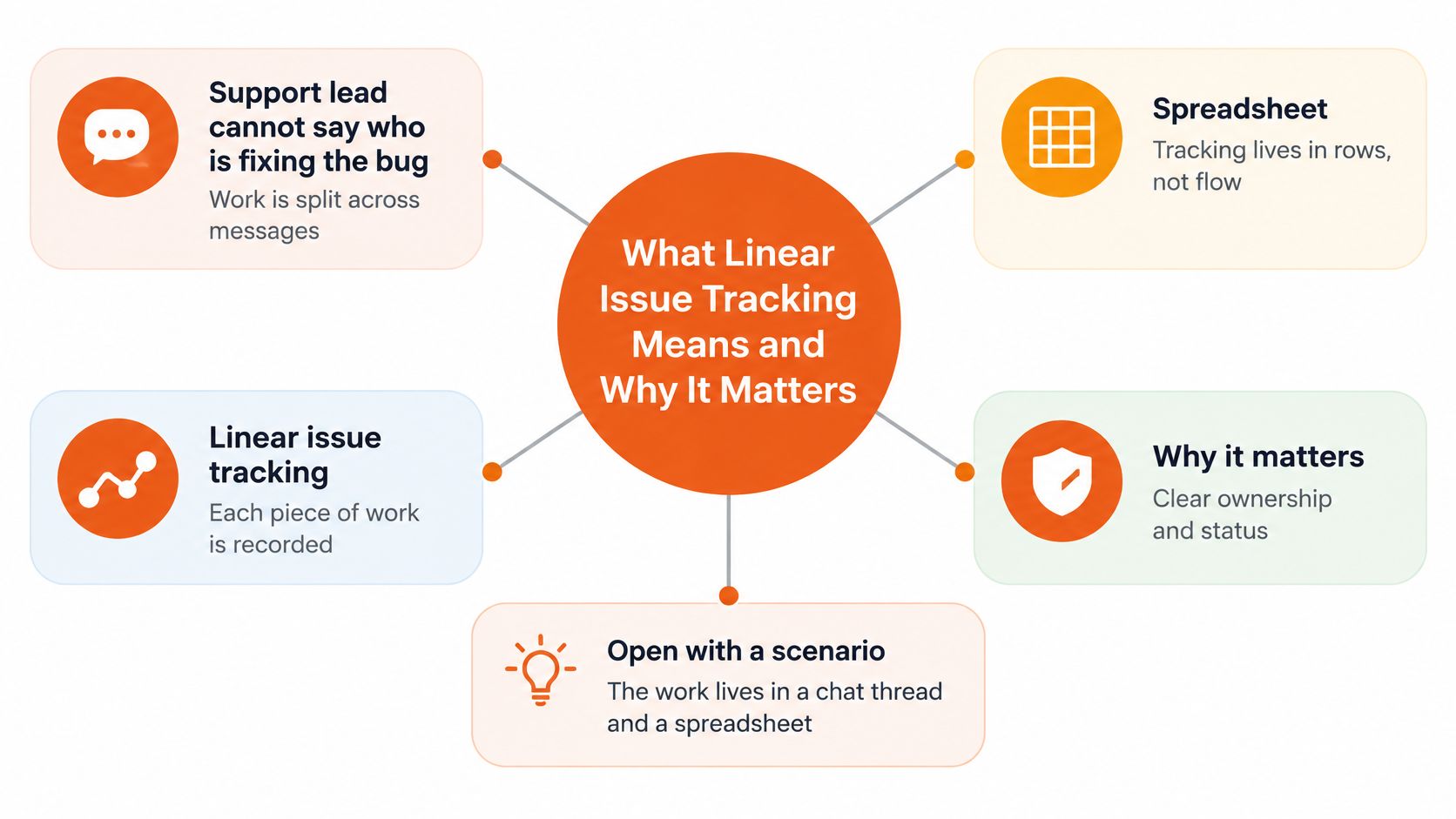
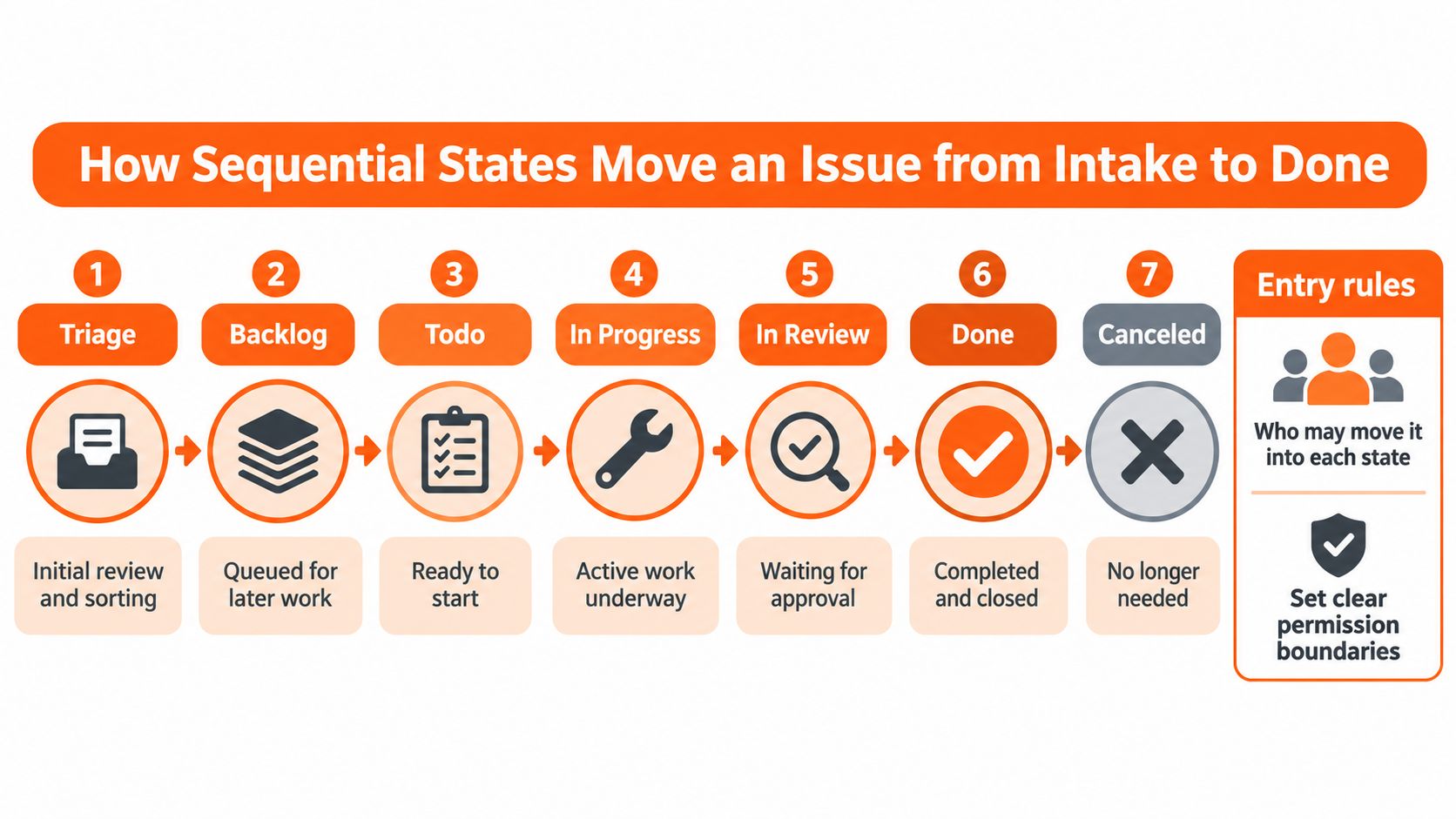
In a sequential workflow, you record each piece of work as an issue and move it through ordered states such as Triage, Backlog, Todo, In Progress, In Review, and Done. For this operating model, give each issue exactly one accountable owner at a time.
Think of a relay race. The baton passes between runners, but everyone can see who holds it. Support may collect the evidence, engineering may implement the fix, and a reviewer may verify it. Ownership changes deliberately rather than disappearing between teams.
The workflow pattern and the product
Linear is also a specific product, founded in 2019 by Karri Saarinen, Jori Lallo, and Tuomas Artman and launched publicly in June 2020, according to this historical account of Linear. Here, sequential tracking describes the workflow pattern, while Linear supplies the application example. They aren't interchangeable terms, and Linear's name doesn't require a rigid, straight-line project plan.
The basic objects have different jobs:
- Issues describe individual bugs, requests, or tasks.
- Teams organize the people responsible for related work.
- Cycles group work into time-boxed batches.
- Projects connect issues to a larger outcome.
- Labels identify attributes such as product area or report type.
An issue can return to investigation when verification fails. Sequential doesn't mean irreversible. It means the current state and next handoff are explicit.
Why the distinction matters
According to Dataintelo's issue-tracking-software market report, the global category was valued at $2.96 billion in 2025. Teams are choosing among established tools, not just deciding whether to replace a spreadsheet.
Start with an operational test: can you name the person holding each open issue and its current state? If you can't, your workflow isn't sequential in the useful sense yet, regardless of which application you've bought.
Linear Issue Tracking Compared with Other Workflows
| Workflow | Unit of work | Ownership rule | Best fit | Main weakness |
|---|---|---|---|---|
| Sequential issue tracking | Issue with ordered states | One accountable owner per issue at a time | Product and engineering teams planning in cycles | Needs disciplined state updates |
| Kanban board | Card in columns | Assignee convention plus work-in-progress limits | Continuous intake queues | Planning cadence needs a separate agreement |
| Scrum sprint board | Story in a sprint | Team commits to sprint scope | Teams delivering within fixed-length sprints | Reprioritization requires renegotiating scope |
| Shared spreadsheet | Row | Must be defined explicitly, otherwise editors may assume ownership | Small, one-off lists | History and notifications don't establish a workflow by themselves |
| Email or chat thread | Message | Implicit unless someone accepts responsibility | Quick questions | Context scatters and issues get lost |
These aren't mutually exclusive categories. A team can display sequential issues on a Kanban board, and a Scrum team can track its work in Linear. The board is a view; the workflow is an agreement about how people act.
For the support-to-engineering model, require both a named accountable owner and timestamped state changes. Those requirements distinguish a controlled handoff from an informal queue. Neither belongs exclusively to a particular tool.
What happens to the same bug
Say support puts a CSV export bug on a Kanban board. Several teammates move the card as they investigate, but nobody explicitly accepts responsibility. The card reaches In Progress even though each person assumes someone else is fixing it.
The problem isn't Kanban. It's the missing ownership rule.
Under a controlled sequential workflow, the triage owner accepts the report, records why it's ready for engineering, and assigns the implementation owner. When review begins, the record identifies who's responsible for obtaining approval. Support can answer the customer without reconstructing the conversation.
Practical rule: A moved card isn't a completed handoff. The receiving person must know what they've accepted and what evidence they need next.
Choose for the work you actually receive
A Kanban approach suits a steady intake queue where people pull the next eligible task and manage work in progress. Cycles add value when engineering and product need to agree on a planned batch of work. Don't introduce a planning cadence merely because your tracker supports it.
A spreadsheet may be adequate for a temporary list with an attentive coordinator. Chat works for a question that can be answered immediately. Neither should become the only record of a customer-impacting defect that crosses departments.
Choose a sequential tracker when work crosses teams and each handoff needs a named owner. If work arrives continuously, needs little advance planning, and stays within one team's control, a well-run board may be enough.
How Sequential States Move an Issue from Intake to Done
Build the workflow around decisions people make. Each state should explain either what someone is doing or what the issue is waiting for.
Set up the flow
-
Define the states. Use Triage for assessment, Backlog for accepted but unscheduled work, Todo for ready work, In Progress for implementation, In Review for checking, and Done for accepted completion. Give Canceled a separate outcome so abandoned work doesn't look delivered. Treat these as a starting configuration, not mandatory Linear defaults.
-
Write entry rules. Specify who can authorize each transition and what they must check. For example, require reproduction evidence before a bug leaves Triage, or record why reproduction isn't possible and who approved investigation anyway. In Review should require an available change and a named reviewer, not just a developer's optimistic update.
-
Make planned work accountable. Before an issue leaves Backlog, assign an owner and a due date or cycle. A due date expresses a delivery constraint; a cycle expresses a planning window. Don't let the interface imply that they're the same promise.
-
Handle unfinished work explicitly. At the end of a cycle, decide whether to carry the issue forward, split the remaining work, or return it to Backlog. Record the reason. Otherwise, the team can't distinguish an unexpected blocker from work that was never realistically ready.
-
Inspect waiting states regularly. Review issues by state and investigate accumulating work, especially in In Review. Ask whether reviewers are unavailable, acceptance criteria are unclear, or changes are too large to assess comfortably.
Keep transitions usable
Avoid creating a state for every minor activity. If developers must distinguish between several nearly identical waiting states, they'll spend time maintaining the tracker without making the handoff clearer. Use labels or comments for details that don't change responsibility.
For implementation context, Fivenines provides a workflow automation guide for DevOps. When mapping the support side, use the ticket workflow documentation to check how ticket actions correspond to your engineering transitions.
Responsiveness matters because people should update the issue while making the decision, not reconstruct updates later. An independent Linear and Jira comparison describes Linear's local-first synchronization and reports approximately 24 ms for issue-creation modal loading in its test scenario, a directional benchmark rather than a production service guarantee.
Handing Off Support Issues to Engineering Without Losing Context
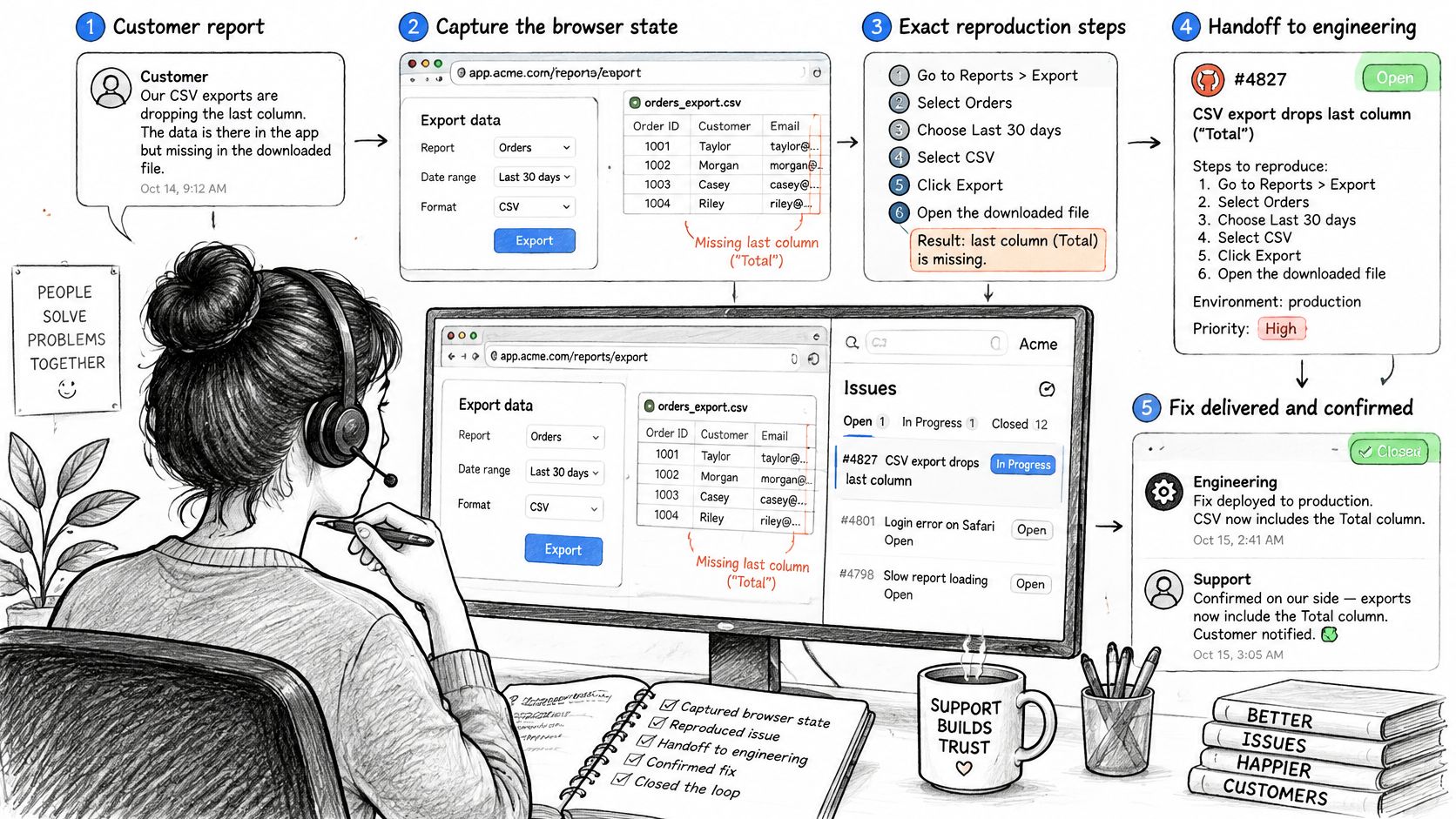
A customer reports that CSV exports drop the last column. The support specialist owns the conversation initially and records the customer's plan, browser, export settings, expected output, and exact steps. They request a sanitized example rather than copying sensitive customer data into a broadly accessible issue.
The support lead validates the initial severity against customer impact. A blocked business process and a cosmetic formatting error shouldn't receive the same treatment just because both customers sound frustrated.
From conversation to accepted engineering work
Before creating an issue, the specialist searches for the same error text, export behavior, and product area. If the defect already exists, they attach the new customer report to the canonical issue while preserving the separate conversation. Similar symptoms aren't sufficient evidence to merge unrelated bugs.
For a new issue, require:
- Impact and account context: What the customer can't do, which account is affected, and whether a workaround exists.
- Severity and product area: The support lead's assessed impact and the likely owning component.
- Evidence and conversation: Reproduction details, sanitized attachments, and a durable link back to the customer exchange.
This is information engineers shouldn't have to recover through repeated messages. The Atlassian developer-experience report identifies finding information, adapting to new technology, and switching tools as major developer time-wasters.
Route, accept, and close the loop
Our Help Desk routes tickets to the default team, a team requested by an AI escalation, or the global unassigned queue. Round-robin follows team-member join order; least-loaded selects the member with the fewest active tickets in that team; unassigned waits for a manual claim. Automatic assignment skips teammates set to Away or lacking Inbox write access, and moving a ticket to another team reruns assignment logic, which can change its owner.
Notify the receiving team before transferring the ticket. The issue escalation guide provides context for designing that handoff, but your operating agreement must still identify who acknowledges receipt.
Engineering's triage owner validates technical scope and confirms severity with the support lead if the evidence changes. The implementation owner then moves the issue into active work and posts meaningful progress back to support.
After a human verifier accepts the fix, support checks availability for the affected customer, sends the outcome, and updates relevant help content. A closed engineering issue doesn't automatically mean the customer has received an answer.
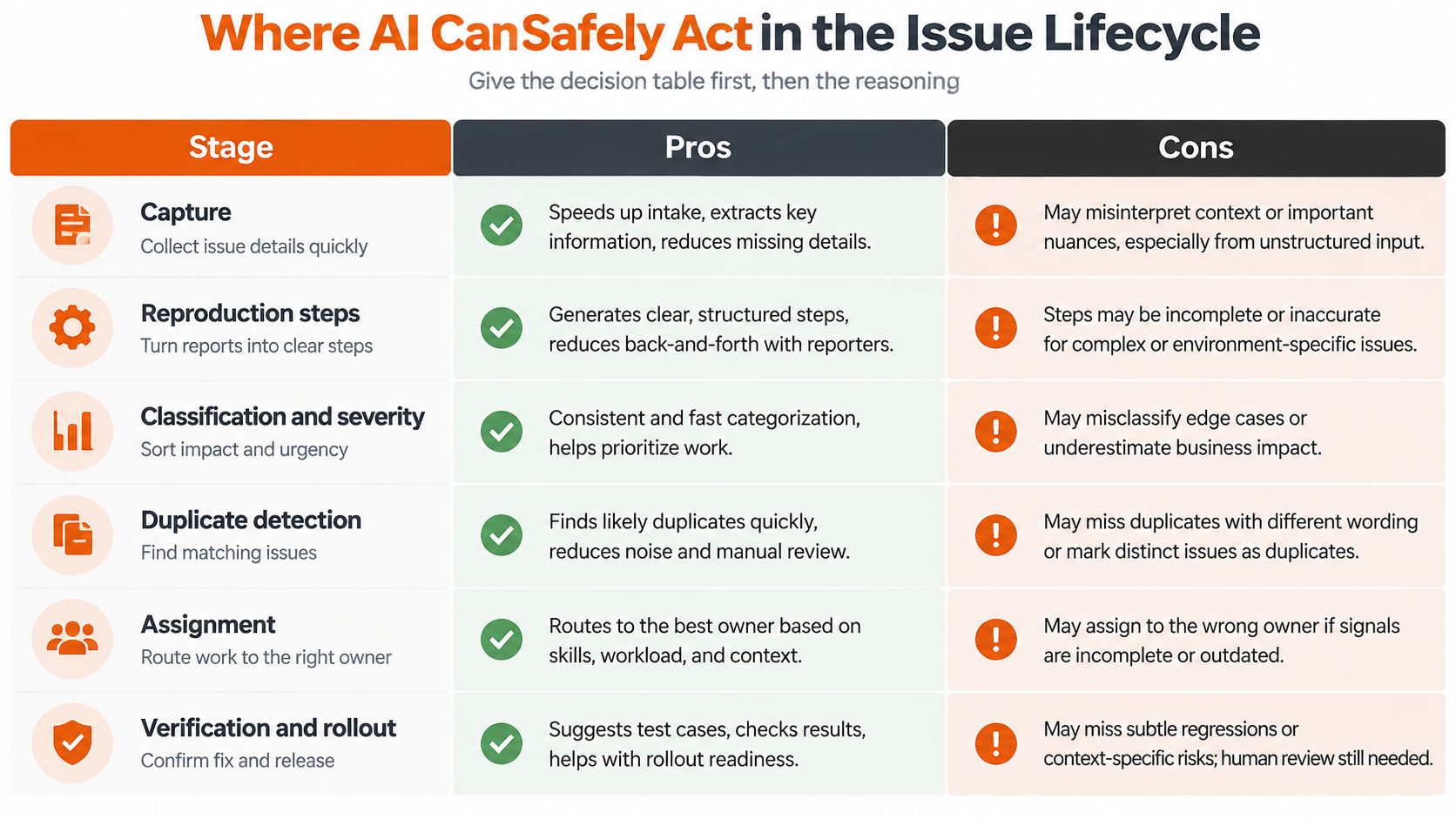
Where AI Can Safely Act in the Issue Lifecycle
| Stage | Automation level | Human approval required when |
|---|---|---|
| Capture from support conversation | Draft automatically | Customer data is unclear or incomplete; a person reviews customer-reported issues |
| Reproduction steps | Draft with AI, verify manually | The bug is security-sensitive or unverified |
| Classification and severity | Suggest classification; human confirms severity | Confidence is low, and always for severity decisions |
| Duplicate detection | Flag matches automatically | Any merge of customer reports |
| Assignment | Route automatically within approved rules | The issue affects several teams or a key account |
| Verification and rollout | Human-led | Always |
AI can turn a scattered conversation into a readable draft. It can also make an unsupported interpretation look authoritative. A polished issue isn't necessarily a correct issue.
The ACM paper on language-model agents in bug tracking identifies end-to-end integration as not yet systematically studied. That uncertainty argues against treating automated intake, diagnosis, fixing, and release as a proven continuous process.
Why more automation can mean more noise
If your team doesn't agree on severity, AI won't settle the disagreement responsibly. It may instead apply inconsistent examples faster. If your intake lacks required context, automated drafting can produce more issues that engineering still can't act on.
Compare that with a human-in-the-loop approach: AI drafts a summary, flags missing evidence, and proposes a destination. A person reviews the customer impact and accepts the handoff. The additional checkpoint is useful when it prevents speculative work from entering the engineering queue.
For organizations deciding how to sequence adoption, Wisely's AI implementation for growing businesses is a relevant planning resource. Establish decision rights before expanding automation.
Conditions that require a person
- Customer or security impact: Send customer-reported issues and security-sensitive reports to a person, even when AI prepares the draft.
- Uncertain classification: Put low-confidence suggestions in a review queue rather than choosing a product area.
- Missing context: Ask the reporter for the missing detail. Don't manufacture an environment, error message, or reproduction.
- Generated reproduction: Have a person execute the proposed steps against the relevant environment before treating them as confirmed.
- Release authority: Keep acceptance, rollout, verification, and closure with designated humans.
Automate preparation and permitted routing, not accountability for the outcome.
Connecting Linear Issue Tracking to Your Support Stack
Support conversations live in one system. Engineering status lives in another. The connection between them works when code decides what is permitted, and the model only suggests what might help.
Linear's published client SDK exposes its GraphQL schema through strongly typed models and operations. Those types catch mismatched identifiers, workflow states, teams, labels, and comments during development. GraphQL also lets a triage view request only the fields it needs.
A support ticket that says "checkout is broken for three customers" cannot move straight into engineering as a high severity bug. Someone who owns the customer relationship confirms impact first, then the handoff carries evidence, not just urgency. For chat-originated reports, this guide to Slack issue routing offers additional implementation context. Preserve a durable conversation reference rather than relying on someone to copy messages later.
Build the integration in this order:
- Produce a structured proposal. Ask the model for customer context, proposed severity, product area, evidence links, and escalation reason. Separate reported facts from model inferences.
- Validate before writing. Check required fields, permitted team identifiers, valid states, and access restrictions. Route severity proposals to the designated human rather than accepting them as authoritative.
- Allowlist retry-safe operations. Permit only necessary mutations. Use an application-level idempotency key and a stored result so retrying a failed request does not create another issue.
- Record the decision. Store the source conversation, model confidence score, validation outcome, and resulting issue identifier. Record human overrides too. A confidence score is diagnostic context, not proof that a suggestion is correct.
Successful requests are the easy case. Plan for the rest. Queue retries when the API returns a rate limit instead of resubmitting the same mutation. Make rejected or exhausted escalations visible to an accountable operator so nothing stalls unnoticed. Let the integration create or prepare triage work, but never let a model close the issue. Test with representative workloads. The SDK establishes an integration mechanism, not a latency, throughput, or uptime guarantee.
Before connecting systems, settle the ownership question. Decide which system is authoritative for engineering status, and which holds the customer conversation. Define how each receives updates without allowing circular synchronization to overwrite a deliberate human decision.
Metrics That Show Whether Your Tracking Works
| Metric | Question it answers | How to calculate |
|---|---|---|
| Backlog aging | Are issues stalling? | Average days from creation to today for open issues |
| Duplicate rate | Is intake noisy? | Duplicate issues divided by new issues in the month |
| Report-to-reproducible time | How fast can engineers act? | Hours from customer report to confirmed reproduction |
| Missing-context share | Is the handoff complete? | Issues lacking required fields divided by all new issues |
| Resolution accuracy | Did the fix hold? | Reopened issues divided by issues closed in the month |
| Recurring issues fixed in docs or automation | Does feedback improve help content? | Recurring issues with a documentation or automation fix divided by recurring issues |
Treat these as operational definitions, not industry benchmarks. Agree on what qualifies as a duplicate, a confirmed reproduction, and a recurring issue before comparing results. Otherwise, a change in tagging can look like an improvement in service.
Establish a usable baseline
Choose a baseline period that covers your normal intake and delivery rhythm. Keep the calculation rules unchanged after introducing new states or AI drafting, and record unusual releases or incidents that could distort the comparison.
For reopen rate, follow the same closed-issue cohort when checking subsequent reopenings. Mixing reopened historical issues with unrelated newly closed work can obscure whether recent fixes held. Also distinguish a reopened defect from a customer asking a new question on an old conversation.
The customer-service KPI guide can help connect this engineering-facing scorecard to support outcomes. Keep the measures small enough that an owner can investigate changes rather than merely publish a dashboard.
Turn movement into action
Review backlog aging and missing context during queue reviews. Examine duplicates and reopened defects when reviewing intake and release quality, and assess documentation improvements over a longer window.
If missing context rises, enforce required fields at creation and inspect which field reporters struggle to complete. If report-to-reproducible time increases, check whether support lacks a test environment or whether engineering needs clearer evidence.
Measurement caution: A falling duplicate rate can mean customers stopped reporting problems, not that the problems disappeared.
Read duplicate rate beside intake volume and channel availability. Before declaring the workflow successful, decide which single metric must improve, and what deterioration elsewhere would invalidate that apparent gain.
Confirm Your Workflow Before You Roll It Out
Use a sequential tracker for planned engineering work, and send customer-reported issues through a validated handoff with a named owner. The decision isn't whether your team can maintain a more detailed board. It's whether people can accept work, verify outcomes, and answer customers without reconstructing events.
Keep the rollout deliberately narrow:
- Audit the current states. Remove states nobody uses and retain distinctions that change the next action or responsible person.
- Define the handoff. Agree on required evidence and name the person authorized to validate severity.
- Set automation boundaries. Identify permitted drafting and routing actions, along with the decisions that require approval.
- Baseline the scorecard. Capture the measures under consistent definitions before changing the workflow.
- Pilot with a team. Test real handoffs, failed escalations, rejected reproductions, and ownership changes before expanding.
Ask the pilot team to explain a difficult issue from customer report through accepted resolution. If they can't identify where responsibility changed, revise the handoff rather than adding another status.
Make expansion conditional on the metric you've chosen and on the team's ability to handle exceptions. A workflow is ready when people understand what to do when the happy path fails, not just when every card reaches Done.
AgentStack offers a talk-to-us signup with a live walkthrough from a solutions engineer and a live AI support agent built on your own documentation, with no credit card or commitment. Visit AgentStack to test how a customer report could become a documented engineering handoff while your team retains severity, verification, and closure decisions.