Your queue is full again.
A customer asks for a refund policy in chat, another replies to an old email thread with a billing issue, someone on Slack pastes a screenshot of an error, and the overnight shift leaves a handoff note that says “please review in the morning.” The problem usually isn't a lack of effort. It's that the team's knowledge lives in too many places, the channels don't connect cleanly, and the bot you tried last year could answer simple FAQs but fell apart the moment a conversation needed memory, lookup, or action.
That's where an AI agent development platform becomes useful. Not as a fancy chatbot wrapper, but as an operational system that takes in knowledge, chooses how to reason, connects to tools, decides when to escalate, and gives your team a way to inspect what happened afterward.
Support leaders are feeling this shift now because the market around agent platforms is expanding fast. The agentic AI development platform market was valued at USD 10.75 billion in 2025, is projected to reach USD 14.62 billion in 2026, and is forecast to hit USD 66.38 billion by 2031, with a 35.34% CAGR from 2026 to 2031 according to the 2025 AI Agent Index. The same source notes strong concentration in platform software, public cloud, and large-enterprise adoption, which is a good clue that this category is moving beyond experimentation.
Table of Contents
- Introduction to AI Agent Development Platforms
- What an AI Agent Development Platform Really Is
- Core Components That Power Every Platform
- How to Evaluate and Choose the Right Platform
- Real World Use Cases and ROI in Action
- Implementation Scaling and Migration Best Practices
- Key Takeaways for Building With Confidence
Introduction to AI Agent Development Platforms
A support team at a SaaS company often starts in a familiar place. The help center exists, but it's incomplete. Product answers live partly in Notion, partly in old docs, partly in someone's memory. The team wants faster replies and better after-hours coverage, but they also need to avoid bad answers, broken handoffs, and awkward “the bot said something wrong” escalations.
That's why the phrase AI agent development platform matters. It doesn't just mean “a smarter chatbot.” It means the software stack used to build, test, deploy, monitor, and govern agents that can answer questions and take limited actions across support workflows.
Enterprise behavior already shows that this isn't a side project anymore. Ninety-six percent of enterprises surveyed planned to expand their use of AI agents in the next 12 months, and 57% said they had implemented AI agents in the past two years in the Verdantix enterprise AI agent adoption report. The same survey found that many organizations are building on enterprise AI infrastructure platforms or using agentic features inside existing core applications.
Why support teams get confused
Most articles flatten the category into model comparisons. They talk about Claude versus GPT, speed versus quality, or open source versus managed APIs. Those are real decisions, but they sit in the middle of the stack, not at the center of the operating problem.
A support leader usually needs answers to more practical questions:
- Knowledge control: Where does the agent get its answers, and how often is that knowledge refreshed?
- Workflow safety: What happens when the answer is uncertain, sensitive, or requires approval?
- Channel coverage: Can one system handle chat, email, Slack, and voice without creating four separate bots?
- Operational visibility: Can your team see why the agent responded the way it did?
A support agent that answers quickly but can't be audited is hard to trust in production.
What matters in practice
A useful platform helps your team do four things well:
- Turn scattered content into usable context
- Route each task to the right model or tool
- Deliver answers in the channels customers already use
- Give humans control when the conversation gets messy
That's the lens to keep throughout this guide. Not “which model is smartest,” but “which system helps my team run support safely and consistently.”
What an AI Agent Development Platform Really Is
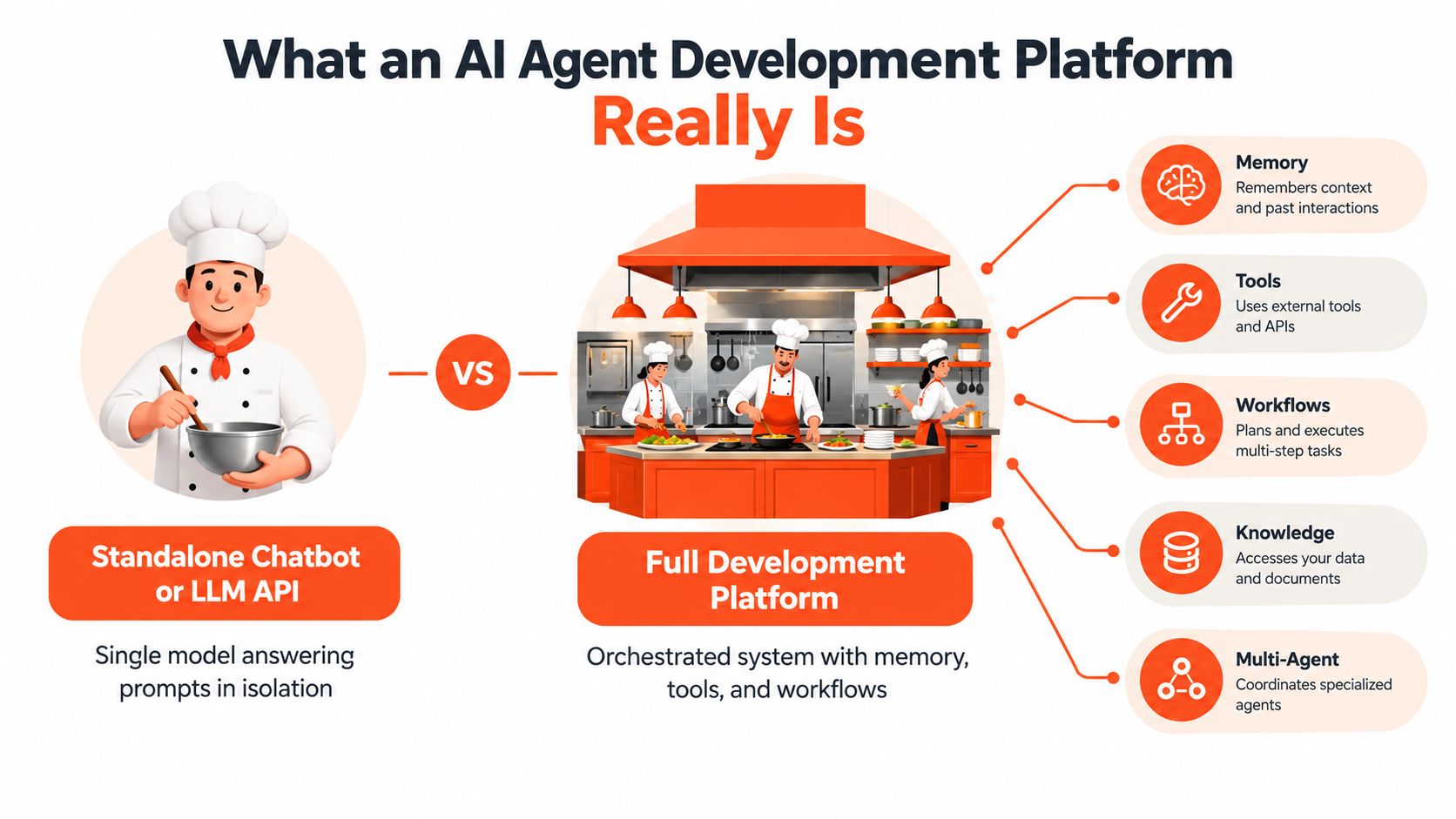
A standalone chatbot is like a single chef working alone with no prep station, no pantry system, and no expediter. It can cook one dish if you hand it ingredients and instructions. It struggles when orders pile up, special requests appear, or one table needs service across multiple steps.
An AI agent development platform is the whole kitchen. It includes storage, prep, routing, timing, quality control, and a way to send the finished order to the right table.
What it is not
A platform is not just:
- An LLM API: That gives you model access, not ingestion, orchestration, or support workflow design.
- A widget alone: A chat box on your site is delivery, not the system behind it.
- A prompt library: Prompts matter, but they don't solve retrieval, logging, or escalation.
People often buy the model first and discover later that most of the work sits around it. The hard part isn't getting text from a model. The hard part is making that text reliable enough to use in customer-facing operations.
What the platform actually does
A real platform usually handles a chain like this:
- Ingests content from your website, docs, files, or internal tools
- Prepares that content so it can be searched and retrieved cleanly
- Finds the right context when a question arrives
- Chooses a model or workflow based on the task
- Executes actions if the conversation needs more than an answer
- Delivers the response in chat, email, Slack, or voice
- Logs what happened so a human can review and improve it
This is why model choice alone doesn't solve support automation. A strong model can still give weak answers if retrieval is bad, if channel delivery is clumsy, or if there's no handoff path when the conversation leaves the happy path.
Why this distinction matters for buyers
Support leaders often compare vendors by asking, “Which model do you use?” A better question is, “What operational responsibilities does your platform own?”
If your team has to build custom ingestion, custom logs, custom approval flows, and custom handoffs around the model, you haven't really bought a platform. You've bought ingredients.
Practical rule: If a tool can answer a demo question but can't show how it gathered context, what system it touched, and when it should escalate, it's not ready for serious support work.
Core Components That Power Every Platform
The easiest way to understand an AI agent system is to follow one customer question from raw content to final answer. Every production platform has layers. Some expose them visually. Others hide them behind templates. But the layers are still there.
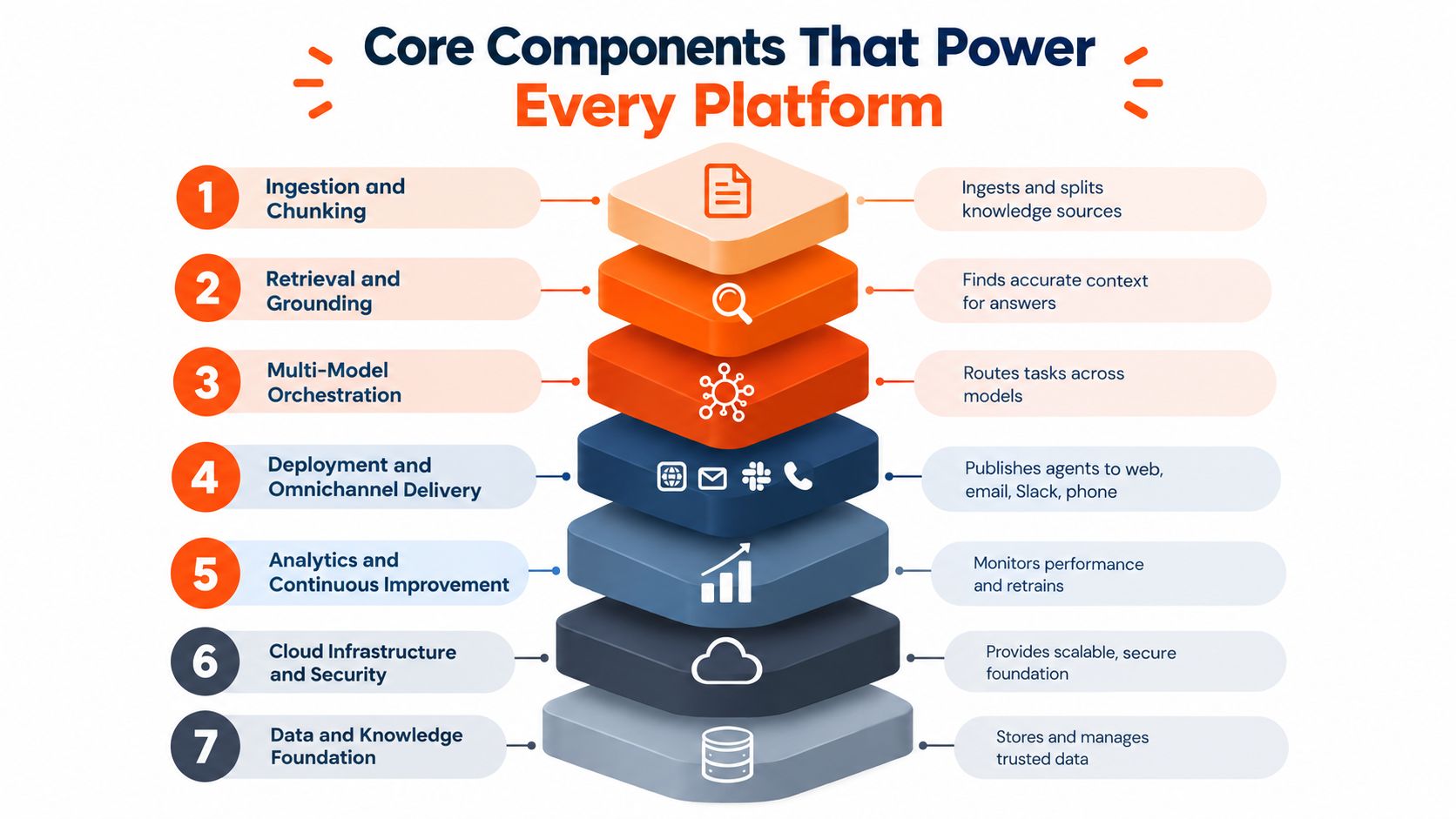
Ingestion and chunking
Before an agent can help, it needs source material. That includes public docs, internal policy files, pricing sheets, troubleshooting guides, and often messy knowledge that was never written for machine retrieval.
Chunking is the step where the platform breaks long content into smaller searchable units. Too large, and retrieval gets vague. Too small, and the agent loses context.
A support team should ask whether the platform can handle content in the formats they already use. In practice that often means websites, PDFs, Word files, spreadsheets, internal pages, and Q&A pairs maintained by non-engineers.
Retrieval and grounding
When a customer asks, “Why was I charged twice?”, the agent shouldn't guess. It should retrieve the most relevant policy, billing explanation, or workflow note, then ground the answer in that material.
Grounding is what turns a model from a fluent improvisor into a support system with a reference point.
This is also where many pilots fail. The model sounds confident, but the retrieval layer sends weak context, outdated context, or no context at all. The result is polished nonsense.
Multi-model orchestration
Not every request deserves the same model. A short password-reset answer might use a fast, lower-cost model. A nuanced billing dispute or policy interpretation might need a stronger reasoning model.
That routing logic is a core platform function. It's why many teams looking into cost-effective AI agent frameworks eventually realize they need orchestration policy, not just a cheaper runtime.
For teams evaluating tool interoperability, it also helps to understand protocols and tool access patterns such as MCP server architecture, because model quality means less if the agent can't reliably reach the tools and context it needs.
A useful platform can also expose these choices to operators. The support team doesn't need to tune models all day, but they do need sensible defaults and clear override points.
Here's a useful visual walkthrough before going further:
Deployment and omnichannel delivery
A platform becomes operational when answers can go where customers already are. For support, that usually means website chat, email, Slack, and phone workflows.
This layer handles channel formatting, session state, and handoff behavior. A customer asking in web chat and another replying through email may need the same knowledge base but different response logic. The delivery layer keeps that from turning into duplicate systems.
Analytics and continuous improvement
After launch, teams need to know more than “the bot handled conversations.” They need to see unresolved topics, repeated confusion points, and where retrieval failed.
Look for dashboards that show unanswered questions, resolution outcomes, and sentiment patterns in plain operational terms. Those give support managers something to act on.
Security and governance
This layer is where most lightweight guides stay vague. That's a mistake. An agent in production needs identity boundaries, access rules, audit trails, and clear control over deletion and export.
AgentStack is one example of a platform that combines ingestion, multi-model routing, web, email, Slack, and voice delivery, plus analytics, exportable audit logs, role-based access control, GDPR-related controls, custom API actions, an MCP server, and AES-256-GCM encryption. What matters isn't the feature list by itself. It's that these controls live in the same operational system as the agent.
Developer extensibility
Sooner or later, support workflows need custom actions. Booking a meeting, checking an order state, opening a ticket, or passing context into another internal tool all require extension points.
That's why mature platforms expose APIs, tool connectors, and programmable actions. Without them, the agent stays stuck at the “FAQ assistant” stage.
How to Evaluate and Choose the Right Platform
Most demos look good for the first five minutes. The agent answers a clean question from a polished dataset, everyone nods, and then the buying team gets stuck because the hard questions weren't asked.
The differences show up in production conditions. Can the platform explain where an answer came from? Can it delete data on request? Can it hand off a messy conversation without dropping context? Can your operators review what happened without asking engineering to reconstruct events?
Start with the operational checklist
The strongest buying process usually starts with a scorecard, not a demo reaction.
| Evaluation Criteria | What to Ask | Why It Matters |
|---|---|---|
| Data residency and deletion | Where is customer data stored, and how can we delete or export it? | Support data often includes personal and billing information |
| Audit logs and access control | Can we export logs, limit user roles, and review agent actions? | Teams need reviewability for compliance and incident response |
| Observability | Can we inspect full traces, tool use, and decision paths? | You can't improve or govern what you can't see |
| Latency | How do you measure response performance across model and tool calls? | Slow agents create poor customer experience even when answers are correct |
| Integration depth | Which systems can the agent read from and act on? | Support value depends on fitting into existing workflows |
| Human handoff | How does escalation work, and what context transfers to humans? | Broken handoff creates duplicate work and frustrated customers |
| Pricing clarity | What drives cost, and what happens as volume grows? | Hidden usage triggers make pilots look cheaper than production |
Governance is the real separator
An agent platform becomes risky when it can take actions without supervision, logging, or approval design. That's not a theoretical concern. Independent reporting cited in the AgentMarketCap analysis of the AI agent developer experience gap says only 24.4% of organizations have full visibility into which agents are communicating with each other, more than half of agents run without security oversight or logging, and only 21% of companies have a mature governance model for agents.
Those numbers explain why a platform that looks slower to set up can still be the better choice. Governance is what lets you move from pilot to trusted operation.
What observability should include
Many vendors say they offer monitoring. Ask what that word means.
According to Deloitte's guidance on AI observability and monitoring, effective observability for enterprise agents needs the full execution trace, including planned steps, involved data assets, where data flows, affected systems, and dependencies between steps. That's a very different standard from “we log the final response.”
If the platform only shows the output, you're auditing the ending of the story, not the process that created it.
Two buying questions teams often skip
- Workflow redesign: Who owns escalation logic, approval rules, and shared inbox review after launch?
- Channel economics: If you're comparing support voice tools, this roundup of affordable AI receptionist tools is useful because it shows how channel-specific pricing can change the deployment cost.
A smart buying team includes support operations, security, and an engineer who can probe integrations. If only one of those groups evaluates the platform, blind spots show up later.
For orchestration design, it also helps to compare platforms through the lens of AI agent orchestration patterns, since many production issues come from tool coordination and handoff logic rather than from answer generation alone.
Real World Use Cases and ROI in Action
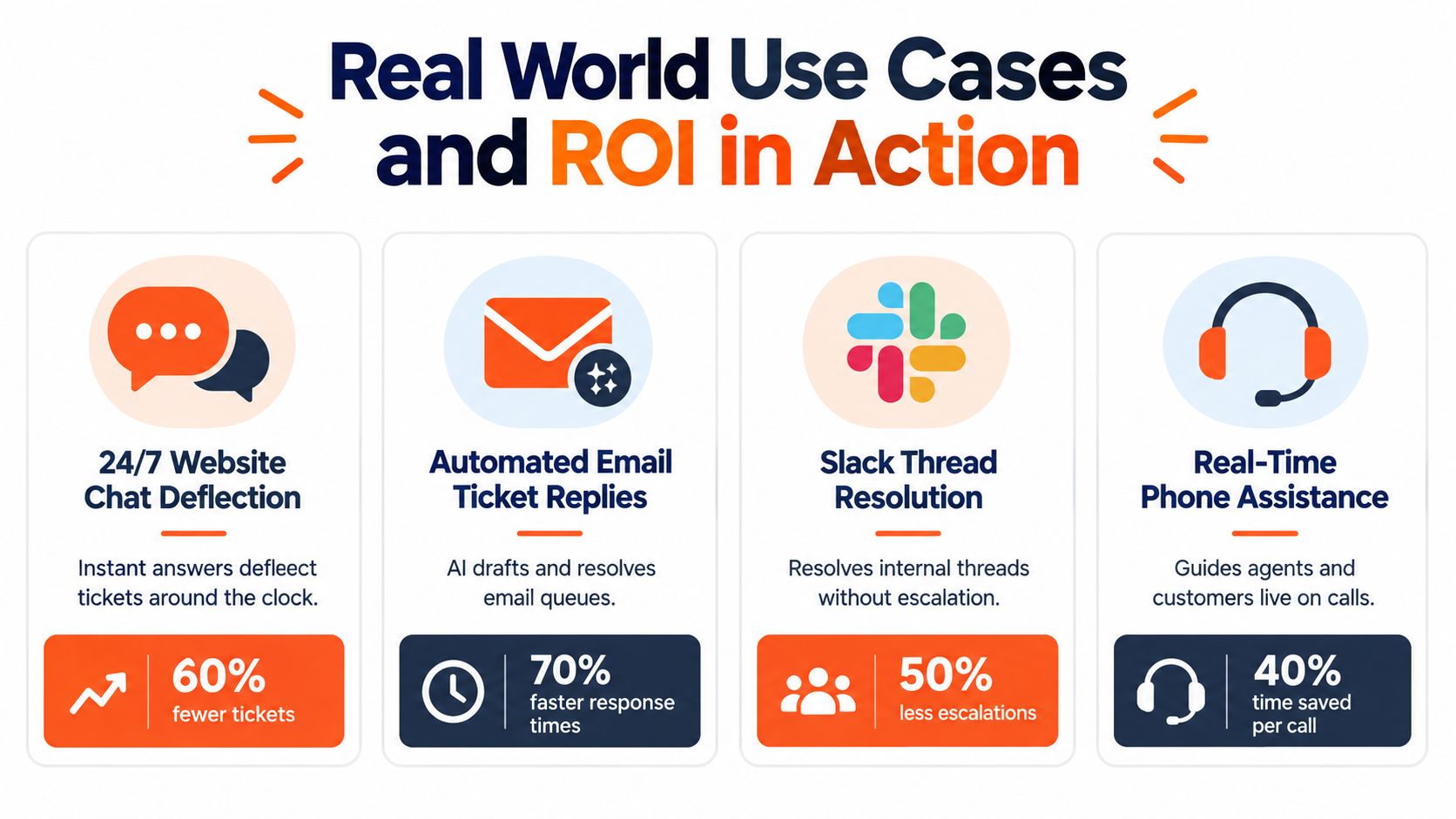
A platform earns its keep when it changes daily support operations, not when it wins a demo. The most practical use cases usually start with repetitive, high-volume interactions and then expand into more complex workflows once the team trusts the system.
Four support use cases that matter
- Website chat deflection: The agent answers policy, setup, shipping, or account questions at any hour. This reduces backlog pressure by resolving routine requests before they become tickets.
- Automated email replies: The platform drafts or sends grounded responses to repeat questions, especially when a queue contains many versions of the same issue.
- Slack thread resolution: Internal teams use the same knowledge and action layer to answer operational questions without pulling senior people into every thread.
- Real-time phone assistance: A phone agent or live assist flow can surface guidance during a call, which is useful when customers need help navigating an account or completing a support step.
These use cases look different on the surface, but they rely on the same foundation. Unified ingestion reduces knowledge fragmentation. Retrieval provides context. Orchestration picks the right path. Escalation catches exceptions.
Where ROI actually comes from
Teams often talk about “automation” as if it were one outcome. In reality, value usually comes from a few operational effects:
- Backlog reduction because routine questions stop waiting for a human
- Faster first response because the agent is always available
- Consistency improvement because answers come from the same approved source set
- Supervisor insight because analytics reveal what customers keep asking and where the knowledge base is thin
A similar logic shows up outside support. For example, this case study on an AI recruitment data pipeline is useful because it highlights the same operational pattern: ingestion quality and real-time data flow matter as much as the model itself.
What to measure after launch
You don't need a huge metrics framework on day one, but you do need the right layers.
The DevOps.com guide to AI agent performance testing recommends measuring time-to-first-token, time-per-output-token, and end-to-end latency because each reveals a different bottleneck. The same guidance says TTFT under 500 ms helps preserve conversational flow, while teams should also track tool-call latency, chain overhead, and coordination delay.
That distinction matters in support. A customer may tolerate a slightly longer answer if it solves the problem, but they usually notice a sluggish start or an awkward pause between tool calls.
Watch latency by layer, not just by conversation. A slow answer might come from retrieval, tool orchestration, or the model itself.
A good platform makes these measurements visible enough that support leaders can discuss them with engineers using the same language.
Implementation Scaling and Migration Best Practices
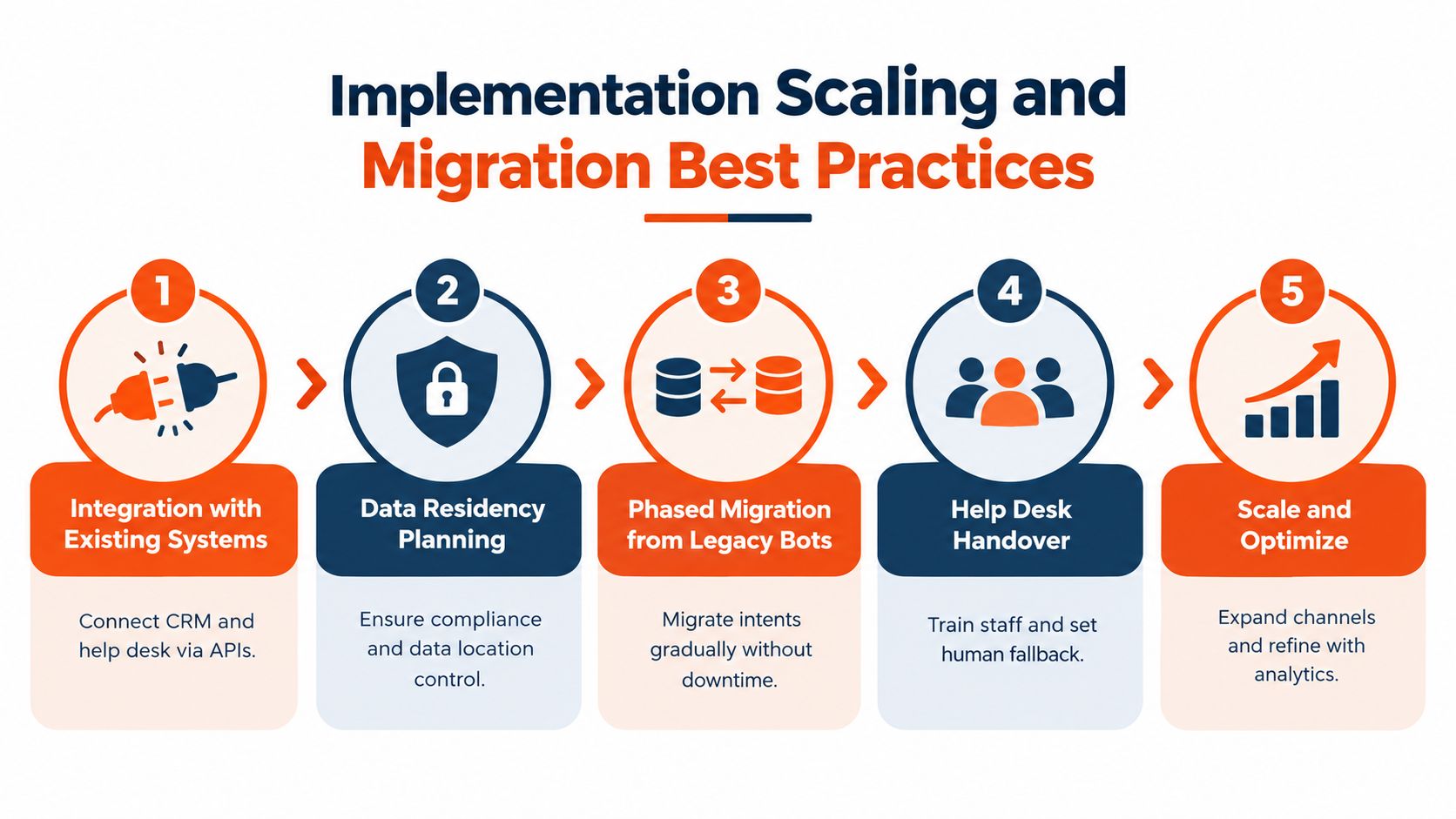
The safer path is controlled rollout, narrow scope, and disciplined review rather than replacing everything at once.
That matters even more because operationalizing agents is often harder than choosing a framework. In one industry summary, 46% of organizations cited integration with existing systems as their primary deployment challenge, 38% struggled with legacy-system integration complexity, and only 11% had moved agents into production according to the Tray.ai enterprise AI agents report.
Roll out in controlled layers
Start with one channel and one bounded problem set. For many teams, that means website chat for known FAQ categories or after-hours intake rather than full account actions on day one.
Then add complexity gradually:
- Phase one: Answer-only use cases with approved sources
- Phase two: Human handoff with shared context
- Phase three: Limited actions such as lead capture, routing, or booking
- Phase four: Broader omnichannel coverage once review workflows are stable
This sequence reduces support debt. The team learns where retrieval breaks, where customers phrase things unexpectedly, and where escalation rules need adjustment before the agent touches more sensitive workflows.
Design the human fallback before launch
Teams often treat escalation as a backup feature. It's really part of the primary design.
Decide in advance:
- Ownership: Who reviews failed conversations?
- Thresholds: What confidence or topic triggers human review?
- Transfer package: What context should the human receive?
- Recovery loop: How does the team convert failures into better content or better rules?
The handoff should feel like a baton pass, not a restart. If the human has to reread the entire thread and rediscover the issue, the agent has added work instead of reducing it.
Monitor traces, not just transcripts
A transcript shows what the customer saw. A trace shows how the system got there. That difference matters during rollout.
Support leaders should ask engineering for full execution visibility during the pilot, especially when actions, retrieval, and multiple tools are involved. For teams working through content plumbing and retrieval setup, this guide to a document ingestion pipeline is a useful technical reference because ingestion quality shapes almost every downstream result.
Keep the review loop short. Launch, inspect failures, refine sources, adjust escalation, and repeat. Teams that skip this rhythm usually blame the model for problems caused by workflow design.
Key Takeaways for Building With Confidence
A strong AI agent program doesn't start with “Which model should we pick?” It starts with “What operating system for support do we need?”
The useful frame is simple. Your platform should turn scattered knowledge into grounded answers, route work intelligently, hand off to humans cleanly, and make its behavior visible enough to govern. Speed matters, but governance, retrieval quality, and observability are what make an agent usable in real support environments.
A practical next-step checklist looks like this:
- Audit your sources: List the docs, files, help articles, and internal pages customers depend on
- Define escalation rules: Decide what the agent can answer, what it can do, and when a human must step in
- Pilot one channel: Start where volume is repetitive and risk is manageable
- Measure operations: Watch resolution patterns and latency, not just total conversation count
- Expand carefully: Add actions and new channels only after the review loop is working
If your queue feels overloaded today, that doesn't mean you need a magical bot. It usually means you need a better support system.
AgentStack offers one way to put this framework into practice with website and document ingestion, multi-model orchestration, omnichannel delivery across chat, email, Slack, and voice, plus auditability and handoff workflows in one system. If you want to see how that kind of operational approach looks in a real product, visit AgentStack.