A customer asks a simple order-status question late at night. The support widget returns a generic article, the customer replies with more context, and the message sits in a queue until morning. By the time a human answers, the customer has repeated the question twice and may already be looking for another supplier.
Most support queues break for operational reasons, not because agents aren't working hard. Knowledge is fragmented across help articles, PDFs, product pages, and internal wikis. Routing sends routine questions to specialists while complex cases wait in general queues. Managers track response time but can't see whether the customer got a durable resolution.
The ten customer support strategies below follow a rollout order. Each one addresses a specific failure, creates a trade-off, and starts with a measurable change. Build the knowledge and routing foundation first, then add automation, handoff controls, measurement, proactive support, action-taking workflows, and developer integrations. If you're deciding between buying and building the automation layer, compare the operational implications in this guide to buy vs build automation, not just the initial implementation effort.
Table of Contents
- 1. 24/7 AI Self-Service Agents
- 2. Retrieval-Grounded Answers With a RAG Knowledge Base
- 3. Omnichannel Support Orchestration
- 4. Multi-Model Tiered Routing
- 5. Human Handoff and Escalation Workflows
- 6. Closed-Loop Knowledge Gap Analysis
- 7. Support Quality Analytics and Sentiment Monitoring
- 8. Proactive and Contextual Support
- 9. Action-Enabled Support With Integrated Workflows
- 10. API-First and Developer-Led Support Integration
- 10-Point Customer Support Strategy Comparison
- From Ten Strategies to a 90-Day Support Roadmap
1. 24/7 AI Self-Service Agents
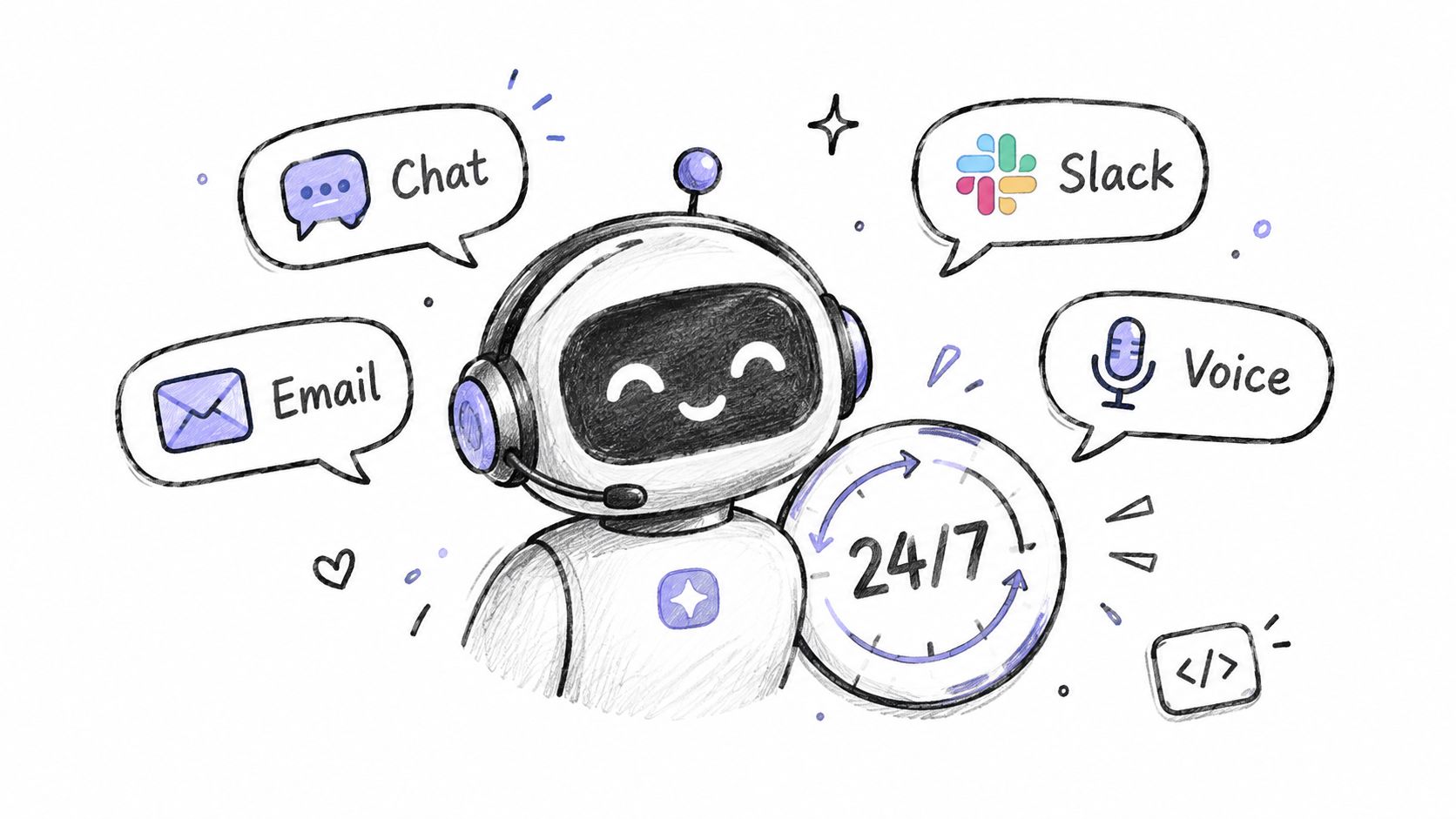
A 24/7 AI agent gives customers an immediate first response when your team isn't staffed. It can handle defined requests such as order status, password resets, billing explanations, pricing questions, and policy lookups, then transfer cases that need judgment or account authority.
The trade-off is coverage versus control. A poorly bounded agent can answer every question quickly while increasing recontacts, correcting inaccurate answers, or hiding the human path. Customers also need to know when they're speaking with automation. Survey evidence found that 69% of respondents believed brands should always disclose AI use, while only 22% said companies always did so (Liveops reports on the AI trust gap).
Start with a narrow intent set
Don't launch with your entire help center. Select 10 to 20 high-volume intents, confirm that the source content is authoritative, and define the exact point at which the agent must stop. Show a visible human option in the first message, not after several failed attempts.
Track the first operational change weekly:
- Resolution rate: Did the customer complete the task without another contact?
- Escalation rate: How often did the agent transfer the conversation?
- Recontact rate: Did the customer return because the answer wasn't enough?
- Answer quality: Did sampled responses follow policy and cite the right source?
Freshworks reports that real-time conversations averaged 41 minutes without AI assistance versus 2 minutes with AI copilots, while service tickets averaged 36 hours without AI versus 32 minutes among organizations using AI extensively (Freshworks CX benchmark). Treat those figures as benchmark observations, not a promise. Pilot one intent group, sample the answers, and expand only when resolution holds.
2. Retrieval-Grounded Answers With a RAG Knowledge Base
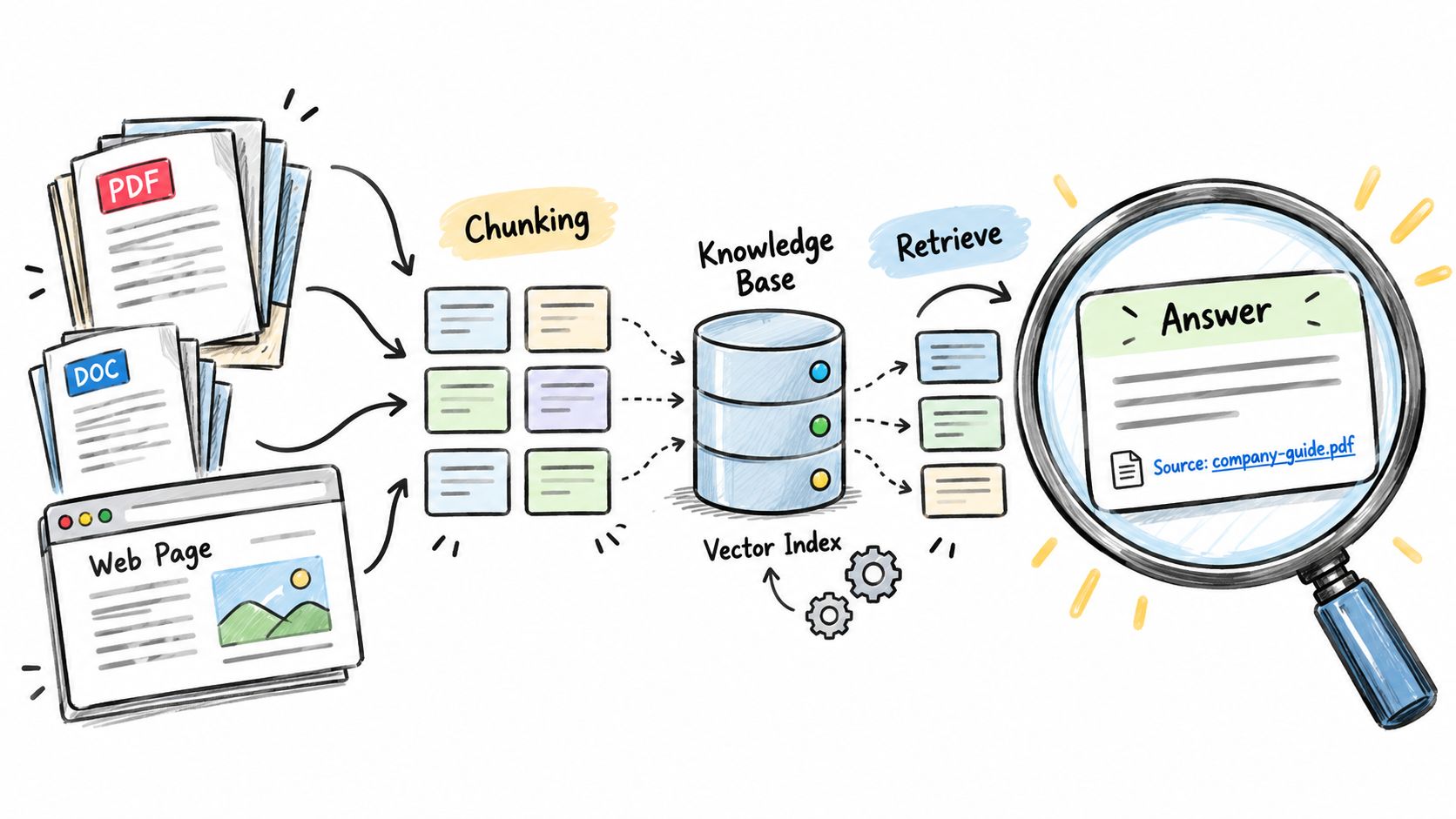
A customer asks whether a refund applies to an older purchase. The agent should retrieve the current policy, identify the relevant eligibility rule, and show the supporting passage before answering. Retrieval-augmented generation, or RAG, searches approved content at question time, supplies relevant passages to the language model, and produces a response grounded in those passages. This gives support teams more control than relying on general model knowledge.
The trade-off is maintenance versus launch speed. Indexing every document can produce a quick prototype, but duplicate pages, expired policies, and conflicting PDFs create unreliable retrieval. Assign owners before indexing product documentation, billing policies, refund rules, and release notes.
Make the source reliable before tuning the model
Retire outdated pages and use clear titles and headings so the system can identify the right passage. Add explicit question-and-answer entries for refunds, cancellation conditions, eligibility, and legal restrictions, where wording affects the customer's next action. Test retrieval with real support questions before judging the generated response.
Use this review sequence:
- Collect real questions: Pull examples from tickets, chat searches, and agent escalations.
- Classify each failure: Mark it as missing, unclear, conflicting, or poorly retrieved content.
- Verify citations: Check that the returned passage supports the answer.
- Assign ownership: Name a reviewer for each content area and define a review trigger.
The retrieval-augmented generation best practices provide implementation guidance. Measure the first change through the unsupported-answer rate on a fixed set of customer questions. Keep that evaluation set stable while correcting content and retrieval settings, so improvements reflect better answers rather than easier tests.
3. Omnichannel Support Orchestration
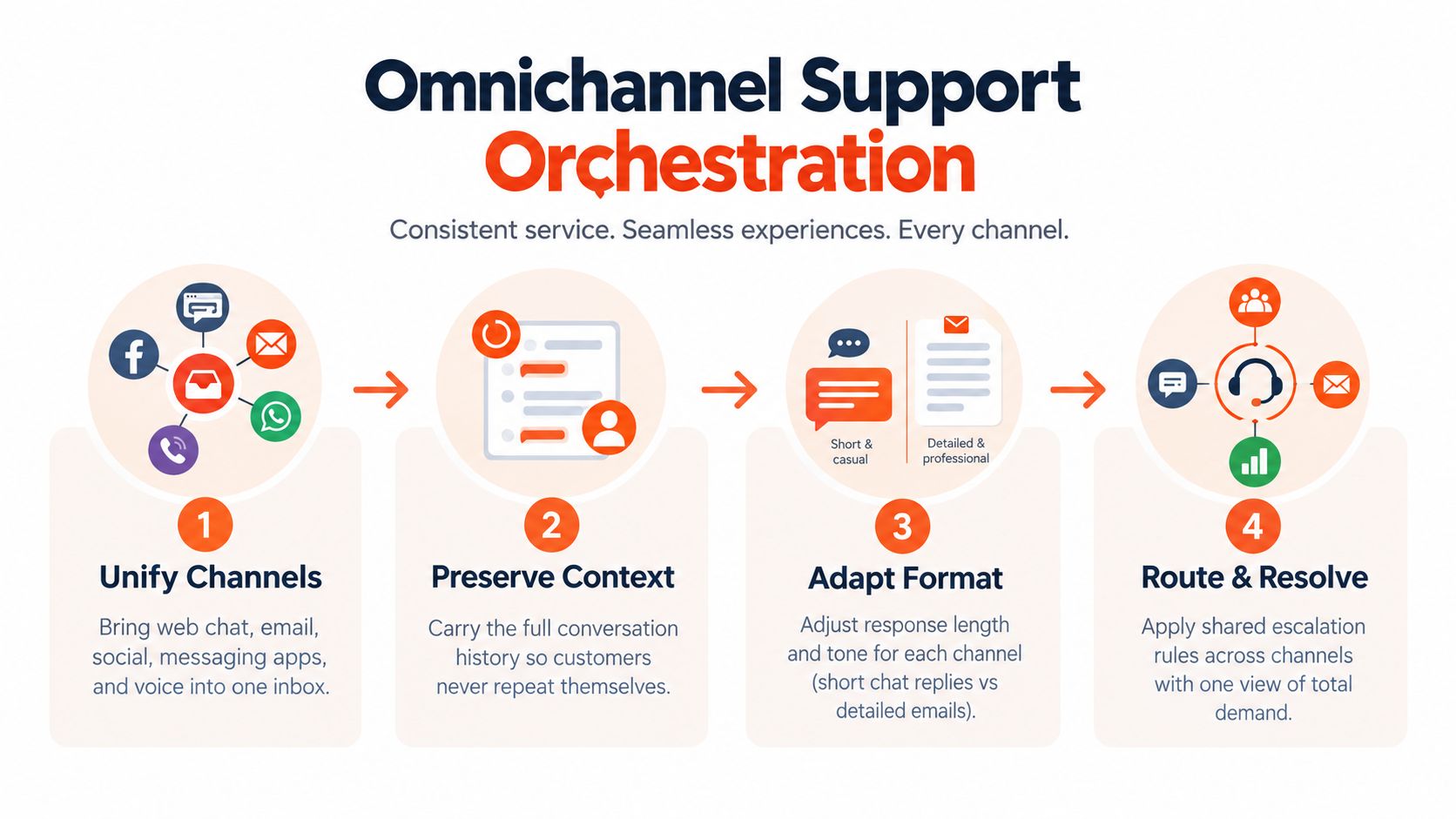
A customer may start with chat on a pricing page, send account details by email, then call when the issue becomes urgent. Orchestration connects identity, conversation history, routing rules, and approved product information across web chat, email, messaging, social, voice, and in-product support.
The operating trade-off is consistent policy versus channel-appropriate communication. Reusing one script everywhere produces poor interactions. Email can carry full context, chat should show concise progress, and voice requires a human-paced exchange. Keep policy and product facts in one source, then adapt wording and length to each channel.
Map the journeys that cross channels
Choose the five most common journeys that move between channels. Record the entry point, authentication step, information collected, transfer trigger, and next owner for each. If a customer has already supplied an order number in chat, the email queue should receive it with the case rather than request it again.
Track the first operational change at journey level:
- Repeat-contact rate: How often does the same issue reopen?
- Transfer count: How many queue changes occur before resolution?
- Resolution by channel: Where do cases stall most often?
- Context preservation: Did the next agent receive the transcript and prior actions?
Product facts need the same control. When product data lives separately, agents can give different answers about price or availability. A PIM-based approach to product information can help boost customer loyalty with PIM only when the support workflow uses that shared data across chat, email, and voice.
Test the handoff by assigning an agent a transferred case and forbidding repeated discovery questions. If the agent cannot resolve it from the transcript, customer record, and prior actions, fix the handoff before adding more channels. Use channel-specific writing rules, a shared knowledge base, and one customer history. The omnichannel support software guide offers criteria for evaluating that operating layer.
4. Multi-Model Tiered Routing
Route requests by the work they require, not by a single default model. A fast model can classify intent, summarize a conversation, or answer a clear shipping question. A stronger reasoning model fits ambiguous cases, conflicting policy conditions, several account dependencies, or complex troubleshooting.
The operating trade-off is response quality against latency and cost. Sending every case to the strongest model slows routine work and increases spend. Sending too many cases to a smaller model produces weak answers and avoidable escalations.
Start with a routing matrix, then test it against real cases. Define five signals:
- Intent: FAQ, account action, or unclear problem.
- Risk: Potential financial, legal, privacy, or access consequences.
- Context load: Number of documents, account fields, and prior actions required.
- Customer value: Need for a specialist or priority workflow.
- Confidence: Whether the available evidence supports a reliable answer.
A clear shipping FAQ might stay with a fast model. A billing dispute with several account changes should move to a stronger tier, even if the initial question looks simple. This rule protects cost control without treating every message as equally difficult.
Run the same evaluation set through each tier. Compare answer accuracy, appropriate escalation, response latency, and cost per resolved conversation. The first metric to change should be cost per resolved conversation by intent, paired with resolution quality. Cost per message alone can reward an inexpensive answer that causes another contact.
Review the matrix after each model change. A rule that worked for one version can route too many cases incorrectly after an update. Track routing errors by intent so the next adjustment targets a specific failure rather than increasing capacity everywhere.
5. Human Handoff and Escalation Workflows
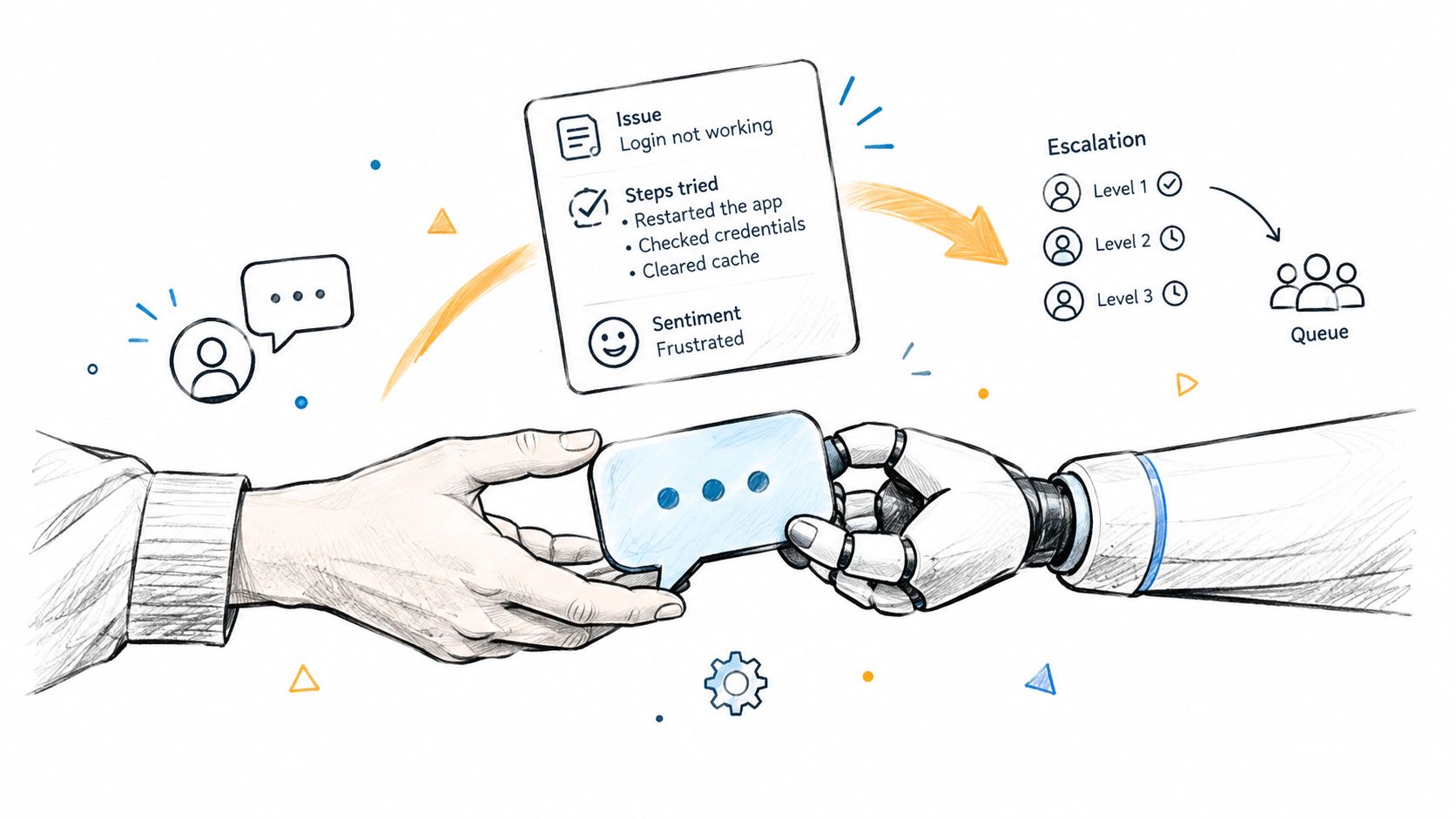
A customer should reach a person before automation turns a difficult case into a damaged relationship. Trigger handoff when the customer requests human help, evidence is weak, authentication is required, an action fails, emotions run high, or the request carries financial, legal, privacy, access, or policy risk.
The operating trade-off is containment versus ownership. Delaying escalation may raise automated resolution on a dashboard while forcing the customer to repeat the problem. Set the first measurable change as the share of escalated conversations transferred with complete context, then monitor resolution time and repeat contacts for those cases.
Transfer the work, not just the message
A visible human option belongs in every channel. The receiving agent needs a concise summary of the customer's goal, the full transcript, retrieved pages and policy references, relevant account context, tools called, returned results, failed actions, urgency, sentiment signals, and any deadline the customer stated. This lets the agent continue the investigation instead of restarting it.
Set response-time targets by queue and case risk, then alert when an escalated case breaches its target. Research covering 107 million customer-service interactions from 4,466 accounts in 15 industries found that each additional 12-hour delay for email and web-form requests was associated with a 9.6% decline in CSAT (Freshworks customer response analysis). The same analysis reported average CSAT of 86.7 for responses within four hours and 78.5 after four hours. Use four hours as an operating threshold for non-real-time digital requests, while setting different targets for urgent or complex cases.
Review escalation reasons each month. A cluster caused by one missing permission, broken tool, or unclear article points to a system fix. Assign that fix to the responsible owner, and track whether the related transfer rate falls.
6. Closed-Loop Knowledge Gap Analysis
Unanswered questions should become assigned work, not recurring tickets. Start with failed searches, abandoned conversations, repeated reformulations, and agent corrections. Compare those signals by topic, then decide whether the fix belongs in content, routing, the product, or the automation policy.
The trade-off is queue capacity today versus fewer repeated contacts later. Updating a source takes an agent or knowledge manager away from active cases, but one accurate answer can serve customers and agents repeatedly. Measure the first change at the topic level: unresolved conversations for that intent should fall after the fix reaches the system.
Turn recurring gaps into owned work
Hold a weekly review with support operations, knowledge management, and a product representative. Assign one owner and classify each gap:
- Missing information: Create an article or Q&A pair.
- Unclear information: Rewrite the page in customer language.
- Conflicting information: Retire duplicates and name the authoritative source.
- Product friction: Send the issue to product or engineering with conversation evidence.
- Unsafe automation: Add an escalation rule or remove the intent from automation.
A Q&A pair can contain demand while a fuller article is prepared. After publishing, test retrieval for the affected topic and sample responses for accuracy. Keep the work item open until customers and agents stop encountering the same gap. Publishing content is an activity; fewer repeated failures are the outcome.
Review the root cause before blaming agent performance. A cluster of billing questions may come from confusing invoice language, while repeated access questions may reflect a missing permission or unclear setup step. Route each pattern to the team that can remove it, then track unresolved conversations and repeat contacts for that specific topic. Do not use article count as the success measure.
7. Support Quality Analytics and Sentiment Monitoring
A queue can improve its response time while customers still repeat themselves. Separate speed, resolution, quality, sentiment, escalation, and topic volume so an apparent gain in one measure does not hide deterioration elsewhere.
The operating trade-off is dashboard simplicity versus useful detail. A short dashboard is easier to run, but a single deflection figure can reward conversations that end without solving the customer's issue. Pair automated-resolution data with post-interaction CSAT, recontact, sampled quality reviews, and escalation outcomes.
Start with a resolution baseline
First-contact resolution shows whether the customer received an answer without another interaction. A cited 2025 benchmark places average FCR at approximately 70%, with top-performing organizations reaching 85% (Lorikeet customer service metrics). Treat those figures as directional because definitions and sampling vary. Track FCR by intent, channel, customer segment, and escalation reason, otherwise complex cases disappear inside a blended average.
The first measurable change is a dependable baseline. Record the same definitions before changing automation, routing, or agent guidance, then compare results by topic rather than relying only on the overall rate.
Each week, manually review a conversation sample. Check whether sentiment labels and automated quality scores match the interaction, and flag topics where sentiment falls while volume rises. Use customer sentiment analysis to prioritize review, not to replace human judgment.
Keep the dashboard focused on decisions:
- Median first-response time
- Verified resolution rate
- First-contact resolution
- Escalation and recontact rate
- CSAT after automated and human interactions
- Unsupported-answer rate
- Top unanswered questions
Assign an owner to every metric and record the action triggered by a material change. That turns analytics from reporting into queue management.
8. Proactive and Contextual Support
A user who stalls during setup, repeats an integration error, or pauses at checkout may need help before opening a ticket. A prompt can surface the relevant article, guide, or contact option while the triggering page and action remain visible to the support system.
The trade-off is prevention versus interruption. A timely explanation can keep a task moving, while a generic pop-up can disrupt successful work. Start with one high-intent moment and test its effect before adding prompts elsewhere.
Start with the customer's stalled task
For example, trigger a dismissible message after repeated errors on one onboarding step. Reference that step directly, offer a targeted Q&A flow or article, and include human contact when the issue needs investigation. Keep the customer in control.
Measure three outcomes together: completion of the assisted task, dismissal of the prompt, and contact with support afterward. A lower ticket count alone can hide abandonment.
Use this review sequence:
- Define the trigger: Specify the event that starts the message.
- Match the context: Refer to the page, setup step, or action currently visible.
- Offer control: Make dismissal immediate and avoid trapping the customer in the prompt.
- Check side effects: Review confusion, repeated errors, and additional contacts.
- Expand cautiously: Add another trigger only after the first produces a clear result.
For e-commerce, a shipping or returns prompt can answer questions before checkout abandonment. For SaaS, contextual onboarding guidance can explain an integration step on the screen where it occurs. The first measurable change is assisted-task completion, reviewed alongside downstream contact rate. That pairing distinguishes useful intervention from a message that merely suppresses ticket creation.
9. Action-Enabled Support With Integrated Workflows
A customer asking about an order may need a lookup, a status check, and a case update in one conversation. Action-enabled support connects the agent to approved tools for account lookup, order status, ticket creation, meeting booking, rescheduling, and policy-bounded refunds.
The trade-off is faster resolution versus the cost of an incorrect change. Read-only actions limit exposure. Write actions affect customer records, money, or schedules, so each one needs clear permissions, confirmation, logging, and human approval when the consequence warrants it.
Sequence tools by operational risk
Begin with actions that expose information without changing customer state. Test each action against both a successful response and an API failure before adding a higher-risk tool.
- Account lookup: Confirm identity and retrieve only the context needed for the request.
- Order status: Return fulfillment information from the source system, with its current state clearly identified.
- Ticket creation: Open a structured case when automation cannot complete the request, and pass along the conversation context.
- Meeting booking: Show approved availability and confirm the selected time before creating the appointment.
- Refund or cancellation: Apply policy checks, obtain customer confirmation, and route sensitive cases for approval.
Record the action's inputs, output, timestamp, actor, and related conversation. Scope credentials to the minimum permissions required. If a tool returns an error, the agent should state that the action was not completed, preserve ownership, and transfer the case instead of claiming success.
Platforms such as Zendesk and Intercom commonly connect support conversations with account and commerce systems. The implementation still needs failure testing, permission reviews, and audit checks. Track verified resolution for action-enabled intents as the first measurable change. Sample completed actions against the customer's request to confirm that the system did what the conversation authorized.
Full autonomy is not the target for every workflow. Human approval remains appropriate when a wrong refund, cancellation, or schedule change would cost more than removing one review step.
10. API-First and Developer-Led Support Integration
The final stage treats support as a programmable service rather than a standalone chat widget. Engineering teams can connect agents to product data, ticketing systems, status pages, CI workflows, internal tools, and customer-facing applications through APIs and tool-integration protocols.
The trade-off is flexibility versus governance. A developer-led integration can place support in the product experience customers already use. It can also create undocumented dependencies, broad credentials, inconsistent configurations, and analytics gaps if every integration logs differently.
Put support changes through engineering controls
Create separate API keys for development, staging, and production, with scoped permissions for each environment. Store prompts, routing rules, retrieval configuration, and tool schemas in version control. Promote changes through testing rather than editing production behavior directly.
Make internal actions discoverable and predictable. An order lookup should have documented inputs, structured outputs, authentication requirements, failure states, and audit fields. API-triggered conversations should enter the same analytics system as widget conversations so leaders can compare outcomes across entry points.
A protocol such as NotFair tools for MCP illustrates the broader need to define how AI applications access external tools. The protocol itself isn't the operating model. Your team still needs ownership for permissions, tool reliability, data retention, rollback, and quality review.
The first measurable change is integration coverage for a defined workflow. For example, confirm that an in-product assistant can retrieve the same account context, apply the same escalation rule, and produce the same resolution record as the website widget. Consistency matters more than the number of connected tools.
10-Point Customer Support Strategy Comparison
| Solution | Implementation Complexity 🔄 | Resource Requirements ⚡ | Expected Outcomes 📊 | Ideal Use Cases 💡 | Key Advantages ⭐ |
|---|---|---|---|---|---|
| 24/7 AI Self-Service Agents | Moderate, embed widget, ingest content, escalation flows | Moderate ongoing maintenance and monitoring | Instant first-line responses; high deflection for routine queries | High-volume routine questions; global/out-of-hours coverage | Consistent 24/7 answers; reduces backlog; frees agents ⚡ |
| Retrieval-Grounded Answers (RAG KB) | High, crawling, chunking, indexing, re‑indexing | Moderate–High: vector storage, compute, content cleanup | Source-grounded answers with citations; lower hallucination risk | Documentation-driven support, compliance, technical docs | Cites sources; updates via content changes; reduces hallucinations ⭐ |
| Omnichannel Support Orchestration | High, integrations across many channels and unified history | High: engineering, integrations, governance | Consistent cross-channel experience and single view of demand | Businesses with multi-channel customers and handoffs | Seamless channel transitions; prevents answer drift 📊 |
| Multi-Model Tiered Routing | High, classifier, routing logic, fallback monitoring | Moderate: access to multiple models, cost tracking | Optimized cost-quality balance; faster responses for simple queries | Mixed-complexity traffic where cost and latency matter | Controls cost while preserving quality on hard cases ⭐ ⚡ |
| Human Handoff & Escalation Workflows | Moderate, configurable triggers, shared inbox, context transfer | Moderate: staffing for escalations and integration work | Fewer bot loops; faster human resolution with context | Sensitive, high-value, or policy-bound issues | Preserves context; shortens handle time; avoids repetition 📊 |
| Closed-Loop Knowledge Gap Analysis | Moderate, analytics, clustering, content workflows | Low–Moderate: analytics and content owners | Continuous improvement of resolution rates over time | Teams aiming to iteratively improve docs and bots | Targets real gaps; prioritizes content work for impact 💡 |
| Support Quality Analytics & Sentiment Monitoring | Moderate, tagging, dashboards, exportable reports | Moderate: analytics tooling, manual sampling | Visibility into resolution quality, sentiment trends, alerts | Measuring AI automations, staffing and product signals | Data-driven decisions; early warning on product issues ⭐ |
| Proactive & Contextual Support | Moderate, event instrumentation, page-context triggers | Moderate: event data, segmentation, trigger rules | Fewer inbound tickets; improved onboarding and conversions | Checkout, pricing pages, onboarding flows | Prevents issues in-context; improves conversion if well-timed ⚡ |
| Action-Enabled Support (Integrated Workflows) | High, secure API actions, guardrails, audit logs | High: integrations, security, monitoring, approval flows | Higher true-resolution rates; fewer follow-ups | Use cases needing automated transactions or updates | Completes tasks (refunds, reschedules); reduces back‑and‑forth ⭐ |
| API-First & Developer-Led Integration | High, REST APIs, webhooks, MCP, versioned config | High: engineering ownership, CI/CD, testing | Programmable, testable support layer that integrates systems | Developer-focused products, custom integrations, internal tools | Flexible, extensible, and reproducible support infrastructure 💡 |
From Ten Strategies to a 90-Day Support Roadmap
A support operation shouldn't implement all ten strategies at once. The sequence matters because every later layer depends on the earlier one. Automation built on contradictory documentation produces faster inconsistency. Measurement added after launch can't reconstruct a baseline. Handoff designed without shared context moves the customer's repetition from one queue to another.
Start by confirming the knowledge and routing foundation. Audit the pages, PDFs, wikis, and Q&A pairs that agents and customers currently use. Retire duplicates, identify policy owners, and create an evaluation set from real customer questions. At the same time, map the major intents and decide which require a specialist, a human approval, an account action, or no automation.
During the first phase, define the measurements before changing the workflow. Track median first-response time, resolution outcome, escalation rate, recontact, CSAT, and unanswered questions by intent and channel. Support leaders need to know whether faster replies produce complete resolutions. Customer expectations make that distinction important. One survey found that 92% of 7,078 respondents agreed businesses should respond quickly, while 54% preferred a quick, concise interaction over a slower, more empathetic response (CM.com customer service speed research). Speed matters, but it can't replace ownership and accuracy.
Then switch on one automation for a narrow group of high-volume, low-risk intents. Identify the agent as AI, show the human option immediately, and review conversations weekly. Add retrieval grounding before expanding the intent set. If the content isn't reliable, fix it instead of tuning the model around bad sources.
After the pilot has a stable baseline, add escalation and analytics. Preserve the transcript, retrieved evidence, attempted actions, and customer details during every handoff. Review whether escalations are appropriate and whether humans receive enough context to take ownership quickly. Measure first-contact resolution separately by topic. This prevents deflection from becoming the only success signal.
The final phase introduces proactive prompts, action-enabled workflows, and API integrations. Begin with contextual read-only actions, then add write actions with confirmation and approval controls. Put configuration in version control and make every entry point use the same knowledge, routing, and measurement rules.
A platform such as AgentStack can fit into this sequence when a team wants website and document ingestion, multi-model routing, omnichannel delivery, shared inbox handoff, analytics, API actions, and developer tooling in one support layer. Evaluate it against your own intents, permissions, source quality, and escalation requirements rather than treating platform selection as a substitute for operating design.
The habit that keeps the system healthy is straightforward: hold a weekly review of unanswered questions and escalation reasons with a named owner. Turn those findings into source updates, Q&A pairs, routing rules, product fixes, or explicit safeguards. AI support is a managed service operation, not a one-time chatbot installation. The team that keeps reviewing the failure cases will improve durable resolution, while the team that watches only response time may create faster ways to send customers back into the queue.
AgentStack helps teams build, train, and deploy AI customer-support agents across website chat, email, Slack, and voice, with retrieval-grounded knowledge, multi-model routing, analytics, actions, and human handoff. Use the AgentStack platform to test a focused support workflow, measure resolution and escalation, and expand only when the evidence supports it.