ChatGPT agent is an agentic version of ChatGPT that combines reasoning with action through a virtual computer, web browsing, and code execution. For support teams, that means it can potentially carry out a workflow, not just explain how a person might do it.
It's late, the support queue has ballooned, and password-reset requests are piling up while the knowledge base goes unread. The operations question isn't only how to write faster replies. It's whether a system can gather the right information, take a permitted action, and hand a case to a person when it reaches a boundary.
Understanding what ChatGPT agent is starts with separating answering from acting. A useful mental model is to picture an agent observing a work environment, choosing a tool or action, checking what happened, and continuing toward a result. The key parts are its tools and context, the tasks that suit delegation, and the controls that keep people responsible for consequential decisions.
Table of Contents
- Why Support Teams Are Asking About ChatGPT Agent
- From Chatbot to Agent, What Actually Changes
- How ChatGPT Agent Works Under the Hood
- Customer Support Use Cases That Actually Move the Needle
- Where Autonomy Stops, A Trust and Control Framework
- Single-Model Versus Multi-Model Orchestration
- Deployment Checklist for Production Support Agents
- The Short Version, What to Remember and Where This Goes Next
Why Support Teams Are Asking About ChatGPT Agent
A conventional chatbot responds to a question. An agent can work through a sequence: look up an order, check a policy, prepare a response, and, if authorized, update a record. That difference matters in support because many tickets involve several small steps across separate systems, not just a missing sentence in the knowledge base.
OpenAI introduced ChatGPT agent on July 17, 2025, describing it as a system that combines reasoning with actions through a computer interface. It can investigate public websites, work with uploaded files and connected third-party sources, and perform tasks such as filling online forms or editing spreadsheets. OpenAI says it keeps users in control of consequential actions, and the agent can be interrupted. OpenAI's introduction to ChatGPT agent describes its launch to Pro, Plus, and Team subscribers, with access beginning for Pro on launch day and rolling out to Plus and Team afterward.
For a support lead, the practical questions are more specific than “Can it use tools?” Ask what information it can access, what changes it can make, and when a human must approve or take over. Those answers determine whether it's a useful assistant or a risky new route into customer records.
Start with the workflow, not the label. List the steps a support specialist takes, then decide which steps are safe to delegate.
The goal is a clear mental model of how the system works, a grounded view of support tasks it could help with, and a decision framework for approvals and escalation. Treat it as a working blueprint, not a magic box: its usefulness depends on the access you grant and the boundaries you set.
From Chatbot to Agent, What Actually Changes
The familiar chatbot pattern is simple: a person asks a question, and the system generates an answer. The chatbot may search a knowledge base, but it generally returns information for a person to use. An agent adds a loop: it can observe an environment, choose an action, inspect the result, and decide what to do next.
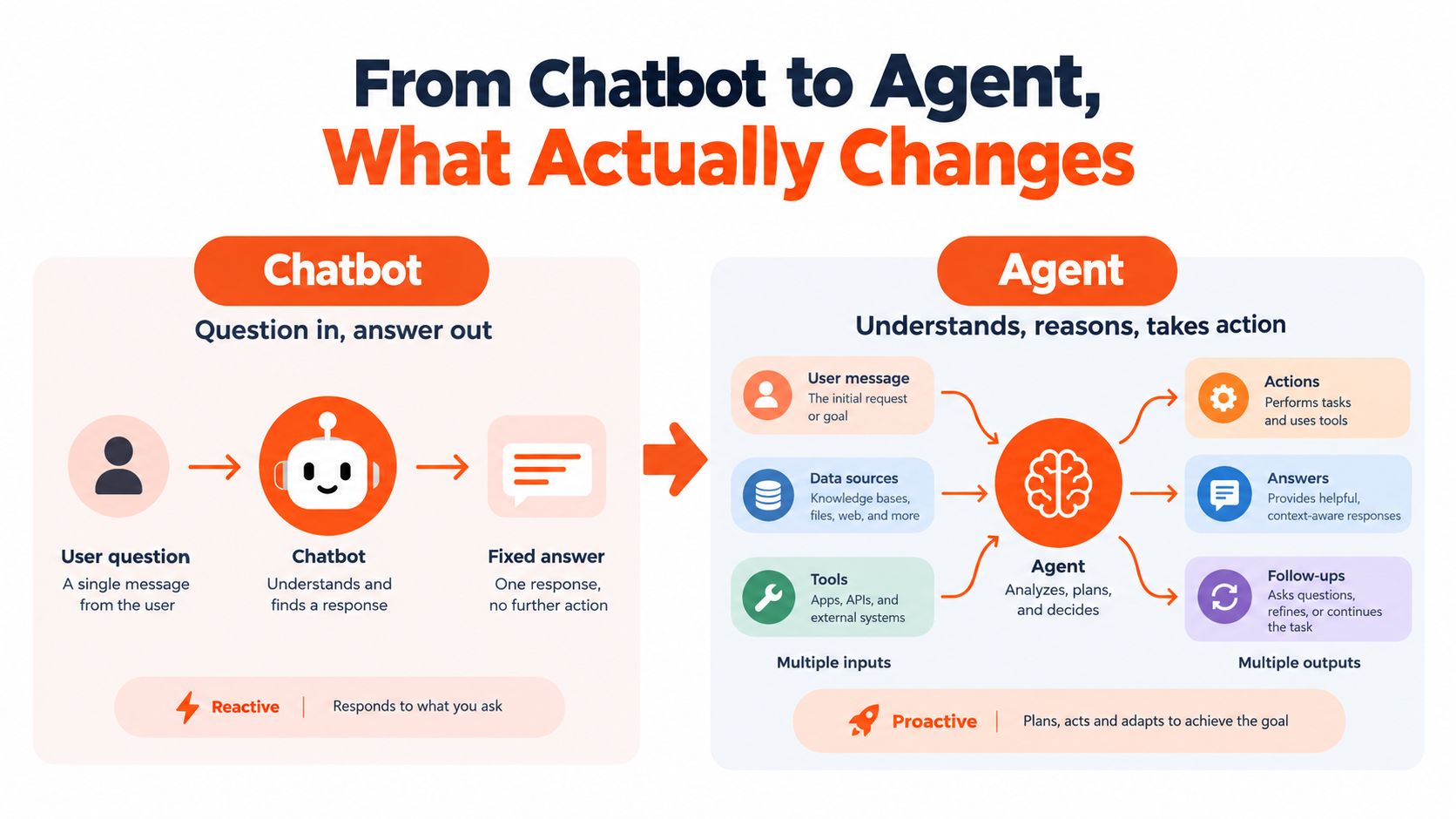
Think of a receptionist and a personal assistant. The receptionist passes along a request or tells you where to find a form. The assistant might gather the necessary details, fill out the form, check that it was accepted, and report back. In support, the first pattern produces a refund-policy explanation; the second could look up the order and prepare the refund request, subject to the rules and approvals your team sets.
The environment is the place the agent works, such as a webpage, connected file source, or terminal. An action is something it does there, like searching, clicking, or running a script. The action loop is the observe, act, and check sequence. The confirmation boundary is the point where the agent must pause for a person before a consequential step.
ChatGPT agent brings together capabilities associated with Deep Research and Operator. Deep Research contributes web research and synthesis; Operator, introduced as a research preview, was built to interpret webpages visually and interact by typing, clicking, and scrolling. ChatGPT agent combines these kinds of capabilities with code execution, so the system can research and act within one task rather than stopping at a written recommendation.
That doesn't mean an agent always acts independently or that every task should be handed over. The more a workflow changes customer accounts, commits money, or sends messages externally, the more important a clear confirmation boundary becomes. For a broader introduction to how agentic systems plan and use tools, see this guide to autonomous AI agents.
How ChatGPT Agent Works Under the Hood
The system is easier to evaluate when you break it into working parts. ChatGPT agent runs in a virtual computer, using a browser, terminal, and connected sources to complete tasks. Those components provide different ways to see information and act on it.
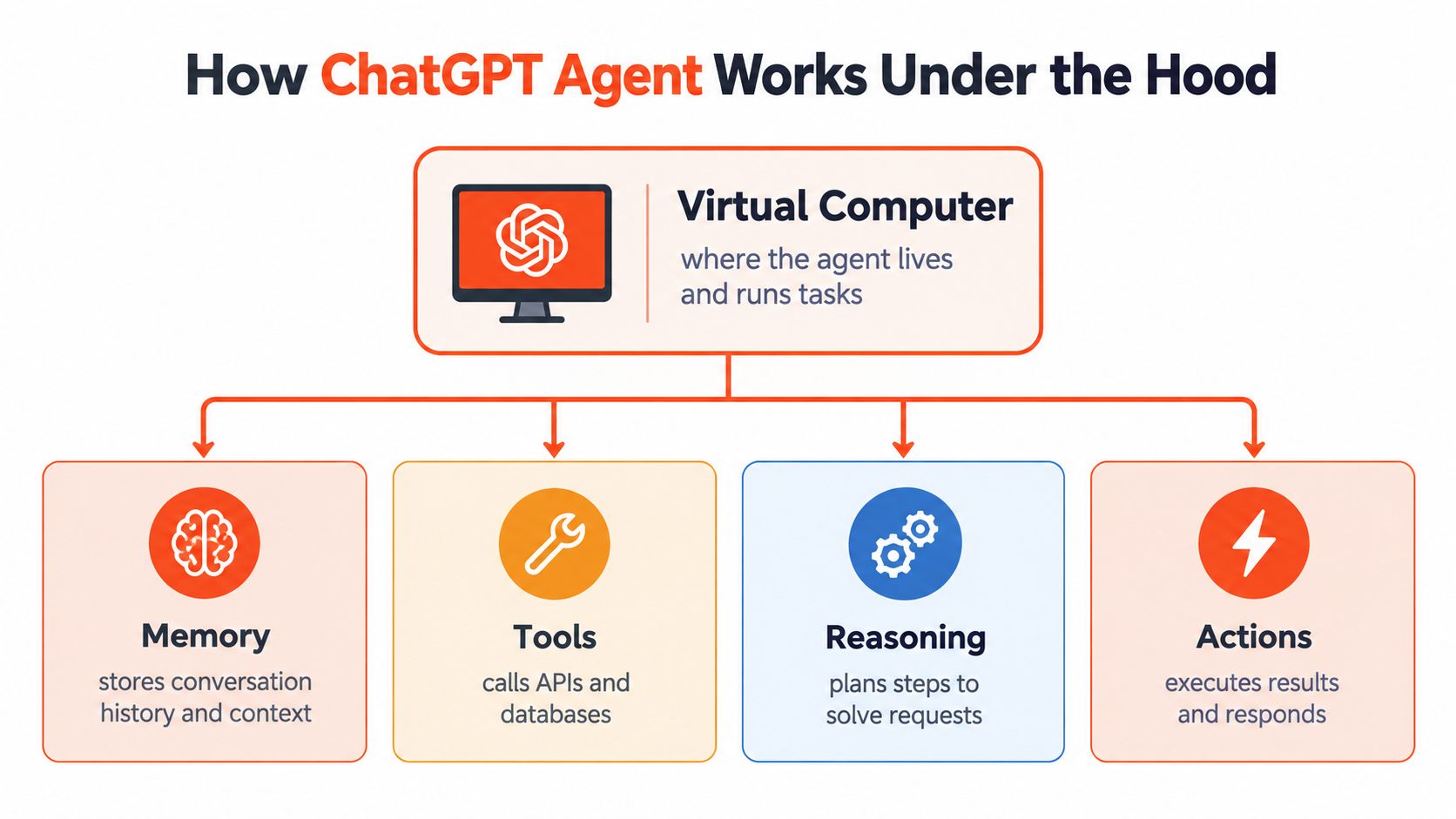
The virtual computer is the workspace where the task runs. A browser lets the agent inspect webpages visually and interact with them using mouse-and-keyboard actions. In a support workflow, that might mean checking a partner's public status page or navigating an approved portal. But screen interaction is less predictable than a direct, typed API call. A changed layout, login barrier, or ambiguous page state can interrupt the task or lead the agent down the wrong path.
The terminal adds a different capability: running scripts, working with files, and analyzing data. A support lead might use this to process an exported file of unanswered questions and prepare a report for review. It's not a guarantee that the report is correct; the team still needs to validate the source data, the script, and the output before using it to change customer-facing guidance.
Connected sources supply the context
Connectors can let the agent work with approved external sources, such as Google Drive, and it can also use uploaded files. For example, a support workflow could retrieve a policy document or relevant account material before drafting a reply. Access should be limited to what the task requires, and an agent should not be treated as authorized just because a source is connected.
In plain terms, the browser sees and interacts with pages, the terminal handles code and files, and connectors provide access to relevant information. The model reasons about the task and selects among those tools, but the reliability of the result depends on the access, instructions, and checks around them. Teams designing their own integrations can learn about the Model Context Protocol server role, which provides a structured way for tools and services to communicate with AI applications.
Customer Support Use Cases That Actually Move the Needle
The best starting workflows are narrow, repeatable, and easy to review. Here are support scenarios that map the agent's capabilities to real work, while keeping the failure mode visible.
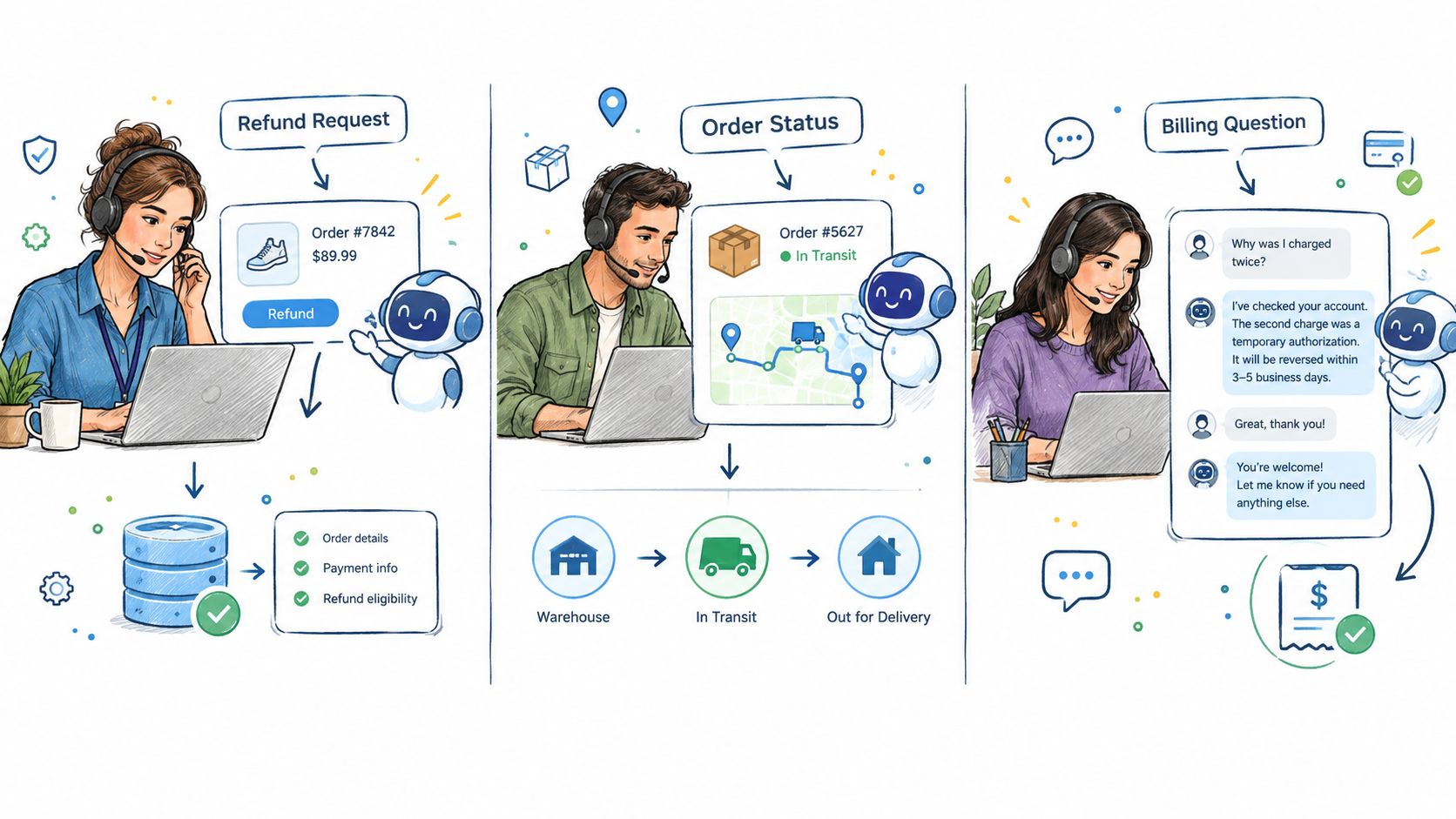
Refund and order-status requests. A customer asks where an order is and whether it qualifies for a refund. With approved access to the relevant account source, the agent could retrieve the order details, compare them with the policy, and draft a response. The likely work involves retrieval and synthesis, perhaps an API action if a supported integration allows it. The obvious risk is stale or mismatched data, so a person should review any reply or transaction that could affect the customer's account.
Knowledge-base gaps. The agent could review unanswered tickets or a prepared export, group recurring questions, and flag topics that lack a useful article. Here, synthesis and file analysis do the work. A common failure is mistaking unusual cases for a recurring gap, or proposing an article that contradicts current policy. A knowledge manager should verify patterns and approve new guidance before publication.
Tier-one triage and escalation. An agent could classify a request, consult approved material, attempt a low-risk resolution, and pass the conversation to a human when the request needs judgment or the available information is unclear. The handoff should include the customer's issue, the checks already completed, and the reason for escalation. Otherwise, the customer may have to repeat the story, and the human agent may not know what the system already tried.
A good handoff doesn't just say “needs a human.” It gives the next person the context to act.
These examples depend on the systems and permissions a team connects. If you're comparing how automated intake can support a specialized service environment, this overview of an AI receptionist for clinics offers another practical lens on routing and human involvement.
Where Autonomy Stops, A Trust and Control Framework
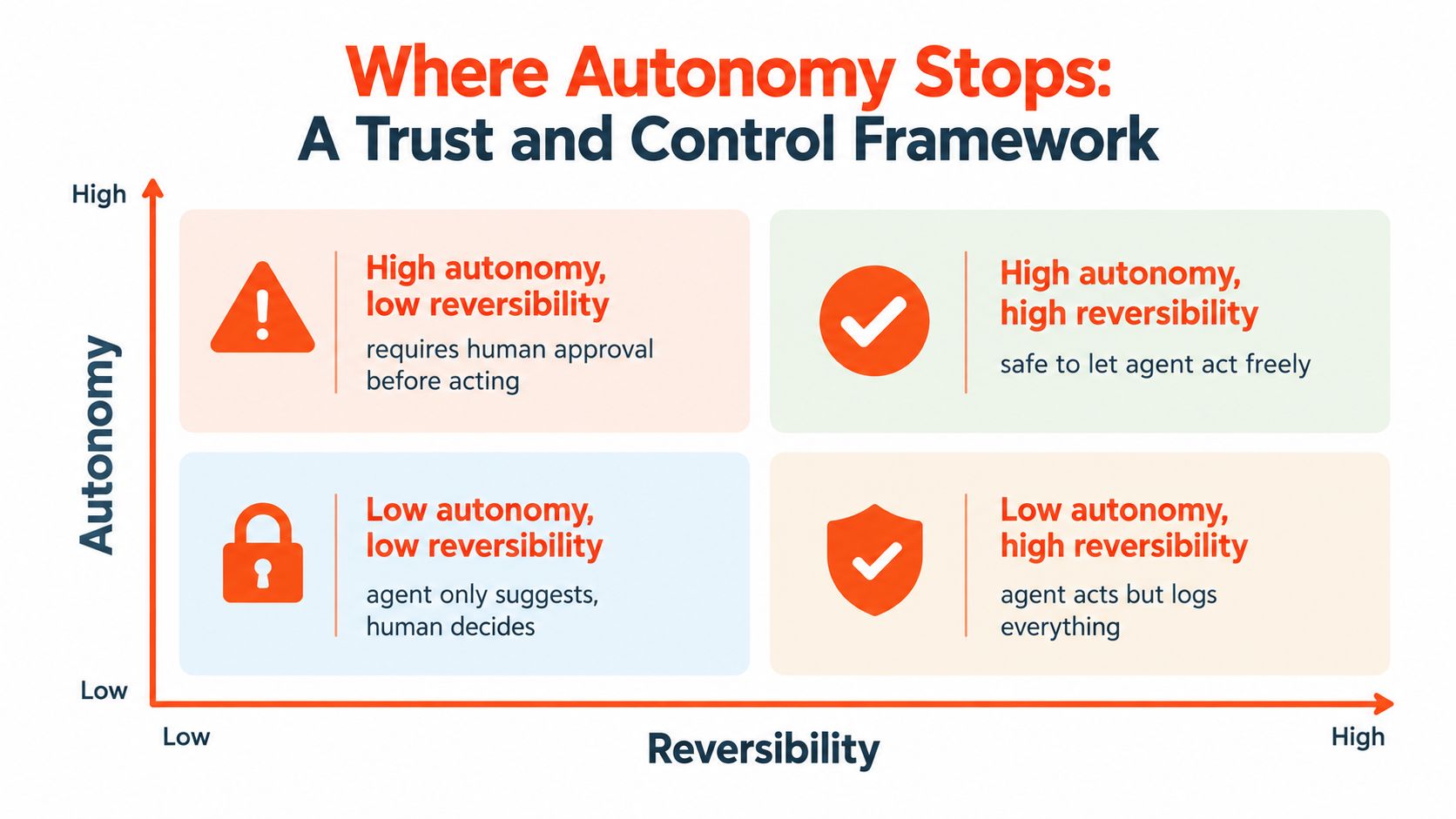
More autonomy isn't automatically better. A useful decision starts with two questions: How reversible is the action? And how much impact could it have? An agent can often draft a message safely because a person can edit it before sending. It should face a higher bar before sending the message itself or making a change that affects an account.
Consider the following defaults:
| Task | Reversibility and impact | Sensible default |
|---|---|---|
| Drafting a reply | Easy to revise before it reaches a customer | Delegate drafting, then review |
| Summarizing a record | Usually reversible, but errors can mislead | Allow with logging and spot checks |
| Sending a customer message | Harder to take back once delivered | Require approval until the workflow is trusted |
| Purchasing or changing an account | Potentially consequential and difficult to reverse | Keep a human approval step |
The framework applies beyond messages. Comparing products is not the same as purchasing one. Summarizing a customer record is not the same as modifying it. Recommending an action is not the same as executing it. As impact rises and reversibility falls, the agent's role should shift from acting to preparing a recommendation for a person.
Set the boundary before connecting the tool
PwC's survey findings, cited in TechCrunch's coverage of ChatGPT agent, show that trust falls for higher-stakes uses: 20% for financial transactions and 22% for autonomous employee interactions. Those figures aren't a rule for every support team, but they're a reminder that permission to use a tool is not the same as customer or employee confidence in autonomous decisions.
OpenAI says ChatGPT agent requests permission for consequential actions and lets users interrupt it or take over the browser. Support teams should build on that principle with explicit rules, not rely on a general promise of oversight. For help defining approval points in tool-driven workflows, see this guide to approvals and risk for agent actions.
Practical rule: Delegate reversible preparation. Put approval in front of consequential execution.
The right question isn't just “Can the agent do this?” It's “Should it do this without review, and what does the human need to see before it proceeds?”
Single-Model Versus Multi-Model Orchestration
A support system can use one model for every request, or route different tasks to different models. The single-model approach is simpler to configure and reason about. Multi-model orchestration adds routing decisions, but lets a team choose a model based on the kind of work: a more capable option for complex reasoning and a faster option for routine questions.
Agents also introduce extra work around each answer. A request may involve tool calls, browsing, and code execution, so the full workflow can take longer than a plain text response. Routing routine questions to a lighter model can be a sensible design choice, provided the system can escalate when a question is ambiguous or consequential. That's a deployment decision to test, not a guaranteed improvement in speed, cost, or resolution quality.
| Dimension | Single Model | Multi-Model Orchestration |
|---|---|---|
| Accuracy | One model's behavior across all tasks | Can route complex work to a model suited to it |
| Latency | Consistent model path, but not necessarily fast for every task | Routine tasks can use faster models; routing adds overhead |
| Cost | Easier to estimate, though complex requests may use more capability than needed | Can reserve higher-capability models for tasks that warrant them |
| Complexity | Easier to configure and monitor | Requires routing rules, testing, and fallback behavior |
| Best-fit workload | Similar requests with consistent risk and complexity | A mix of routine questions and difficult or sensitive cases |
Choose based on the shape of the queue
A single-model setup earns its keep when the workload is consistent and operating simplicity matters most. Multi-model orchestration makes sense when support requests vary substantially in complexity and teams can monitor whether routing works as intended. In either case, define a fallback for uncertainty and keep the human handoff path available.
For teams evaluating a support-agent platform, AgentStack offers content ingestion, model routing, support across web, email, Slack, and voice, configured actions, and human escalation workflows. Choose the setup that fits your queue and governance needs, rather than assuming that a larger model or more elaborate routing will solve an unclear process.
Deployment Checklist for Production Support Agents
Before an agent handles live support, walk the workflow through practical gates. The aim isn't to remove every possibility of failure. It's to limit what the system can affect, make its work reviewable, and ensure a person can step in.
- Scope every tool. Document the data and actions each connection needs. Give the agent the least access that lets it complete its assigned task.
- Require confirmation for consequential actions. Put approval in front of refunds, account changes, or external messages. Keep a clear route for the customer-support specialist to review and confirm.
- Record tool activity. Log each tool call and preserve traces that let the team inspect what the agent saw, attempted, and returned.
- Make outcomes visible. Track resolution outcomes, customer sentiment, and unanswered questions. Those signals help the team spot weak answers and missing content.
- Preserve context during handoff. Pass the customer's issue, relevant evidence, actions taken, and reason for escalation to the human agent.
- Review security and data handling. Confirm encryption in transit and at rest, role-based access, data residency options where required, and clear retention and deletion policies.
These controls work as a system. A confirmation prompt is less useful if nobody can see what the agent did beforehand. An audit log is less useful if a support lead can't connect it to a customer outcome. Teams planning a broader rollout can use this practical overview of AI agent deployment to think through readiness, operations, and oversight.
After launch, treat analytics as a feedback loop. Review unresolved conversations and recurring questions, update the knowledge base, and adjust permissions or instructions when the agent reaches the wrong boundary. That ongoing review helps the team catch drift and refine the workflow instead of assuming the initial configuration will remain suitable.
The Short Version, What to Remember and Where This Goes Next
Keep these four points handy for your next support-operations discussion:
- ChatGPT agent combines reasoning with action. It can use a virtual computer, browser, terminal, and connected sources to work through tasks.
- Support value comes from completing workflows, not just generating better replies. Measure whether the agent helps resolve work, and whether it hands cases off with useful context.
- Autonomy is a decision, not a setting to maximize. Match the level of independence to the action's impact and reversibility.
- Production depends on control. Scope permissions, confirm consequential actions, log tool use, review outcomes, and preserve human handoff.
Teams that instrument their agents well can learn from failures and improve their workflows. Treat the system as a working part of support operations, with visible boundaries and accountable human decisions.
AgentStack helps support teams build agents grounded in their own content, connect actions and channels, route work across models, and hand difficult conversations to people. If you're mapping an agent workflow for your support queue, visit AgentStack to explore how its tools and controls fit your needs.