Your call dashboard looks healthy. The voice agent is answering calls, conversations are ending without transfers, and the support queue appears manageable. Yet your team keeps hearing from customers who already called, still need help, or can't reach the right person.
The missing signal is proof of resolution. An AI voice agent dashboard should help you establish what the customer needed, what the agent accomplished, and whether the problem stayed solved.
Table of Contents
- Why Voice Agent Dashboards Need More Than Call Volume
- How an AI Voice Agent Dashboard Works
- Core Features Every Voice Operations Team Should See
- Key KPIs for Measuring Voice Agent Performance
- Latency and Transcript Quality as Operational Signals
- Set Up Permissions, Routing, Alerts, and Validation
- Turn Analytics Into Better Voice Agent Performance
- Common Misconceptions and Governance Checks
Why Voice Agent Dashboards Need More Than Call Volume
Consider a hypothetical subscription-support call. A customer asks to correct a billing error, receives an explanation of the billing policy, and hangs up. The dashboard records an automated conversation without a transfer, but nobody has corrected the charge.
A support manager reviewing only volume and automation could interpret that interaction as success. A billing specialist reviewing the reopened ticket would reach a different conclusion. Both teams need a shared view that connects the conversation to the operational result.
Treat the dashboard as a control room
A useful dashboard resembles a control room rather than a scoreboard. Operators need to see where calls are going, whether the agent is responding reliably, which customers need intervention, and what happened after the conversation ended.
That means bringing together several kinds of evidence:
- Conversation behavior: What the caller requested and what the agent answered.
- Operational events: Which actions ran, which failed, and where routing changed.
- Customer experience: Waiting, frustration, requests for human help, and feedback.
- Business outcomes: Completed requests, unresolved tickets, repeat contacts, and service recovery.
Practical rule: A disconnected call is an event. A resolved customer problem is an outcome.
Managers should also distinguish monitoring from improvement. Monitoring helps an operator intervene during a failure. Improvement requires identifying the underlying cause, changing knowledge or routing, and checking whether the change helped.
The strongest dashboard supports both responsibilities. It gives developers technical evidence, gives support leaders an outcome view, and gives knowledge managers a clear list of unanswered needs. The result should be a traceable path from call behavior through configuration and analytics to accountable service decisions.
How an AI Voice Agent Dashboard Works
An AI voice agent dashboard is the operational interface for observing and managing automated voice conversations. Think of the voice system as the equipment handling calls and the dashboard as the console that helps people understand its behavior.
The basic flow connects audio, interpretation, and action:
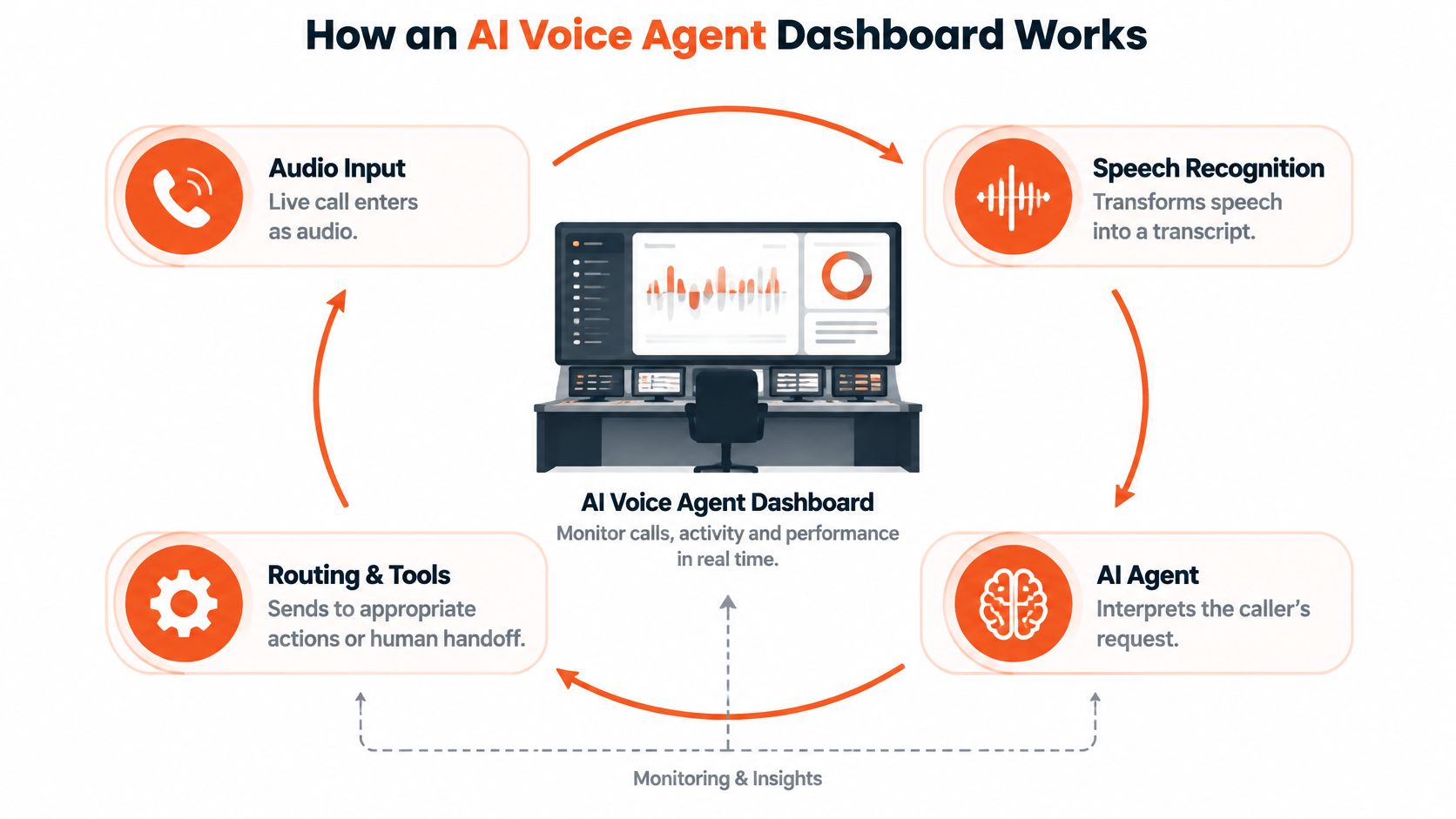
A caller speaks, and speech recognition converts the audio into text. The agent interprets the request, consults relevant knowledge, and decides whether to answer, invoke a tool, or route the conversation elsewhere. A speech-generation layer turns the response into audible output.
The dashboard should connect these events without pretending they're interchangeable. Correctly recognizing a request doesn't prove that a tool completed it, and generating an answer doesn't prove that the customer could act on it.
Records explain the conversation, analytics explain the pattern
A conversation record lets an operator inspect an individual interaction. Operational analytics organize many interactions by intent, routing path, sentiment, technical behavior, and outcome.
For a practical interface reference, the Lighthouse Legal dashboard guide offers another dashboard resource to consult when considering how users work within an operational workspace.
When evaluating your own system, ask whether an operator can move from a summary chart into the underlying evidence. A rise in billing-related calls should lead to relevant conversations, action results, and escalation records, not just another chart.
- Knowledge connections should make it possible to investigate which information informed an answer.
- Orchestration visibility should distinguish model decisions from tool execution.
- Handoff records should show what information reached the receiving team.
- Integration events should connect the call to downstream support records.
Platforms expose different controls. Treat this as an evaluation model, not a promise that every dashboard includes live transcripts, detailed traces, or native outcome verification.
Core Features Every Voice Operations Team Should See
Start an investigation with the customer's request, not the summary score. A good operator workflow moves from the conversation to the execution path, then checks the result.
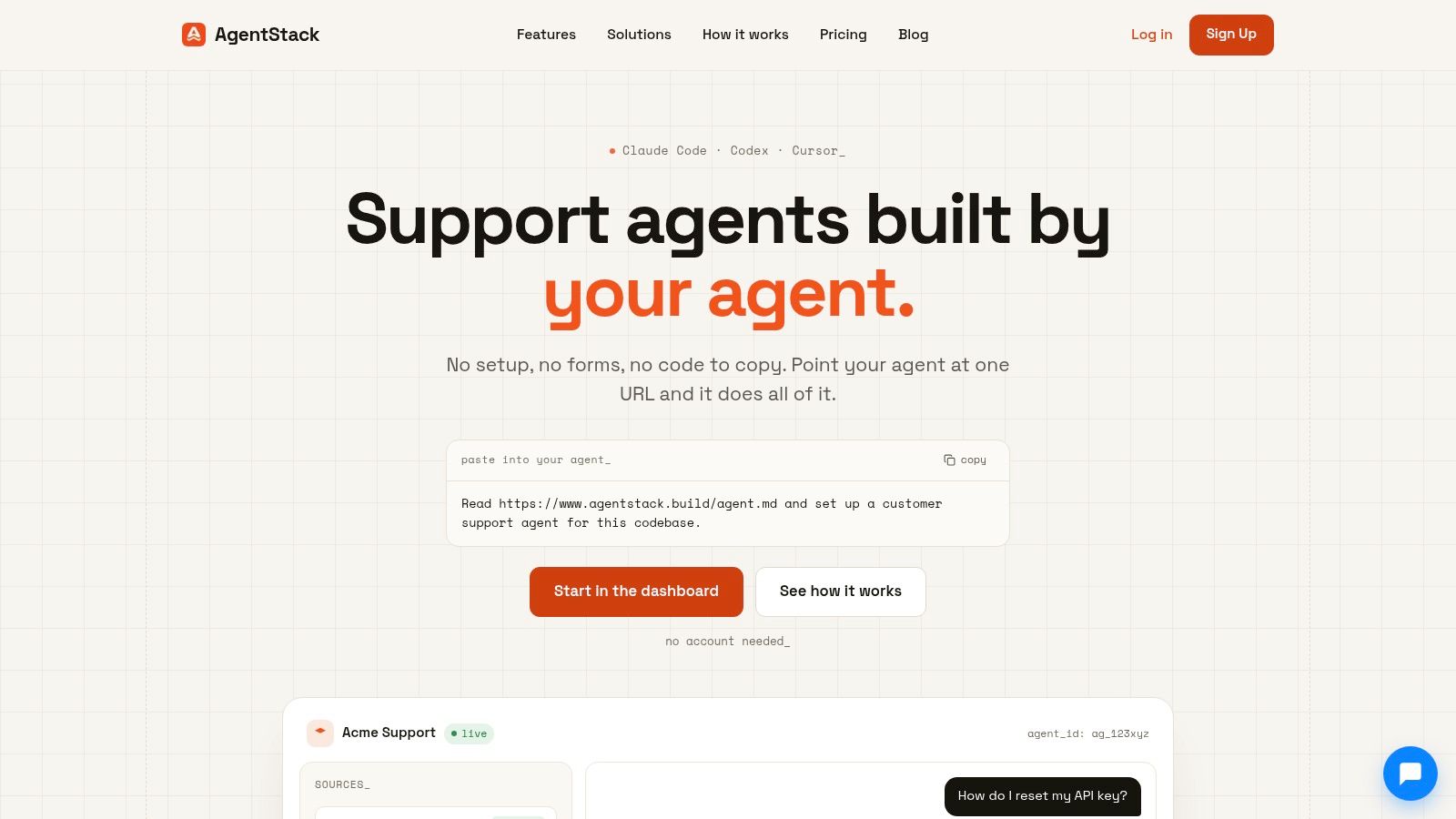
The platform context below is useful when considering how analytics fits alongside agent configuration and support workflows:
Read the conversation beside the execution trail
Transcripts help reviewers compare the customer's request with the agent's response. Where real-time transcription is available, operators can inspect an active interaction. Where it isn't, completed-call review still supports diagnosis.
Keep routing and action events beside the transcript. Suppose a caller requests a delivery-address change. The conversation may sound appropriate, but the operational question is whether the address-update action succeeded, was rejected, or never ran.
A useful review should distinguish:
- Heard correctly, acted incorrectly: Investigate decision logic or tool configuration.
- Heard incorrectly, followed the wrong path: Investigate recognition and intent interpretation.
- Answered correctly, lacked authority to act: Review the escalation path and customer expectations.
This separation prevents teams from editing knowledge content to fix an integration failure.
Connect experience signals to follow-up behavior
Sentiment trends can help reviewers find conversations worth inspecting. Read them alongside the transcript and the customer's next action rather than treating a sentiment label as a verdict.
Unanswered-question identification should reveal gaps in supported knowledge or workflows. Group related requests into actionable themes, such as invoice explanations, account access, or return eligibility. Raw wording alone can obscure that several differently phrased questions describe the same need.
AgentStack is one option that provides conversation volumes, resolution outcomes, sentiment trends, and unanswered-question identification, alongside website and document ingestion, multi-model orchestration, omnichannel delivery, shared-inbox handoffs, and developer integrations.
For handoffs, look beyond whether a transfer occurred. Review whether the receiving person obtained the request, relevant account context, attempted actions, and outstanding work. A customer shouldn't have to reconstruct the entire conversation because the automation and human-support systems lack a shared record.
Key KPIs for Measuring Voice Agent Performance
Build your measurement model in layers. Activity establishes workload, technical health establishes reliability, and resolution quality establishes whether support delivered value.
Voice analytics has become a distinct measurement category. One market analysis estimates a $1.68 billion market in 2025 and projects $4.08 billion by 2031, which provides commercial context rather than proof of any deployment's effectiveness (Mordor Intelligence's voice analytics market analysis).
Voice Agent KPI Categories
| KPI group | Example measures | Question answered |
|---|---|---|
| Activity | Call volume, conversation volume, intent mix | What workload are we handling? |
| Automation | Containment, escalation, transfer rate | Where does automated handling stop? |
| Technical health | Response latency, transcription quality, failed actions | Can callers reliably use the service? |
| Resolution quality | Verified resolution, first-contact resolution, unresolved containment | Did the customer's problem get solved? |
| Service recovery | Handoff completion, context preservation, repeat contacts | Did customers receive effective follow-up? |
| Efficiency | Handling time, cost per verified resolution | What resources did successful service require? |
Define your denominators before comparing results. A conversation may contain several intents, while a phone connection may end before the customer states a request. Your team should document what counts as an eligible interaction for each measure.
Containment means the conversation remained within automation under your chosen definition. Verified resolution requires supporting evidence, such as a confirmed account change or a completed service request. Unresolved containment identifies interactions that stayed automated without adequate evidence of success.
Measure efficiency against completed customer work, not just completed calls.
Choose metrics that diagnose decisions
For first-contact resolution, define the issue being tracked and the follow-up window. A related repeat contact may challenge the original classification, but an unrelated question shouldn't automatically invalidate it. A successful human-assisted resolution can also qualify, depending on the definition your team adopts.
Average handling time helps assess effort, but shorter isn't better. Escalation rate needs intent context because transferring a sensitive or unsupported request may be the correct outcome. Handoff quality should include completed connection and preserved context, not merely an attempted transfer.
For a broader small-business reporting perspective, consult Networking2000's analytics guide for SMBs, while keeping voice-specific definitions explicit.
A practical priority stack puts verified resolution and repeat-contact evidence first, recovery quality next, technical reliability underneath, and activity and cost around them for context. This ordering helps leaders resist optimizing a convenient counter at the expense of service.
Latency and Transcript Quality as Operational Signals
A customer experiences response speed and recognition quality together. Diagnose them together, but instrument them separately so engineers can identify what needs changing.
Use this illustration as a reminder that neither speed nor accuracy should be optimized in isolation:
Trace the delay before changing models
Capture speech-recognition latency, model time to first token, text-to-speech time to first audio, and end-to-end response time from the caller's final speech sample to the agent's first audible response. Inspect p50, p95, and p99 separately; a sustained p95 above roughly 1,000 milliseconds is a practical alert starting point, not a universal service guarantee (Hamming's voice-agent evaluation metrics guide).
Validate that starting point against your callers' experience. Model output arriving quickly doesn't establish that the customer heard a quick response.
Check what the system understood
Word error rate, or WER, divides substitutions, deletions, and insertions by the number of reference words spoken (NIST's conversational-telephone evaluation). Calculating it requires a reference transcript, so don't label an unvalidated confidence score as measured WER.
- Segment the evidence: Compare language, accent, channel, noise conditions, and recognition model.
- Inspect consequential errors: A mistaken account identifier may matter more operationally than a harmless wording difference.
- Follow the downstream effect: Check retrieval, tool arguments, routing, and escalation after the error.
The voice-agent overview provides broader implementation context. As an adjacent conversation-analysis resource, Gini Help's approach to scam blocking can inform questions about interpreting conversational signals, rather than serve as a latency benchmark.
For an additional audiovisual resource, use the embedded video below.
Set Up Permissions, Routing, Alerts, and Validation
Consider a hypothetical account-access call. The customer can't sign in, the agent recognizes the intent, and the recovery action fails. Before launch, your team needs an agreed answer to what should happen next, who can inspect the record, and how the dashboard should classify the result.
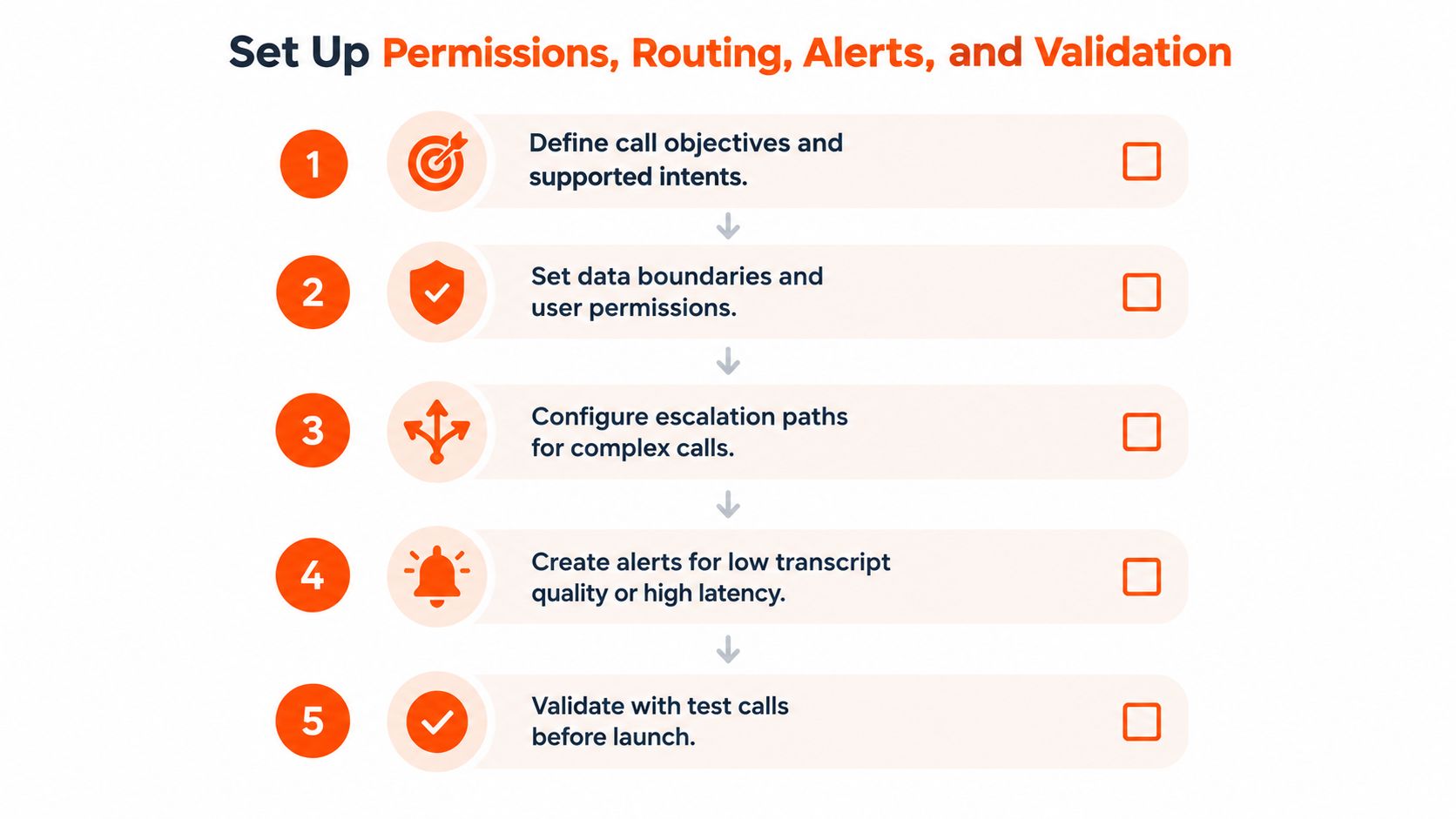
Use the configuration sequence below to establish those responsibilities:
Define the service boundary
Document supported intents, permitted actions, identity requirements, and escalation paths. Distinguish requests the agent may explain from requests it may execute. An account-recovery explanation and an authenticated account change need different success criteria.
Connect transcript, routing, action, sentiment, and handoff events through a shared interaction identifier. Where permitted, associate later support records with the same issue. Define ambiguous outcomes explicitly so reporting doesn't silently convert missing evidence into success.
- Support reviewers need relevant conversation evidence.
- Engineers need technical traces and failure details.
- Knowledge managers need unanswered-intent patterns without unnecessary personal data.
- Administrators need controlled configuration access and an audit trail.
Make failures testable
In the account-access example, a failed recovery action should create an unresolved outcome and invoke the agreed recovery path. A transfer attempt should remain distinguishable from a completed handoff.
Configure alerts for latency-budget overruns, transcription degradation, unresolved-intent spikes, failed actions, and abnormal transfer patterns. Each alert needs an owner, an investigation path, and a documented response.
Handle recording notices, consent requirements, retention, and sensitive transcript access according to applicable requirements and internal policy. Test these controls rather than assuming configuration equals compliance.
Before interpreting production trends, run routine, ambiguous, urgent, noisy, multilingual, and human-transfer scenarios. Confirm that the dashboard reflects the observed journey, including deliberate failures. A validation call is useful only if you check both customer experience and recorded outcome.
Turn Analytics Into Better Voice Agent Performance
A dashboard finding becomes useful when someone turns it into a testable change. The following are representative diagnostic scenarios, not reported customer case studies.
Follow the finding to the right intervention
An unanswered-intent cluster around renewal terms might indicate missing or unclear knowledge. Review the relevant source material, update the approved explanation, and test differently phrased requests before publishing.
A transcript error that changes a product name needs a different response. Compare the audio, recognized text, retrieved information, and answer. Add the failure to your evaluation set, then adjust recognition, grounding, or prompts according to the diagnosed cause.
- Deteriorating sentiment after handoff: Check whether the receiving team obtained the context and could complete the request. Change transfer rules or the handoff summary where evidence supports it.
- Delay concentrated in a model path: Test faster routing for routine intents while retaining more deliberate processing for complex requests. Compare resolution quality as well as response speed.
These examples challenge a common assumption: an attractive summary metric tells you what to change. Low latency doesn't identify whether the answer was grounded, and positive sentiment doesn't establish that an action completed.
Keep a change record
For every intervention, record the affected intent, configuration version, expected benefit, and possible downside. Compare similar call groups and check for unintended changes in transfers, unresolved outcomes, and customer effort.
The connection between behavior and business interpretation matters beyond voice. The customer experience and analytics guide offers related context for organizing that work.
Change discipline: Keep the original failure in your test set so a later update doesn't quietly reintroduce it.
If the evidence doesn't improve, revisit the diagnosis rather than repeatedly adjusting the same prompt.
Common Misconceptions and Governance Checks
More automation isn't automatically better support. An agent should complete suitable work and make human assistance accessible when automation isn't appropriate. In Verizon's customer-experience research, 47% of consumers reported frustration with a lack of access to human agents (Verizon's 2025 CX Annual Insights Report).
Sentiment isn't a trust certificate either. A polite customer may still have an unresolved problem. Use sentiment to prioritize investigation, then inspect action results and follow-up evidence.
Measure transparency without treating it as optional
Disclosure introduces a genuine operational tension. Vendor-sponsored consumer evidence summarized in a compliance article reported that 80% wanted to know whether they were speaking with AI, while 22% said they would hang up immediately on AI; those findings warrant independent validation rather than universal assumptions about caller behavior (Sobot's contact-centre compliance discussion).
Teams can compare clear disclosure wording, voice presentation, and the visibility of human assistance where applicable rules permit. They shouldn't test concealing required information as a way to improve completion.
Make governance observable through:
- Disclosure and choice: Opt-outs, abandonment following disclosure, and availability of human assistance.
- Consent and privacy: Recording-consent failures, privacy requests, complaints, and evidence of corrective action.
- Accessibility and fairness: Differences in recognition quality, waiting, escalation, and resolution across relevant caller segments.
These indicators need careful interpretation. An increase in opt-outs could reflect clearer choice rather than worse service. A decrease in complaints could reflect an inaccessible complaint route rather than improved trust.
Decide who can intervene and inspect
Before expanding the program, answer several operational questions. What evidence is sufficient to verify resolution? Which failures require immediate human escalation? Who may access sensitive transcripts, and who approves changes to routing or disclosure?
Use a documented role-based access-control model to connect responsibilities with permissions. Review whether access remains appropriate when employees change teams, and preserve the evidence needed to investigate disputed outcomes.
Establish a weekly operating review
Start the weekly review with unresolved and repeated intents, not the most flattering chart. Inspect representative transcripts and sentiment patterns, then examine resolution quality, handoffs, latency percentiles, and recognition accuracy.
Keep the agenda compact:
- Knowledge gaps: Which questions remain unanswered?
- Resolution evidence: Which contained calls remain unverified?
- Human access: Where are customers waiting for assistance?
- Unequal performance: Which segments are slower or less accurately understood?
- Change effects: What happened after the latest configuration update?
Rank proposed improvements by customer impact and confidence in the diagnosis. Assign an owner, define a success measure, and set a review date before making the change.
A strong AI voice agent dashboard isn't the destination. Your team uses it to make controlled improvements, verify the effects, and recover when automated support falls short.
AgentStack offers conversation analytics, unanswered-question identification, knowledge ingestion, multi-model orchestration, and shared-inbox handoffs. Visit AgentStack to explore how these capabilities could support your voice operations, and bring a real unresolved call to your evaluation so you can assess the path from conversation evidence to corrective action.