AI customer service software can raise productivity without immediate workforce replacement. In a peer-reviewed study of 5,172 support agents, AI assistance increased issues resolved per hour by 15% on average.
That result is useful, but it doesn't support the usual “automate everything” pitch. It points to a more practical model: use AI to spread knowledge, remove repetitive work, and help people make better decisions, while preserving experienced human judgment for ambiguous, sensitive, and high-impact cases.
The strongest deployments treat support as a distributed workforce system. AI handles predictable questions and prepares context. Newer agents receive guidance that helps them work with greater confidence. Experienced representatives spend less time searching and summarizing, but still own the conversations where nuance, empathy, and accountability matter.
That distinction changes how you choose software, design workflows, and measure success. A lower ticket count can hide rising transfers, repeat contacts, or weaker complex-case resolution. A fast answer can still be a poor answer if the system can't show its evidence or reverse an action.
Table of Contents
- What AI Customer Service Software Does
- How AI Support Systems Work Under the Hood
- The Case for Agent Augmentation Over Automation
- Security, Compliance, and Trust Requirements
- Evaluating AI Support Vendors and Platforms
- Implementation Roadmap and Best Practices
- Measuring Success and Driving Continuous Improvement
What AI Customer Service Software Does
AI customer service software combines customer-facing automation, agent assistance, knowledge retrieval, workflow routing, and operational analytics. It can answer a question in a website widget, draft an email, summarize a long ticket, classify intent, or assign a conversation to the right team. The useful unit is the complete path from customer request to safe resolution, not the chatbot alone.
Field evidence supports augmentation over replacement. In a study of 5,172 agents, an AI assistant helped representatives resolve more issues per hour, with the largest gains among less experienced and lower-performing workers. The Stanford Graduate School of Business summary reports an average improvement of approximately 14%, while the Quarterly Journal of Economics study reports 15%. These figures are not universal forecasts. They show that AI can help people work more effectively without requiring an immediate staff reduction.
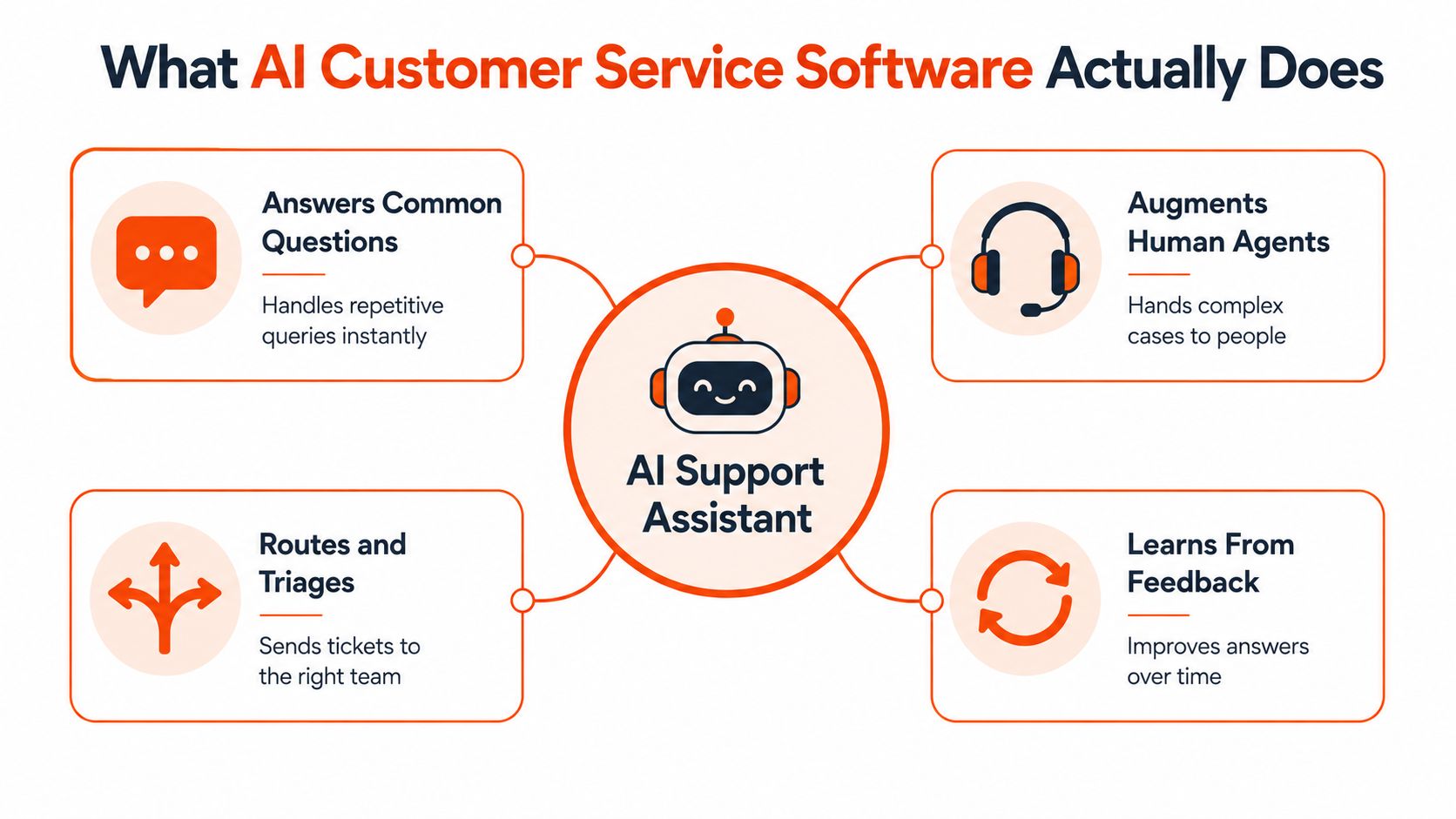
The operating model
A well-designed system handles several jobs:
- Answer routine questions: It retrieves approved information about products, billing, setup, returns, and policies.
- Assist representatives: It suggests replies, surfaces documentation, summarizes history, and recommends next actions.
- Route conversations: It identifies intent, urgency, language, risk, and ownership before assigning a case.
- Escalate exceptions: It transfers uncertain or consequential requests with the conversation history intact.
- Learn from gaps: It shows which questions remain unanswered, which sources conflict, and where customers repeatedly need help.
Average productivity can conceal uneven effects. A new representative may benefit from suggested troubleshooting steps, while a senior specialist may need fewer prompts and greater control over the interaction. Applying one automation policy across every queue can improve easy-case throughput while weakening expert handling of difficult cases. That trade-off affects service quality, workforce distribution, and the availability of experienced judgment.
What teams should expect from the software
Strong systems connect knowledge sources instead of relying on a static script. They ingest websites, help-center articles, internal documents, product information, and policy material, then retrieve relevant passages during a conversation. They may also connect to business systems for approved actions, such as checking an account or creating an escalation.
Deployment can cover a web widget, email, Slack, and voice. The channel matters less than the handoff design. A customer who starts with AI should reach a human without repeating the problem. The representative should see the supporting evidence, actions already attempted, and unresolved uncertainty.
Practical rule: Treat AI customer service software as a teammate with bounded permissions, not as an unsupervised employee.
The business case includes capacity, consistency, and potentially lower stress, not only deflection. The field experiment also reported lower worker stress and improved retention outcomes, suggesting that removing repetitive searching and composition can affect employee experience as well as ticket throughput. That benefit disappears when AI creates extra review work or sends poorly prepared escalations to already overloaded specialists. Teams should therefore assess who receives the remaining complex cases, whether experts retain decision authority, and whether automation improves resolution quality rather than only reducing visible workload.
How AI Support Systems Work Under the Hood
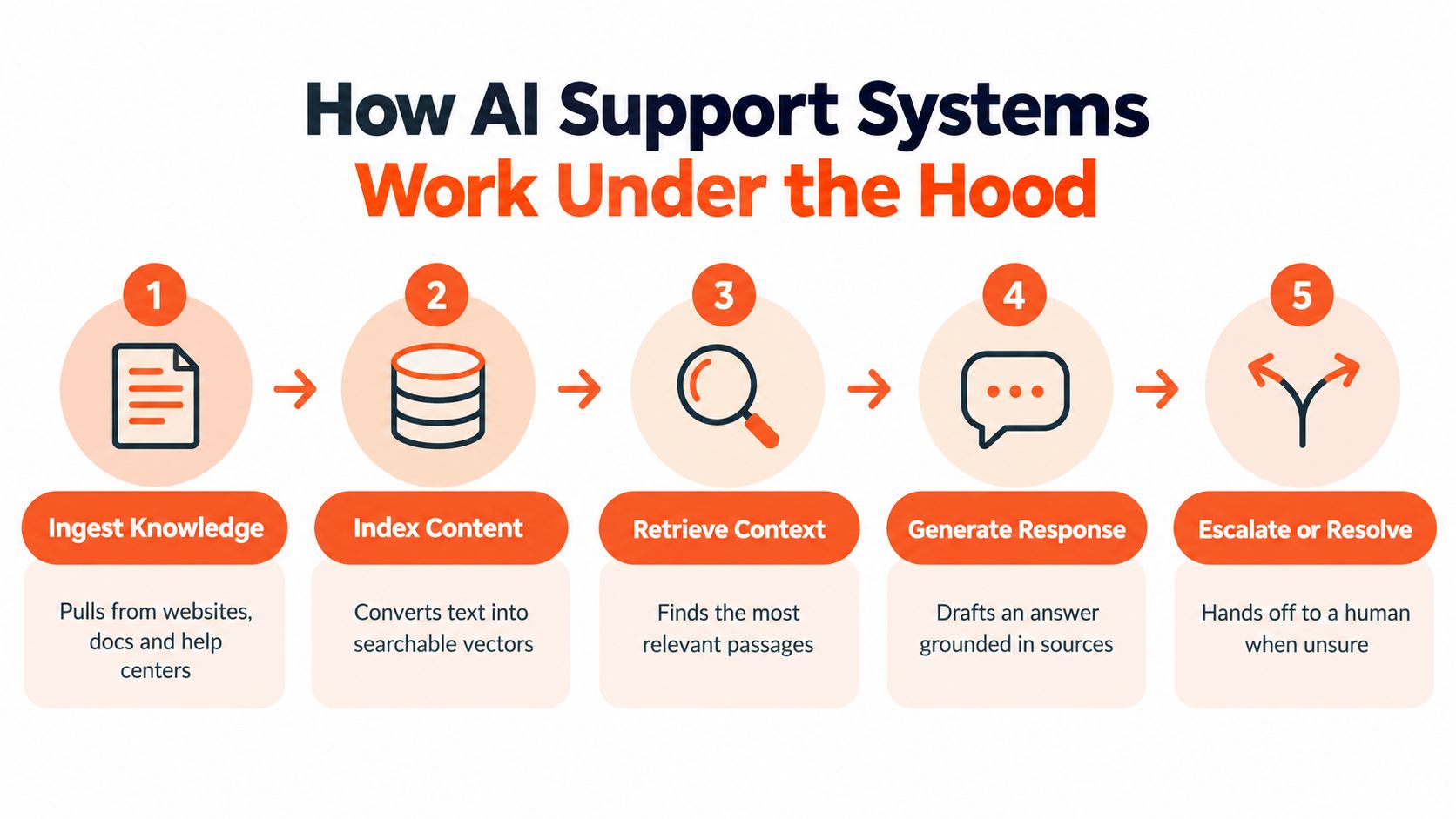
A production support system has three core layers: knowledge ingestion, model orchestration, and delivery with control. Teams often buy a conversational interface first, then discover that answer quality depends more on source management, permissions, routing, and escalation than on the visible chat window.
1. Ingest and index the knowledge
The system first collects material from websites, help centers, documents, and connected repositories. It breaks content into retrievable units, adds metadata, and indexes those units so a later query can locate relevant evidence.
This stage is easy to underestimate. A policy page with contradictory regional rules can produce a confident but incorrect answer. A document split at the wrong point can separate a qualification condition from the instruction it modifies. A stale article can outrank a current policy if the system doesn't track source ownership and update status.
A platform such as AgentStack illustrates the broader architecture by combining website and document ingestion, automatic chunking, indexing, source synchronization, and unanswered-question analytics. Teams evaluating an AI agent development platform should inspect those operational details, not just the quality of a demo response.
2. Retrieve context and select a model
When a customer asks a question, the system identifies the likely intent and retrieves relevant passages. It may then route the request to a fast model for a simple lookup or to a more capable model for a complex explanation, provided the answer remains grounded in approved sources.
Routing should reflect risk and complexity, not only latency. A shipping-status question may need a connected order lookup. A billing dispute may require identity verification and human approval. A regulated or account-changing request should have a narrower action scope than a general product question.
The response generator should receive the retrieved evidence, relevant conversation history, permissions, and workflow instructions. If retrieval confidence is low, the safest outcome is often a clarifying question or escalation, not a longer answer.
3. Deliver, act, and hand off
The final layer connects the response to the channel and the workflow. A widget can provide self-service on a website. Email automation can draft or send a reply. Slack support can resolve internal questions in a thread. A shared inbox can assign the conversation to a representative when the AI reaches a boundary.
Teams can study how voice deployments connect automation with customer experience through resources such as pioneering customer loyalty with AI, while still validating the implementation against their own use cases and controls.
The important technical distinction is between retrieval, generation, and action. Retrieval finds information. Generation turns it into language. An action changes a customer record or triggers an external process. Each step needs separate permissions and separate testing. A system may be allowed to explain a refund policy but not issue a refund without approval.
The Case for Agent Augmentation Over Automation
AI creates the most value when its role reflects how work is distributed across a support team. The peer-reviewed field study cited earlier found that less experienced and lower-performing workers gained the most, with productivity improvements of up to 35% for some workers. The most experienced and highest-performing workers saw smaller speed gains and slight quality declines.
That finding changes the implementation question. Rather than asking how many tickets AI can resolve without people, ask which tasks it should complete, which it should prepare, and where expert judgment improves the result. Workforce distribution matters as much as the automation rate.
Match autonomy to the work
A practical routing policy can follow four levels:
- Routine and reversible: Let AI handle well-defined FAQs, status checks, and basic troubleshooting when the source material is current and the action carries little risk.
- Routine but consequential: Use AI for retrieval and drafting, then require human approval for refunds, account changes, entitlement decisions, and other actions that affect the customer.
- Ambiguous or emotional: Give the representative relevant context and suggested next steps, while keeping the conversation with a person.
- Complex and specialist: Route the case directly to experienced staff. Use AI for summaries, evidence retrieval, and preparation instead of autonomous resolution.
This allocation protects the cases where senior expertise has the greatest effect. It also gives newer representatives a structured way to learn. An answer without its supporting policy can encourage an agent to repeat a mistake. A response that surfaces the relevant rule and decision path can turn the same interaction into a coaching opportunity.
Use confidence thresholds and escalation rules to make these boundaries operational. For example, a system may draft a response when the evidence is clear, request clarification when the case is incomplete, and transfer the conversation when the customer's situation falls outside documented policy.
Why average ROI is insufficient
A single productivity average can conceal weaker outcomes in the cases that carry the greatest customer or business risk. Track results by agent experience, queue, issue complexity, risk tier, and customer sentiment. Compare AI-only, human-only, and AI-assisted workflows where the operating model allows it.
Useful quality signals include reopen rates, transfers, escalation rates, repeat contacts, and friction during handoff. For expert queues, a small speed gain may not justify lower resolution quality. For repetitive queues, effective AI assistance can free experienced representatives to handle exceptions that automation cannot safely manage.
The right target is not maximum autonomy. It is the best allocation of human attention.
Employee outcomes belong in the review as well. If representatives spend less time searching and more time solving, AI is adding capacity. If they spend more time correcting generated answers, the apparent automation has only moved the work downstream.
Security, Compliance, and Trust Requirements
Trust depends on how an AI system behaves when it is wrong. Customers need a recovery path, while support leaders need evidence of what the system accessed, decided, and changed.
Consumer research from Delight AI found that 83% of consumers hold the brand accountable when AI goes wrong, while 57% trust AI more when they can undo its actions. This research is not an independent government or academic study, so treat it as a trust signal rather than a universal benchmark. The operational lesson is clear: assess failure recovery, not just answer accuracy. (Delight AI consumer research)
Reversibility beats silent autonomy
A reversible action gives the customer and support team a way to recover. An irreversible action requires stronger controls before execution, particularly when the workflow affects money, access, privacy, or regulated advice.
High-impact workflows should include:
- Approval gates: A human confirms refunds, account changes, sensitive disclosures, and regulated advice.
- Scoped permissions: The AI accesses only the systems and fields required for its assigned task.
- Audit trails: Record the request, retrieved evidence, generated response, tool calls, approvals, and final outcome.
- Clear escalation: Customers can reach a person without restarting the conversation.
- Incident review: Teams identify the failure, correct the source or workflow, and test the fix.
For teams mapping controls to a broader security program, this compliance guide for MSSPs helps frame the relationship between governance standards and operational safeguards. Verify product claims against the vendor's current documentation and contract.
Protect data throughout the workflow
Security review should cover ingestion, retrieval, model processing, logs, integrations, and deletion. Ask where customer data is stored, how access is segmented, how long logs remain available, and whether administrators can export or delete records. Role-based access control and data-residency options matter when teams or regions handle different information. For GDPR-specific controls, review this guide to GDPR and security controls alongside your data-residency requirements.
NIST-aligned guidance identifies confabulation, privacy, bias, and data leakage as risks that require deployment-like testing, red-teaming, and structured evaluation. Retrieval grounding reduces some risks without removing them. Incomplete documents, contradictory sources, poor ranking, context loss, and misapplied permissions can still produce incorrect answers. (NIST-aligned evaluation guidance)
Require vendor demonstrations to include failure scenarios, not only successful FAQs.
Evaluating AI Support Vendors and Platforms
Compare platforms as operating systems for support, not as collections of chatbot features. A polished demo can hide weak ingestion, limited permissions, poor handoff, or analytics that report activity without showing quality.
Start with the knowledge layer. Ask whether the product can crawl the sources you maintain, synchronize updates, preserve permissions, and expose evidence for each answer. A system that retrieves irrelevant or outdated passages will create review work even if its language sounds natural.
Use a scorecard that reflects service quality
A useful evaluation includes these dimensions:
| Dimension | Questions to ask |
|---|---|
| Retrieval quality | Does the answer use the right source, preserve context, and show evidence? |
| Routing flexibility | Can the platform send simple and complex requests to different models or workflows? |
| Action controls | Can teams restrict tools, require approval, and reverse changes? |
| Escalation | Does a human receive the full transcript, intent, evidence, and attempted actions? |
| Analytics | Can managers separate AI-only resolutions from AI-assisted human resolutions? |
| Workforce distribution | Can results be segmented by agent experience, queue, complexity, and risk? |
| Security | Are access control, deletion, export, residency, and audit logs available? |
Don't accept “resolution rate” without asking how the vendor defines resolution. A conversation marked closed may have produced a repeat contact, an escalation, or a correction by another team. Require sample records and test the reporting logic with your own cases.
Test the complete workflow
Use representative questions and deliberately difficult examples. Include outdated documentation, conflicting policies, multi-turn context, failed API actions, sensitive data requests, and customers who change topics mid-conversation.
Platforms differ in how much control they provide. Some focus on self-service, others on agent copilots, and others on workflow automation or shared inbox coordination. AgentStack, for example, combines grounded ingestion, model routing, a shared inbox, custom API actions, omnichannel delivery, and analytics. It should be evaluated alongside alternatives according to the same evidence and control requirements, not selected from feature labels alone.
Run a pilot with the people who will operate the system daily. Ask representatives whether suggestions save time, whether citations are useful, and whether escalations arrive with enough context. Ask support leaders whether the dashboard reveals knowledge gaps or merely counts conversations.
Buyer's test: If the vendor can't show how a bad answer is detected, escalated, corrected, and logged, the product isn't ready for a high-impact workflow.
Implementation Roadmap and Best Practices
Successful deployments begin with a narrow operational problem, not a broad promise to transform support. Choose a queue with clear intents, reliable source material, and a manageable escalation path. Keep complex cases human-led until the system proves that it can retrieve evidence and follow boundaries consistently.

Build the foundation before the pilot
Start by inventorying knowledge sources. Remove duplicate policies, identify owners, mark outdated pages, and separate public guidance from internal instructions. Define which sources can answer which intents, because retrieval without source authority creates ambiguity.
Create a baseline using current support data. Measure issues resolved per hour, average handle time, resolution rate, repeat contacts, escalation behavior, and customer satisfaction for the selected queue. These metrics establish a comparison point without assuming that every improvement comes from AI.
Configure boundaries and test cases
Define the AI's role for each intent:
- Answer: The system can provide a grounded explanation.
- Assist: The system drafts or recommends, with a representative deciding.
- Act with approval: The system prepares a change, but a human confirms it.
- Escalate: The system transfers immediately when risk or uncertainty crosses the threshold.
Build a test set from real customer questions, paraphrases, edge cases, policy exceptions, and failed connected actions. Score grounded-answer rate, evidence coverage, intent accuracy, escalation precision, action success, latency, repeat contacts, and post-conversation satisfaction by intent and risk tier.
Roll out in controlled stages
Begin with internal testing, then a limited customer-facing pilot. Review transcripts daily at first, especially false confidence, missing context, incorrect routing, and incomplete handoffs. Fix the source or workflow rather than just adding a longer instruction when the underlying problem is poor retrieval.
Expand only when the system meets your quality gates. Keep rollback procedures ready, preserve a visible human route, and tell representatives how to report bad suggestions. Continuous improvement should combine unanswered-question analytics, customer feedback, agent feedback, source maintenance, and regression testing after every meaningful change.
The most common failure is scaling the interface before the operating model is ready. More traffic won't repair weak permissions, conflicting documentation, or unclear ownership.
Measuring Success and Driving Continuous Improvement
Measure the support system as a joint human and AI operation. Start with issues resolved per hour, average handle time, resolution rate, customer satisfaction, repeat contacts, escalation precision, and sentiment trends. Review each metric by intent, risk tier, queue, and agent experience so average results don't hide quality loss in complex work.
A useful dashboard separates three outcomes:
- AI-only resolution: The system answered or acted without human intervention.
- AI-assisted human resolution: A representative used retrieval, drafting, summarization, or recommendations.
- Human-led resolution: The case required specialist judgment from the outset.
That separation shows where AI is creating capacity and where it is merely changing the workflow. Track unanswered questions and recurring corrections as knowledge signals. If customers repeatedly ask for information missing from the source material, update the documentation. If the source is correct but retrieval fails, improve indexing, ranking, metadata, or routing.
Teams that need a broader measurement framework can use this guide to measuring website success as a useful reminder to connect operational activity with meaningful outcomes. For support-specific definitions and reporting ideas, review customer service KPIs.
The durable strategy is straightforward: automate predictable work, augment representatives where guidance improves performance, preserve expert control over complex cases, and make every consequential action observable and reversible. AI customer service software earns its place when it improves the distribution of human attention without sacrificing service quality.
AgentStack provides grounded knowledge ingestion, multi-model routing, omnichannel support, shared-inbox handoff, custom API actions, analytics, and enterprise controls for teams building this kind of governed workflow. Visit AgentStack to evaluate how its support agents can fit your documentation, escalation, and measurement process.