Website crawling software automatically browses web pages to collect and index content, acting as the ingestion layer that feeds AI support agents with current answers. In the early web, the World Wide Web Wanderer found more than 200,000 documents across 130 HTTP sites in June 1993, then identified 623 sites by December 13, 1993, showing how quickly the need for automated discovery emerged (historical account of early web crawlers).
Today, the difficult part isn't finding a crawler. It's ensuring that the content it collects is current, permitted, accessible, relevant, and usable in a support answer. A crawler can report successful page fetches while feeding an AI agent stale release notes, duplicate product pages, inaccessible documentation, or private material that should never enter an external dataset.
Table of Contents
- Why Website Crawling Software Powers Modern Support Agents
- How Website Crawling Software Works Step by Step
- Key Features to Evaluate in Website Crawling Software
- How to Choose the Right Website Crawling Software
- Integrating Crawlers with AI and Knowledge Systems
- Security, Privacy, and Compliance in Web Crawling
- Best Practices for Configuring Crawlers for Customer Support
- Turning Crawling Quality into Better Support Answers
Why Website Crawling Software Powers Modern Support Agents
A customer asks whether an integration supports a new authentication method. The support agent searches its knowledge base, retrieves an old setup article, and confidently gives instructions that no longer match the product. A human then has to correct the answer, investigate why the update was missed, and explain the contradiction to the customer.
The failure usually starts before retrieval. The knowledge system never received the revised page, couldn't render the content loaded by JavaScript, indexed several obsolete versions together, or treated a private document as unavailable. An AI support agent can only retrieve and cite what the ingestion layer has collected and represented correctly.
Website crawling software systematically fetches pages, follows links, parses content, and sends usable records to a search or retrieval index. In a support workflow, that makes it more than an SEO auditing utility. It becomes the pipeline between a company's published knowledge and the model answering questions across chat, email, Slack, or voice.
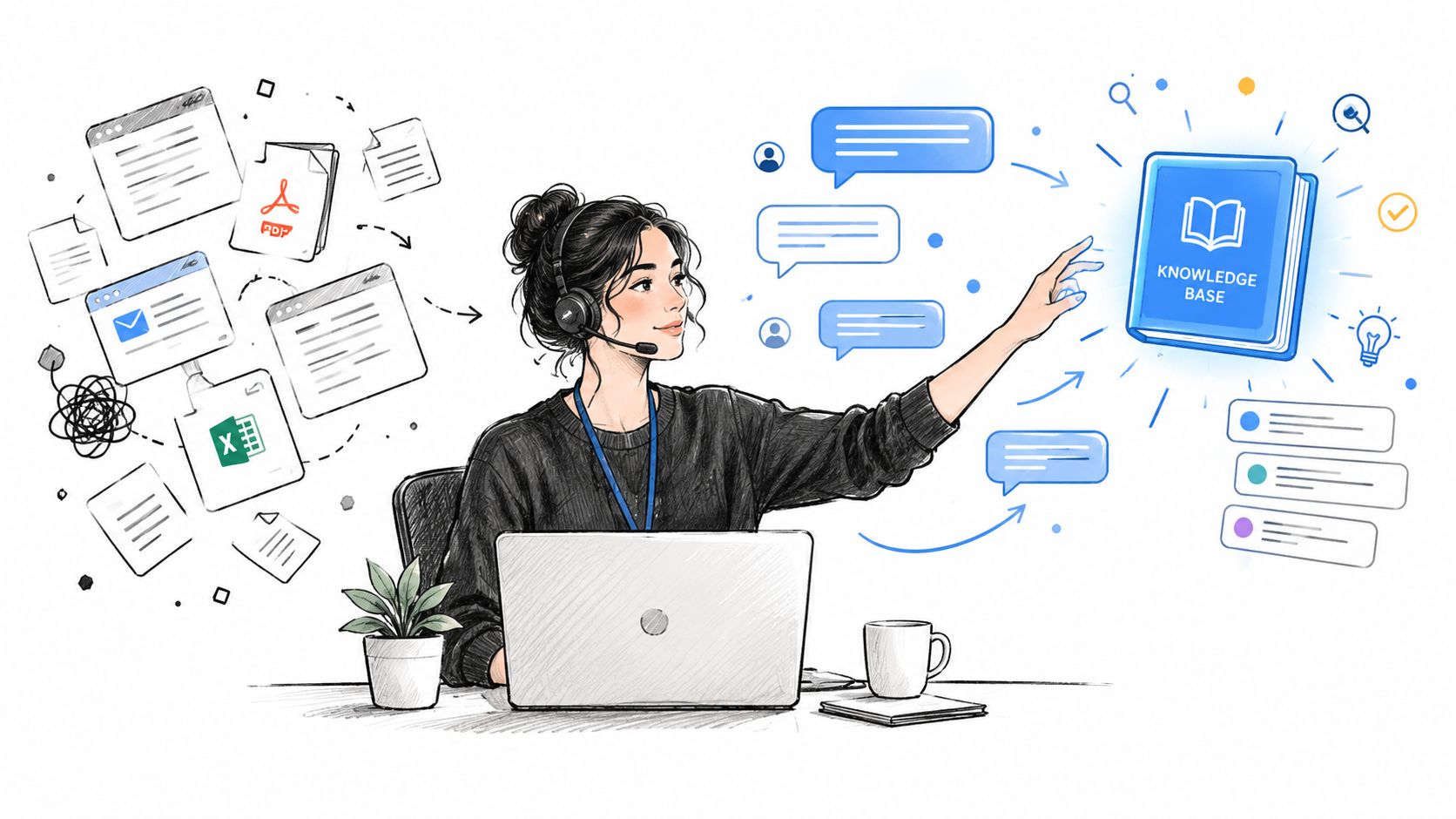
The ingestion failure behind a bad answer
A shallow crawler may collect URLs and status codes, yet miss the information support needs:
- Freshness: An updated troubleshooting page remains absent from the index.
- Context: A paragraph is extracted without the heading, product version, or prerequisite that gives it meaning.
- Coverage: Important content sits behind a navigation path the crawler never discovers.
- Quality: Duplicate pages and conflicting versions compete during retrieval.
- Governance: Sensitive content is fetched without a clear record of whether access was allowed.
The scale of modern crawling explains why this requires engineering rather than a single script. Common Crawl's public corpus contains more than 300 billion pages, and contemporary monthly crawls typically capture about 2.3 to 2.7 billion pages, according to AWS's overview of Common Crawl and open data. Support teams usually crawl a much smaller, controlled set of domains, but they still need the same disciplines: scheduling, deduplication, storage management, parsing, policy handling, and incremental updates.
Practical rule: Treat crawling as a reliability layer for answers, not as a one-time content import.
How Website Crawling Software Works Step by Step
A production crawl is a controlled pipeline. It starts with approved entry points and ends with indexed, attributable content that a support agent can retrieve with the context needed for a reliable answer.
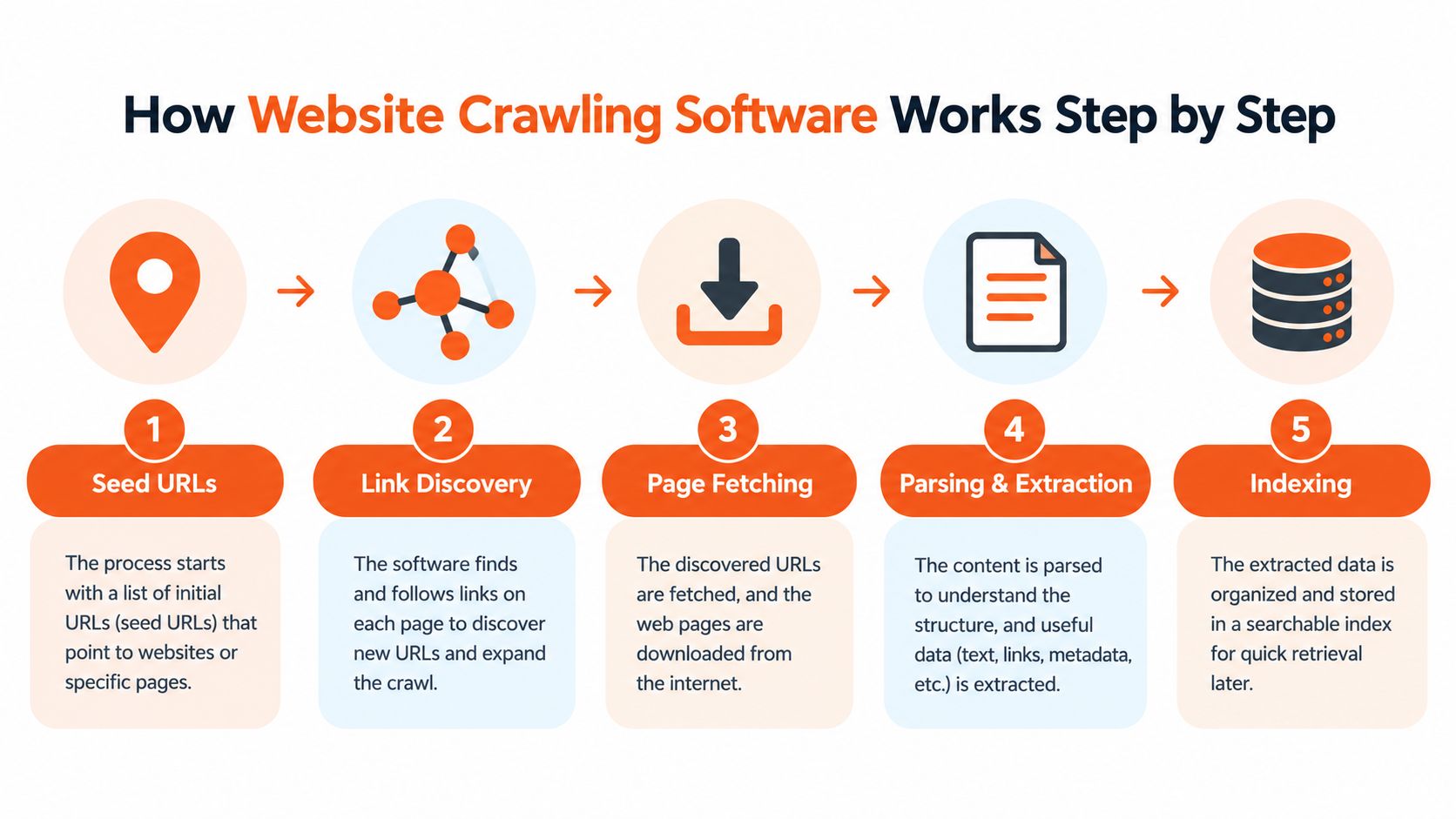
1. Seed URLs establish scope
The crawler receives starting URLs from a documentation root, homepage, sitemap, API request, or selected page. Scope rules define eligible hosts, paths, query parameters, and file types. A support crawl should start with authoritative product documentation, help-center articles, guides, and approved downloads, not every URL the site exposes.
This first decision affects governance as much as coverage. A narrow scope reduces irrelevant pages, limits accidental collection of sensitive material, and gives quality scoring a defensible boundary.
2. Link discovery builds the frontier
After fetching a page, the crawler extracts links and adds normalized URLs to its frontier. Normalization removes fragments, inconsistent trailing slashes, and equivalent tracking parameters. Canonical references and content fingerprints help prevent one article from creating several retrieval records.
Sitemaps deserve separate handling. Keep them current and use them to mark content intended for crawling, then combine sitemap entries with link discovery so recently changed documentation outranks low-value parameterized URLs.
For teams reviewing site structure alongside support ingestion, the technical SEO for ecommerce guide connects crawlability decisions to templates, navigation, and indexable page architecture.
3. Page fetching handles real web behavior
The fetcher follows redirects, records response headers, retries temporary failures, and decides whether browser rendering is required. Direct HTTP retrieval is efficient for static HTML. JavaScript-heavy documentation may need a browser engine, but rendering every page consumes more resources and creates more failure points. Apply it selectively when the initial response lacks the content an agent must retrieve.
Fetch records should preserve failure reasons, response status, and timing. Those signals distinguish an unavailable source from an empty page and help support teams avoid treating a partial crawl as complete.
4. Parsing and extraction turn pages into knowledge
The parser removes navigation, cookie notices, repeated footers, and decorative elements while retaining answer-bearing content. It should preserve headings, lists, tables, links, code examples, dates, language, product versions, and source URLs. PDF and office-file parsers may be required for documentation stored outside HTML.
Quality scoring can then flag thin extraction, missing headings, conflicting versions, or content that changes after rendering. A chunk without its title, location, update metadata, and canonical URL is difficult for an agent to cite and difficult for a support manager to audit.
5. Indexing and scheduling keep answers current
The system stores cleaned content, metadata, fingerprints, and crawl history in a retrieval index. The scheduler assigns revisit rules by source type and change behavior. Changed pages should be reprocessed, deleted pages removed or marked unavailable, and unchanged pages kept out of unnecessary re-embedding jobs.
AgentStack's website crawling documentation describes queuing a crawl and using indexed website content as an agent knowledge source. Fetching is complete only when the result is searchable, attributable, governed, and refreshed after source changes.
Key Features to Evaluate in Website Crawling Software
A crawler built for support ingestion needs different success criteria from a script that collects product prices or checks broken links. Page coverage matters, but answer quality matters more.
Start with scheduling. The tool should support recurring crawls, incremental updates, sitemap ingestion, priority queues, and a clear distinction between newly discovered and previously indexed URLs. A release-notes path may deserve faster refreshes than an evergreen company-history page.
Parsing is the next dividing line. Look for main-content extraction, structured metadata, document handling, JavaScript rendering when required, and preservation of headings and tables. Automatic chunking should respect semantic boundaries rather than cutting text at arbitrary lengths. Metadata should identify the source, page title, section, product area, language, and relevant version.
Deduplication and canonicalization prevent retrieval from choosing among copies that say the same thing. Quality scoring should go further by flagging orphaned pages, contradictory versions, missing dates, inaccessible HTML, and content that changes substantially after rendering.
| Feature | Lightweight Crawler | Ingestion-Ready Platform |
|---|---|---|
| URL discovery | Follows links from seed pages | Combines links, sitemaps, APIs, and controlled URL sources |
| Rendering | Often HTTP-only | Selective browser rendering with fallback rules |
| Extraction | Raw HTML or basic text | Main content, headings, tables, documents, and metadata |
| Freshness | Manual reruns or fixed schedules | Incremental crawling, change detection, and priority queues |
| Retrieval preparation | Export files for another system | Chunking, tagging, indexing, and source provenance |
| Governance | Basic user-agent and robots handling | Policy decisions, audit trails, access controls, and deletion workflows |
| Quality measurement | URL counts and HTTP statuses | Accessibility, duplication, conflict, freshness, and retrieval feedback |
The trade-off is complexity. A lightweight library may be easier to control and fast for a stable, server-rendered site. An ingestion-ready platform reduces integration work but must expose enough configuration to prevent opaque extraction decisions. Don't choose based on the longest feature list. Test whether the system can produce an answer-ready record from your hardest documentation page.
How to Choose the Right Website Crawling Software
Selection should begin with the failure you can't tolerate. If missing a JavaScript-rendered setup step causes incorrect answers, test rendering. If private documentation must never leave your environment, test deployment boundaries and deletion behavior. If multiple support channels share one knowledge base, test how the crawler exposes provenance and update status to every downstream system.
Compliance controls deserve more attention than crawler speed. A production tool should identify itself with an explicit user-agent, retrieve and interpret robots.txt, apply the relevant allow and disallow rules, and record the decision. It should also fail conservatively when policy retrieval is unavailable. RFC 9309 defines the Robots Exclusion Protocol and clarifies that robots.txt is advisory, not an access-control mechanism (RFC 9309).
Questions for a vendor evaluation
- Policy enforcement: Can the tool combine robots.txt with meta directives, HTTP headers, authentication, path exclusions, and allowlists?
- Rate control: Does it adapt concurrency to latency, 429 responses, 5xx responses, and server feedback?
- Auditability: Can you export requested URLs, timestamps, response outcomes, policy decisions, extracted sources, and deletion events?
- Privacy: Can you exclude customer areas, redact sensitive fields, restrict storage locations, and revoke previously ingested content?
- Integration: Can the result feed your retrieval index, model-routing layer, shared inbox, and analytics without a custom export job?
- Quality feedback: Can unanswered questions and stale citations lead to targeted recrawls or content review?
AgentStack is one example of an ingestion and support platform that accepts a public website URL, crawls and indexes pages, and connects that knowledge to support-agent workflows. It also offers audit-oriented controls and integrations that matter when crawling is part of a broader operational system, though any team should validate those controls against its own legal, privacy, and deployment requirements.
Avoid tools that show only a page count. A successful crawl can still produce unusable knowledge if the vendor can't show what was extracted, why a URL was included, when a record changed, or how an administrator can remove it.
Integrating Crawlers with AI and Knowledge Systems
Crawling is the first stage in a retrieval pipeline, not the final AI feature. After fetching, the system cleans the source, divides it into meaningful chunks, generates representations for search, stores metadata, and retrieves relevant passages when a customer asks a question. A language model then uses those passages to formulate an answer, ideally with a source citation and a clear boundary when the evidence is incomplete.
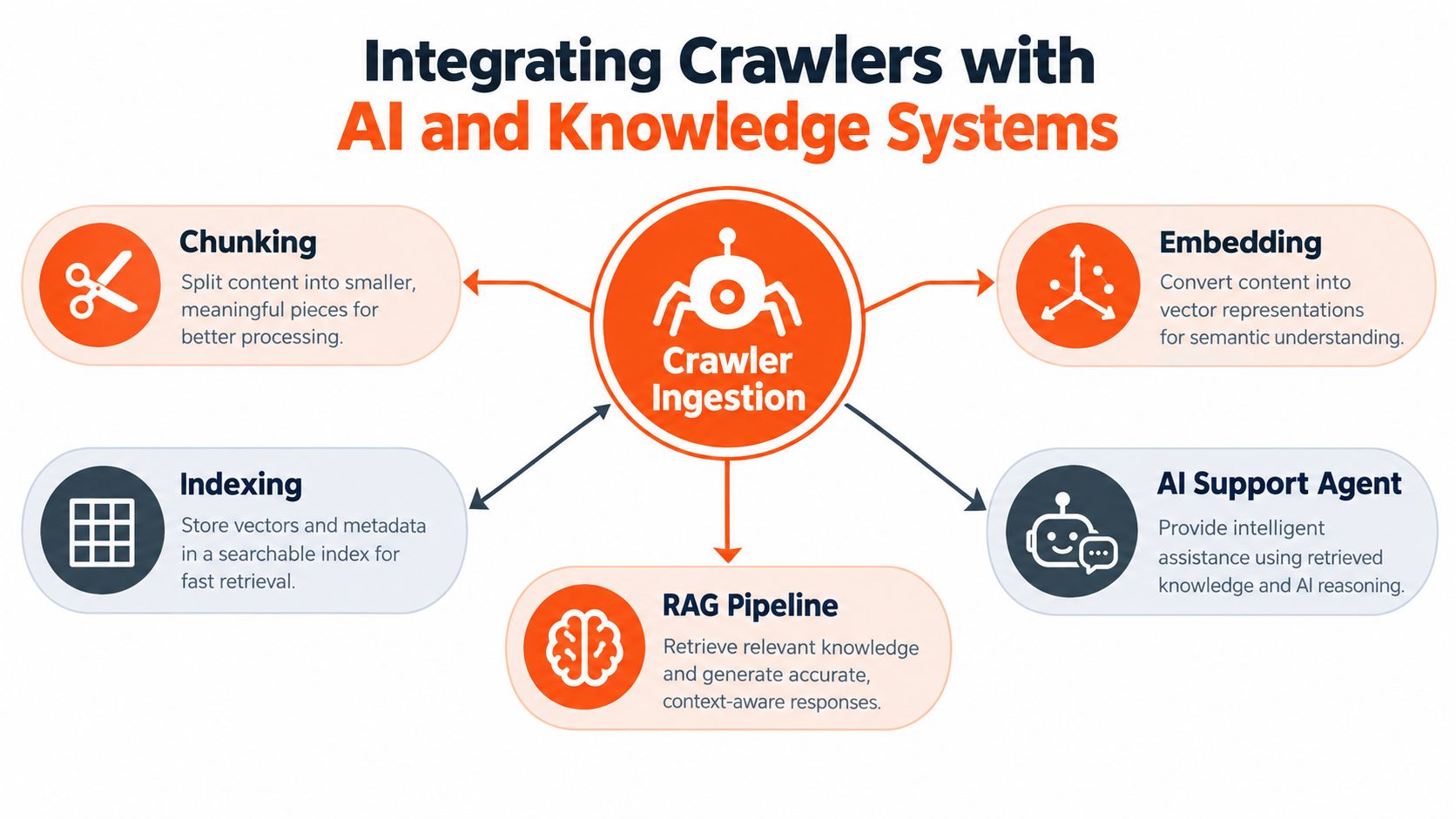
From page to support response
Consider a billing question about changing a subscription. The crawler captures the billing guide and its headings. The ingestion pipeline preserves the plan context and update metadata, creates chunks that keep procedural steps together, and indexes them with the canonical page URL. Retrieval can then return the relevant instructions instead of a broad collection of unrelated billing content.
The model layer still needs guardrails. A strong model can't repair a missing page, resolve two conflicting policies without metadata, or know that a retrieved document is obsolete unless the index exposes that information. Model routing can assign routine questions to a fast model and complex or ambiguous questions to a stronger reasoning model, but routing should operate on clean, governed evidence.
AgentStack's document ingestion pipeline provides a useful reference point for thinking about this chain across websites and uploaded documents. In a multi-channel support operation, the same indexed source can inform a web widget, email reply, Slack response, or phone workflow, while a shared inbox handles cases that need a human.
For teams also tracking how content appears in AI-driven discovery, RankEngine's AI visibility guide offers a separate perspective. Visibility and support ingestion overlap around clarity, structure, and authoritative sources, but they aren't identical goals. A page can be visible to search systems and still be poor evidence for a support answer if it lacks version context or contains conflicting instructions.
Close the feedback loop
Conversation analytics should identify unanswered questions, low-confidence retrievals, stale citations, repeated escalations, and answers that agents correct. Those signals can trigger content updates, targeted recrawls, better exclusions, or revised chunking rules. The system becomes dependable when support outcomes influence ingestion decisions rather than sitting in a separate reporting dashboard.
Security, Privacy, and Compliance in Web Crawling
A support crawler can ingest a page that looks public while exposing customer details, internal procedures, or an endpoint that should never enter an AI knowledge base. Robots.txt helps state publisher preferences, but it does not authenticate requests, enforce authorization, or protect a URL.
A 2025 study of approximately 3.9 million requests across 36 websites found different compliance rates by bot category. AI assistants had a 0.665 overall compliance rate, AI data scrapers 0.560, and AI search crawlers 0.644 (study on crawler compliance with robots.txt). The same research context reports an 87% increase in scraping during Q1 2025, while bots ignoring robots.txt rose from 3.3% to 12.9%. The figures show why a policy file cannot govern sensitive information or determine whether an extracted page is suitable evidence for a support answer.
Use layered controls
- Robots and page directives: Publish clear robots.txt rules and use meta or HTTP directives where appropriate.
- Actual access control: Put private customer, employee, and account content behind authentication and authorization. A disallow rule is not a security control.
- Transport and origin protection: Apply rate limits, bot verification, request monitoring, and conservative concurrency to protect site performance.
- Data governance: Set retention, deletion, residency, redaction, and approved-destination rules before ingestion begins.
- Evidence: Record the declared user-agent, request history, policy result, source URL, extracted record, and removal status.
Separate discoverability from permission. Public documentation may be eligible for ingestion, while a publicly reachable endpoint containing confidential-looking material should be excluded and investigated. Human review suits ambiguous paths, especially on sites that mix public help content with customer-specific material. This decision directly affects support-agent quality: unauthorized or poorly governed content can produce answers that reveal private information or apply outdated instructions.
Teams can apply privacy-by-design principles by limiting collection, controlling access, and planning deletion before content enters the knowledge system. Governance should also assign an owner for exceptions and removal requests, so a support team can correct unsafe evidence without waiting for a full crawl.
Governance principle: If you cannot explain why a page was fetched, where its content went, and how to remove it, the crawl is not production-ready.
Best Practices for Configuring Crawlers for Customer Support
A support agent can start citing an outdated outage procedure hours after an update if the crawler treats every page alike. Configure recrawling around how quickly information changes, not around one global interval. Product documentation, outage guidance, pricing rules, and release notes deserve closer attention than stable reference pages. Use sitemaps and content timestamps to create a priority queue, then let unchanged pages age without repeated full processing.
A production configuration should include these controls:
- Declare scope clearly. Include authoritative documentation paths. Exclude search results, tracking parameters, account areas, and duplicate archives.
- Preserve source context. Store the canonical URL, headings, page title, language, version markers, and update date with each extracted record.
- Use selective rendering. Fetch static HTML directly. Render only pages whose meaningful content appears after JavaScript execution.
- Fingerprint content. Detect unchanged pages and near-duplicates before sending records for embedding.
- Control throughput adaptively. Monitor latency, Time to First Byte, active connections, 429 responses, and 5xx responses for each origin. Google's crawl-budget guidance describes the feedback loop: healthier latency can support higher connection limits, while rising latency, rate limits, or server errors call for lower limits.
- Back off with jitter. Reduce concurrency after repeated failures, wait progressively longer, and vary retry timing so recovery attempts do not create another traffic spike.
- Measure knowledge quality. Track missing answers, citation freshness, conflicting documents, inaccessible pages, and cases where rendered content differs materially from the raw response.
Accessibility belongs in that quality report. The 2025 WebAIM Million analysis found detectable accessibility failures on 94.8% of tested home pages, and one in ten skip links were broken (WebAIM Million 2025 analysis). A crawler that captures only visible text can miss content that customers using assistive technology cannot reach or interpret. Test the complete content path, not only the HTTP response. That check improves both ingestion coverage and the evidence available to support agents.
Turning Crawling Quality into Better Support Answers
A larger corpus doesn't automatically create better support. Unfiltered ingestion can add stale instructions, duplicate pages, inaccessible material, and contradictory product versions, making retrieval less precise even when crawl coverage looks impressive.
Review crawl reports beside support outcomes. Look for unanswered questions, citations pointing to old pages, repeated escalations, low-confidence responses, and corrections made by human agents. Those signals tell you whether to change the crawl scope, refresh schedule, parser, metadata, or source content.
The practical standard is simple: every answer should be traceable to permitted, current, relevant evidence. Validate the sources first, record policy decisions, prioritize changing documentation, and make deletion a normal operational action rather than an emergency procedure.
Website crawling software becomes valuable when it improves the complete support loop, from source discovery to retrieval to human review. Treat it as a continuously measured knowledge system, and page counts become secondary to resolution quality.
AgentStack can crawl and index website content, combine it with uploaded documents and other knowledge sources, and deliver grounded support through web chat, email, Slack, and voice. If you're ready to connect crawling quality with retrieval, analytics, and human escalation workflows, visit AgentStack and evaluate the ingestion path against your highest-risk support questions.