A customer emails support@ while three agents are already working through the queue. One opens the thread, another starts drafting a reply, and a third assumes the billing team owns it. Nobody assigns the conversation. The service target passes, then an automated response arrives and creates another handoff without resolving the original issue.
This is why shared mailbox best practices can't stop at permissions or folders. A support mailbox needs explicit control points for access, ownership, priority, status, service targets, handoffs, knowledge, measurement, and automation. Email remains a foundational business-workflow channel. Research summarized in Front's shared inbox management guide reports that approximately 1 billion workers rely on email for work, 86% prefer it for workplace communication, and the average person receives 55 business emails per day. A shared address should therefore operate as a queue, not as a personal inbox with several people looking at it.
The ten practices below connect the operating model from first access to continuous improvement. They also show where AgentStack can help unify conversations, route work, retrieve approved knowledge, analyze outcomes, and escalate to accountable human agents. For broader process design, teams can also explore this workflow optimization automation service.
Table of Contents
- 1. Establish Clear Access Controls and Role-Based Permissions
- 2. Implement Automated Routing and Intelligent Escalation Workflows
- 3. Maintain a Unified Knowledge Base and Content Ingestion Strategy
- 4. Define and Monitor Key Performance Indicators and Response Metrics
- 5. Establish a Human Handoff and Escalation Protocol
- 6. Enable Omnichannel Support with Consistent Messaging
- 7. Implement Security, Compliance, and Data Privacy Controls
- 8. Develop a Continuous Improvement Process Based on Feedback and Metrics
- 9. Build Agent Training and Onboarding That Teach Judgment
- 10. Match AI Model Selection and Routing to Cost and Performance
- Shared Mailbox Best Practices: 10-Point Comparison
- Make Every Shared Inbox Conversation Accountable
1. Establish Clear Access Controls and Role-Based Permissions
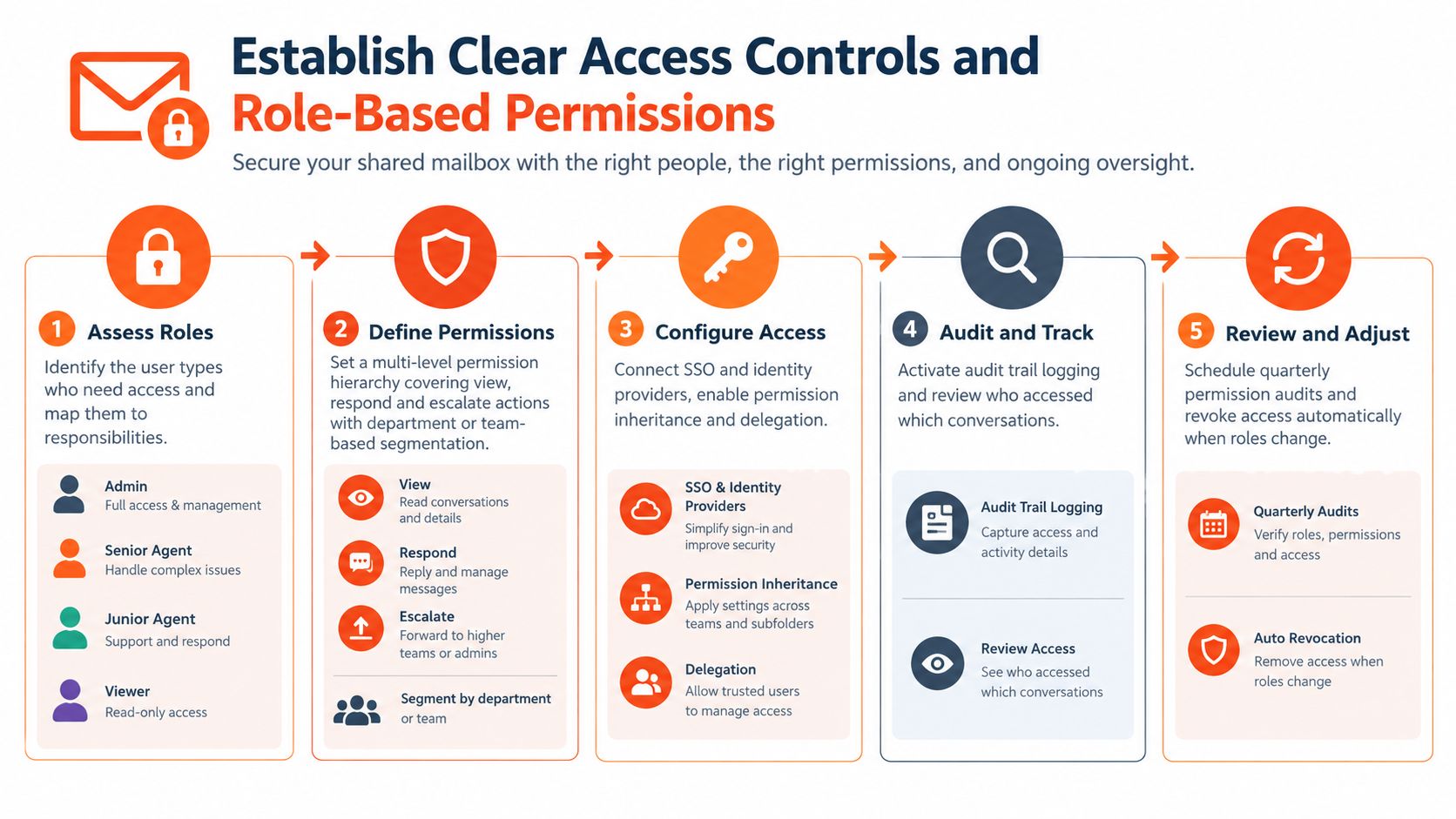
A shared mailbox should never depend on a shared password. Each person needs an individual identity, a defined role, and only the permissions required to perform assigned work. That design protects customer information and gives managers a usable record of who accessed, changed, or sent a message.
Start with three baseline roles: administrator, senior agent, and junior agent. The administrator manages membership, settings, retention, and integrations. Senior agents can handle escalations and approve sensitive actions. Junior agents may read, classify, and draft messages while restricted from high-risk approvals. A SaaS company might route billing conversations only to finance-trained agents, while an e-commerce team limits refund decisions to senior staff. During onboarding, new agents can receive read-only access until they understand the workflow.
Microsoft recommends treating a Microsoft 365 shared mailbox as a delegated resource rather than a login identity. Administrators should block sign-in to the associated account and grant individual users explicit membership-based permissions. Full Access, Send As, and Send on Behalf should be separated according to job requirements, then reviewed on a fixed schedule. SigFinch's explanation of role-based access control offers useful background for documenting those distinctions.
Build permissions around actual decisions
Document who may read, reply, reassign, archive, delete, create folders, change templates, and escalate. Use AgentStack's role-based controls to align permissions with team, responsibility, and escalation path, then use exportable audit logs to investigate changes and access patterns.
Practical rule: Access reviews don't replace workflow ownership. A tightly secured inbox can still miss customer messages if nobody owns the queue.
Review the access list quarterly and revoke access immediately after a departure or role change. In AgentStack, keep sensitive data fields and high-risk actions behind the roles that require them.
2. Implement Automated Routing and Intelligent Escalation Workflows
Routing should answer two questions before a reply is drafted: what kind of work is this, and who is accountable for the next action? A rule that merely moves messages into folders can reduce visual clutter while leaving the ownership problem untouched.
Create priority tiers such as critical, urgent, standard, and low priority, then define the response target, queue, and escalation path for each. Route an order-status question to a routine support flow, send a payment dispute to a specialist, and forward a suspected product defect to the technical or product team. For a high-value customer, routing may also add context for the account owner without allowing the message to bypass the support queue.
AgentStack can classify incoming conversations, apply routing rules, and coordinate different AI models for different levels of complexity. Fast models can handle approved, repetitive questions, while more capable models or human specialists can review nuanced technical, policy, or emotionally charged issues. Set a confidence threshold that triggers a human handoff instead of allowing uncertain automation to send a confident-sounding answer.
Treat fallback as part of the route
Every automated path needs a fallback queue, an owner, and an alert when a message can't be classified. Monitor unassigned work, aging conversations, queue length, and escalations in AgentStack's analytics. Review routing rules after policy changes, product launches, and recurring misclassifications.
Use AgentStack's shared inbox to make assignment visible. Collision prevention, internal notes, status controls, and escalation triggers turn automation into controlled movement through the queue rather than another invisible handoff.
3. Maintain a Unified Knowledge Base and Content Ingestion Strategy
Agents can't give consistent answers when the approved policy lives in one document, the latest product detail sits in Notion, and an outdated FAQ appears in search results. A shared mailbox exposes that fragmentation quickly. Two agents may answer the same question differently because they consulted different sources.
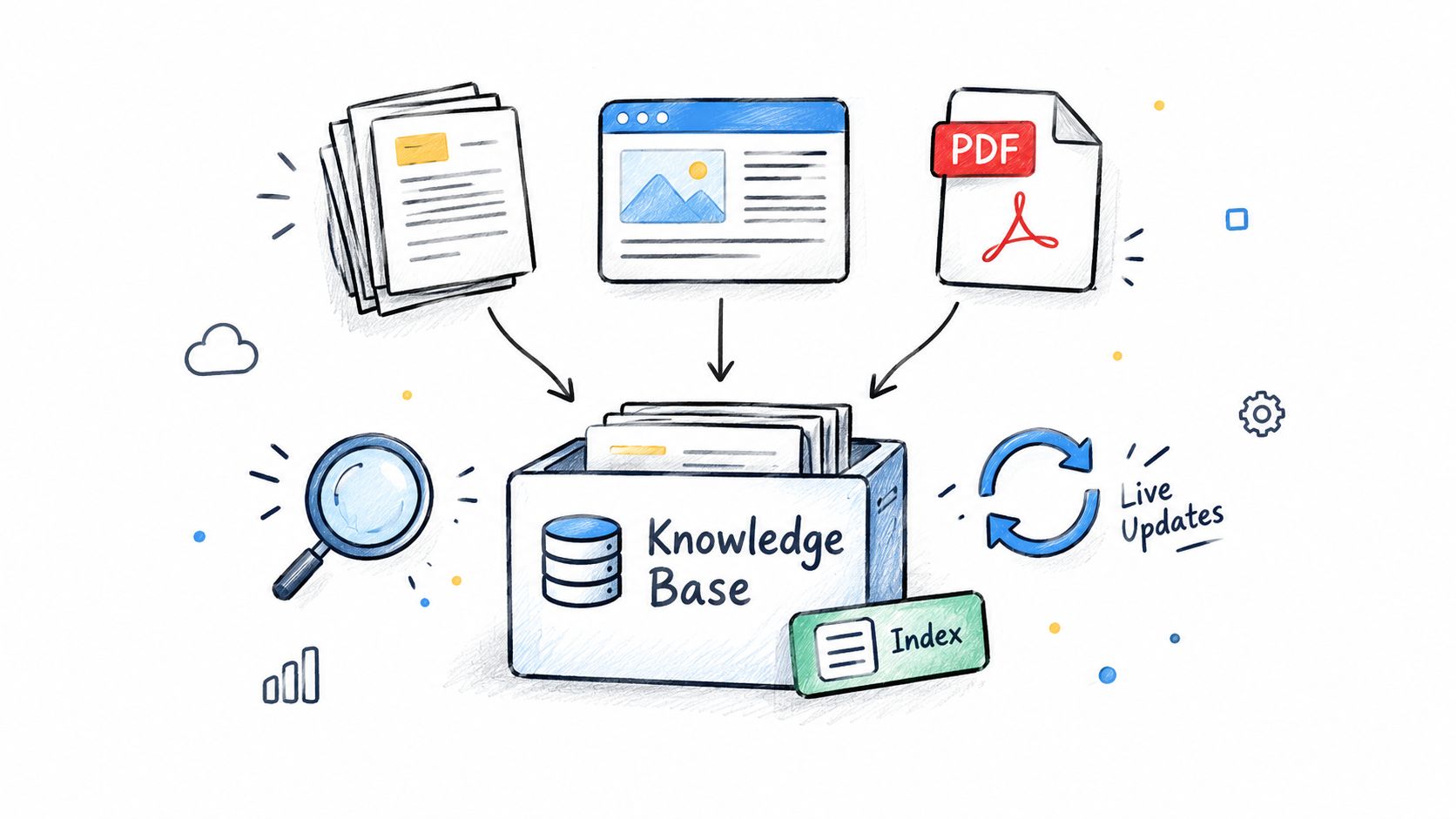
Create one maintained knowledge layer for customer-facing information. Include website pages, product documentation, pricing guidance, FAQs, release notes, troubleshooting files, and approved policy documents. AgentStack supports website crawling, document uploads, Notion synchronization, and custom question-and-answer pairs, so human agents and AI workflows can work from the same indexed material.
A SaaS support team might connect its product wiki, pricing pages, and API documentation. An e-commerce operation might ingest shipping policies, product catalogs, and returns guidance. A technical startup may add troubleshooting PDFs and release notes, while keeping sensitive architecture material restricted to the appropriate team.
Give every source an owner
Knowledge management fails when nobody owns accuracy. Assign a team to each section, record when content was last reviewed, and require approval before publishing policy changes. Use analytics to find unanswered questions, repeated corrections, and conversations where agents regularly add internal notes because the source material is incomplete.
The AgentStack document ingestion pipeline can support the technical side of collecting and indexing content, but ingestion isn't governance. Remove superseded documents, distinguish regional or plan-specific rules, and add custom answers for edge cases. A model can retrieve the wrong source efficiently if the team hasn't maintained the source set.
4. Define and Monitor Key Performance Indicators and Response Metrics
A mailbox can look busy and still provide poor support. Volume alone won't tell a support leader whether conversations are assigned promptly, resolved completely, or reopened because the original answer missed the issue.
Track the flow of work from arrival to closure. Useful measures include time to owner assignment, first-response time, unresolved-age distribution, reopen rate, duplicate-response rate, escalation rate, and customer satisfaction after resolution. Also separate automated outcomes from human outcomes. That distinction shows whether automation is resolving suitable work or merely deflecting it until a customer writes again.
A 2022 Microsoft 365 adoption survey summarized in KeepKnown's shared inbox management coverage reported that 76% of organizations with more than 500 employees used at least one shared mailbox, while 58% of those organizations experienced at least one misrouted or unassigned email during the preceding 12 months. The operational lesson is more important than adoption: a shared address doesn't create accountability by itself.
Make metrics change decisions
Use AgentStack's analytics to identify unanswered questions, sentiment patterns, conversation volume, resolution outcomes, and backlog risks. A weekly team review can examine aging and unassigned work. A broader monthly review can evaluate whether routing, knowledge, staffing, or model selection needs adjustment.
Customer service KPI guidance from AgentStack can help teams define the reporting layer. Don't reward speed without quality. A fast reply that causes a reopen or escalation may be less valuable than a slower, complete resolution. Pair response targets with quality review, customer feedback, and closure accuracy.
5. Establish a Human Handoff and Escalation Protocol
Automation should make a handoff easier, not make the customer start again. When an AI agent escalates a conversation, the receiving person should see the complete thread, the customer's stated goal, relevant account context, the reason for escalation, and any actions already attempted.
Define escalation triggers in operational language. Examples include security concerns, identity verification issues, legal complaints, emotionally charged language, policy exceptions, technical complexity, and requests that require approval. A refund request may need a senior review, while a routine delivery question can remain in the standard queue. The exact boundary depends on your business, but the decision must be explicit enough for agents and automation to apply consistently.
Write the handoff, don't just send it
An effective handoff includes a concise summary, the current state, the unresolved question, evidence gathered, and the requested next action. Internal notes should remain attached to the conversation so the next agent doesn't have to search Slack, personal inboxes, or scattered documents.
AgentStack's shared inbox can present escalated conversations in a unified view and preserve the conversation history for human review. Configure team-level escalation queues when expertise matters more than round-robin distribution. If a technical issue belongs with engineering, route it to a queue with an accountable owner rather than forwarding an unstructured message.
A handoff is complete only when the receiving person knows what decision is needed and when the customer should hear back.
Set response targets for escalated work and alert a lead when the target is at risk. Review escalation reasons regularly. Repeated escalations may indicate a missing knowledge article, an overly broad automation rule, or a policy that agents can't apply confidently.
6. Enable Omnichannel Support with Consistent Messaging
Customers may begin in web chat, continue by email, ask an internal question in Slack, and then request a phone call. Your team doesn't need identical wording in every channel, but it does need consistent facts, policy interpretation, and conversation context.
Use the same approved knowledge base across email, chat, Slack, and voice workflows. Keep the tone adapted to the channel. Chat responses should be concise and easy to scan. Email can include fuller troubleshooting steps. Phone support may require a spoken explanation and a written follow-up. The customer should receive the same answer about eligibility, product behavior, and next steps regardless of the channel.
Connect channels without scattering ownership
AgentStack supports website chat, automated email ticket replies, Slack thread resolution, and a real-time phone agent. Use channel-specific routing where it improves service. A routine product question may be suitable for chat, while a complex technical issue may need a detailed email thread. An urgent account concern may require a phone escalation.
The trade-off is operational complexity. More channels create more places for duplicate work and inconsistent context. Keep one customer conversation record where possible, and make the shared inbox the source of truth for escalated work. If a discussion occurs in Slack, record its decision in the support conversation before closing the thread.
Measure channel performance separately. A strong email process can conceal poor chat handoffs, while a high chat resolution rate can coexist with weak follow-up. Review response time, unresolved age, satisfaction, and escalation patterns by channel.
7. Implement Security, Compliance, and Data Privacy Controls
Support teams routinely handle identity information, account details, payment questions, attachments, and complaints. Security controls must cover not only who can open the mailbox, but also what agents can see, what automation can process, and what the organization retains.
Classify data into practical categories such as public, internal, confidential, and personal. Restrict sensitive queues to trained roles. Mask unnecessary identifiers in agent-facing views, and define how agents verify identity without copying sensitive data into internal notes or AI prompts. Train the team on suspicious attachments, unauthorized disclosure, and the escalation process for security events.
Microsoft's guidance on identifying delegated mailbox activity in the Purview audit log supports reviewing delegated actions and checking whether auditing is enabled. Enable auditing for relevant access, Send As, Send on Behalf, and deletion activity. Audit logs are useful only when the team knows who reviews them and what triggers an investigation.
Retention should be purposeful
Don't keep everything forever just because storage is available. Microsoft notes that mailbox audit records may have a 90-day default retention period in some configurations, while longer retention requires additional configuration. Microsoft's data retention and privacy documentation also illustrates why access, deletion, and retention need deliberate policy decisions.
Separate mailbox content, audit events, attachments, AI summaries, exports, and evaluation data in your policy. Document legal holds, deletion procedures for dormant mailboxes, and rules for using support content in retrieval, evaluation, model improvement, or automated replies. AgentStack provides role-based controls, audit logs, data residency, deletion and export features, and encryption controls, but your organization still needs a documented governance decision for each data category.
8. Develop a Continuous Improvement Process Based on Feedback and Metrics
A shared mailbox drifts unless someone reviews the evidence and changes the system. Templates become outdated, product terminology changes, routing rules create exceptions, and agents discover recurring questions that never reach the knowledge base.
Create an improvement backlog from actual conversations. Record unanswered questions, repeated escalations, reopened threads, duplicate replies, negative customer feedback, and cases where an agent corrected an automated draft. Prioritize work by a combination of frequency, customer impact, operational risk, and implementation effort.
Run a repeatable review cycle
A support lead can review a sample of difficult conversations with agents, then turn findings into specific changes. Add an approved Q&A pair for a repeated edge case. Update a policy article after a product change. Narrow a routing rule that sends unrelated messages to the same queue. Adjust a confidence threshold when human reviewers regularly reject drafts.
AgentStack's analytics can surface conversation volumes, resolution outcomes, sentiment trends, and unanswered questions. Use those signals to connect customer experience with configuration work. If many conversations ask for information that exists in a document, the problem may be discoverability or retrieval quality. If agents repeatedly escalate the same policy question, the policy may need clearer language.
Make changes in controlled batches and compare the outcome with the previous operating state. Keep a record of what changed, when it changed, and which metric should move. Involve frontline agents because they see confusing customer language and handoff failures before dashboards make the pattern obvious.
9. Build Agent Training and Onboarding That Teach Judgment
A new agent can have the right mailbox access and still create risk without clear rules for assignment, status, escalation, and knowledge use. Onboarding should teach how the support operation works, not just where to click.
Start with the queue's purpose, coverage expectations, role permissions, status labels, priority definitions, response standards, and escalation paths. Walk through representative conversations and have new agents practise claiming a message before drafting, adding an internal note, consulting approved knowledge, reassigning work, documenting a handoff, and closing a resolved thread.
A SaaS team might let junior agents handle routine pre-sales questions while senior agents review complex technical responses. An e-commerce team can pair new agents with experienced staff while they learn refunds, delivery exceptions, and complaint handling. A read-only mailbox role lets new hires study real conversations without granting unnecessary send or deletion authority.
Train judgment, not template recitation
Templates support consistency, but agents must recognise when one does not fit. Teach them to check the customer's actual question, confirm that the cited policy is current, and remove irrelevant language before sending. Review examples of strong replies, incomplete resolutions, unsafe disclosures, and poor handoffs. Include practice cases where the correct action is to stop drafting, assign ownership, or escalate.
Use AgentStack analytics to review quality samples, escalation patterns, unanswered questions, and resolution outcomes. Refresh training when policies, products, routing rules, or model behaviour changes. Keep a short reference guide for common decisions, while treating the maintained knowledge base as the authoritative source.
Training is complete only when an agent can explain how to answer, when to stop, who should own the work, and when escalation is required.
Training standard: A person is ready for independent queue work when they can explain not only how to answer, but when to stop, assign, and escalate.
10. Match AI Model Selection and Routing to Cost and Performance
A support mailbox should route work according to risk, judgment, and service requirements. A routine status question does not need the reasoning depth required for a technical diagnosis, policy exception, or distressed customer complaint. Sending every message to the most capable model can add latency and cost. Sending every message to the fastest model can increase corrections, escalations, and customer frustration.
Classify the work your mailbox receives before choosing models. Routine categories may include approved FAQs, status requests, simple account instructions, and known troubleshooting steps. Complex categories may involve ambiguous symptoms, multiple systems, policy interpretation, sensitive data, or emotional situations. Route each category according to its risk and required judgment, not message length alone.
AgentStack's model-agnostic orchestration can route between frontier models such as GPT-5.2, Claude, and Gemini, and faster models such as Grok and Haiku. The model name matters less than the rule governing its use. Define which work can be automated, which requires a draft for approval, and which must go directly to a human queue. Assign an accountable owner for each route so automation does not leave unclear responsibility.
Optimize for resolution quality
Use confidence-based fallback, but do not treat a confidence score as proof of correctness. Compare model suggestions with human approvals, escalations, reopen rates, customer feedback, and unresolved age. A model that produces polished answers but leads to more follow-up may be a poor choice for that category.
Review cost per resolved conversation alongside quality. Test routing changes on a controlled set of work, document the results, and adjust rules when product content or model capabilities change. Keep high-risk topics behind human approval, preserve the full conversation history, and make the automated sender attributable. These controls connect model selection to the mailbox's wider operating system of ownership, service levels, and continuous improvement.
Shared Mailbox Best Practices: 10-Point Comparison
| Strategy | 🔄 Implementation Complexity | ⚡ Resource Requirements | ⭐ Expected Outcomes | 📊 Ideal Use Cases | 💡 Key Advantages / Tips |
|---|---|---|---|---|---|
| Establish Clear Access Controls and Role-Based Permissions | Medium–High: planning, role mapping, policy design | IAM/SSO integration, admin time, audit logging | Strong security & compliance; improved accountability | Regulated industries, large support teams, sensitive data | Enforce least-privilege; audit quarterly; document role-data access |
| Implement Automated Routing and Intelligent Escalation Workflows | Medium: rule creation, ML tuning, testing | Routing engine, intent models, monitoring dashboards | Lower response/resolution times; better FCR | High-volume inboxes with mixed complexity | Start with SLA tiers and fallback paths; tune confidence thresholds |
| Maintain a Unified Knowledge Base and Content Ingestion Strategy | Medium: ingestion pipelines, indexing, versioning | Content owners, ingestion tools, RAG indexing | Consistent, accurate responses; faster agent ramp | Organizations with diverse docs and AI-driven support | Audit content quarterly; assign ownership; prioritize high-traffic sources |
| Define and Monitor Key Performance Indicators (KPIs) and Response Metrics | Low–Medium: metric definitions and dashboarding | Analytics tools, data integration, analyst time | Measurable performance; data-driven staffing and training | Teams scaling support or optimizing automation vs humans | Track AI vs human metrics separately; set baselines before changes |
| Establish a Human Handoff and Escalation Protocol | Low–Medium: policy docs, SLA config | Shared inbox, notifications, trained escalation agents | Seamless context transfer; fewer repeat explanations | High-stakes queries (refunds, security, complex bugs) | Define escalation criteria (e.g., sentiment, amount); set SLAs (e.g., 15m) |
| Enable Omnichannel Support with Consistent Messaging | Medium–High: multi-platform integrations | Channel connectors, unified UI, identity resolution | Consistent cross-channel experience; reduced context loss | Businesses where customers use email, chat, phone, Slack | Prioritize channels by volume; optimize tone/length per channel |
| Implement Security, Compliance, and Data Privacy Controls | High: encryption, residency, policy enforcement | Security engineers, compliance tooling, audits | Regulatory compliance; reduced breach risk; auditability | Fintech, healthcare, enterprise with strict regs | Classify data sensitivity; use PII masking; test deletion/export quarterly |
| Develop a Continuous Improvement Process Based on Feedback and Metrics | Medium: process design, cadence, ownership | Analysts, BI tools, improvement backlog | Iterative quality gains; reduced ticket volume over time | Rapid product change, teams seeking steady optimization | Run weekly reviews of unanswered Qs; prioritize by frequency×severity |
| Create Comprehensive Agent Training and Onboarding Programs | Medium: curriculum creation, assessments, mentoring | Trainers, mentors, training materials, evaluation tools | Faster ramp, consistent quality, fewer compliance errors | Rapid hiring, distributed or hybrid support teams | Pair new agents with mentors; certify competency before independence |
| Leverage AI Model Selection and Routing for Cost and Performance Optimization | Medium–High: multi-model orchestration, routing rules | Multiple models, cost tracking, tuning & monitoring | Lower cost-per-resolution while preserving quality | High-volume, cost-sensitive support with mixed-query complexity | Route routine queries to fast models; use confidence-based fallback to frontier models |
Make Every Shared Inbox Conversation Accountable
A shared mailbox becomes manageable when every conversation has a visible path. Someone may access it, but a named person or queue must own the next action. A message may be urgent, but the team must define what urgent means, where it goes, and when a lead is notified. An AI system may classify or draft a response, but a human owner remains accountable for the outcome when the situation requires judgment.
Start with access and ownership. Block shared sign-ins, use individual accounts, define role permissions, and document who administers the mailbox, who triages it, and who handles escalations. Then define the workflow states that matter to your team, such as new, assigned, in progress, waiting for the customer, waiting for an internal team, escalated, and resolved. Every active conversation should have one accountable owner and one visible state.
Next, write the operating rules. Document priority levels, response targets, assignment timing, templates, tagging, internal notes, handoffs, approval requirements, and closure criteria. Make the rules specific enough that a new agent can follow them without asking a colleague what “urgent” means. Keep the customer-facing reply in the shared system, and record decisions made in other tools back on the conversation.
Connect the workflow to a maintained knowledge base. Assign owners to documentation, review content after product and policy changes, and use unanswered-question data to find gaps. A retrieval system can only provide reliable support when the underlying sources are current, approved, and appropriately restricted.
Measure speed and quality together. Track time to assignment, first-response time, unresolved age, reopen rate, duplicate-response rate, escalation reasons, and customer satisfaction after resolution. Review automated and human outcomes separately, then use the findings to improve staffing, training, routing, source content, and model selection. Microsoft 365 guidance also makes capacity planning part of mailbox governance. A shared mailbox supports 25 simultaneous users as a practical boundary, and a shared mailbox is limited to 50 GB without a license, with 100 GB requiring Exchange Online Plan 2, as documented in Microsoft's shared mailbox guidance. If one queue is approaching those constraints or serving unrelated functions, segment it by region, purpose, or expertise.
The practical next step is small. Choose one high-volume queue, audit its current access list, assign explicit roles, define its states and escalation triggers, set response targets, and review unassigned and aging work. Add automation only after ownership is clear. Review the results with the agents who handle the queue, correct the rules and knowledge gaps they identify, then extend the operating model to other inboxes and channels.
AgentStack can fit into that sequence as a shared support environment with unified conversations, routing, knowledge ingestion, analytics, role-based controls, and human escalation. The platform doesn't remove the need for accountable support leadership. It gives the team a way to make ownership, context, automation, and improvement visible in one workflow.
AgentStack helps support teams ingest website and document content, route conversations across AI models, and manage human handoffs through a shared inbox with analytics and role-based controls. Visit AgentStack to connect your mailbox workflow with knowledge, omnichannel support, escalation, and continuous operational review.