The popular advice on MCP server setup is backwards. Most tutorials tell you to get a tool answering in your editor, celebrate the demo, then figure out security and deployment later. That order works for a calculator. It fails the moment a tool can read a ticket, book a meeting, or send a message for a real customer.
Protocol compliance and HTTPS don't make a server safe. They prove messages are formatted correctly and encrypted in transit. They say nothing about whether the caller should see that ticket, whether the token was issued for your server, or whether a retrieved document just told the model to escalate something it shouldn't touch. For AgentStack, I would treat every tool as a privileged integration from the first line of configuration, not as a feature to harden after launch.
That means the setup sequence matters more than the quickstart. Choose the transport first, set required fields deliberately, apply least privilege before any customer record is reachable, and test real support workflows including the calls that must fail. Only then do you claim the agent and turn tools on for customers.
Table of Contents
- Pick STDIO or Streamable HTTP First
- Bring Up the Server and Set Required Fields
- Least Privilege Before Any Customer Record
- Example Tools and Failed Call Fixes
- Claim the Agent and Turn Tools On
Pick STDIO or Streamable HTTP First
Transport decides who can connect, where secrets live, and how much operational work you're signing up for. Pick it after you've built tools and you'll often rebuild deployment, auth, and logging around a choice made for a laptop demo.
An MCP host, usually the AI application, coordinates one or more clients, and each client keeps a connection to a server. Servers expose resources for structured context, prompts for reusable templates, and tools for actions such as a database query or an API call. That's an interoperability layer for connecting a support application to knowledge bases, ticketing, CRM, calendars, and analytics, not a chatbot or a data store in itself.
STDIO Versus Streamable HTTP for AgentStack
| Transport | Clients | Best fit | Auth and ops load |
|---|---|---|---|
| STDIO | One local client | Desktop tools and local testing | Process launched by the host; secrets in local env |
| Streamable HTTP | Many clients and hosts | Shared tools across channels and tenants | HTTPS, OAuth, concurrency, and lifecycle management |
The split is not cosmetic. The official MCP architecture documentation states that a local MCP server using STDIO typically serves a single MCP client, whereas a remote server using Streamable HTTP will typically serve many MCP clients.
STDIO fits Cursor, Claude Code, Codex, and a first integration on one machine because the host launches the server as a local process for a locally trusted user. There's no public endpoint to defend and no concurrency problem to solve. The cost is reach. One process tied to one developer's session can't serve website chat, email, Slack, and voice at the same time.
Streamable HTTP fits shared support tools because one deployed service can accept connections from multiple clients and potentially multiple hosts. Your ticket lookup, CRM read, calendar, and analytics tools become centrally operated services. The cost is real operations work. You now own HTTPS termination, authentication, authorization, lifecycle management, restarts, and concurrent requests.
What sits under both transports
Both patterns share a data layer based on JSON-RPC, covering protocol versioning, capability discovery, tools, resources, prompts, and notifications. The transport layer handles connection establishment, message framing, and authorization. That's why changing transport later isn't just changing a URL. You're changing where trust is enforced.
Before you lock the choice, check the client configuration shape in the AgentStack MCP clients documentation so the tools you enable match what each host can discover and call. If you're moving toward a shared HTTP service, Foo Guard's MCP hardening guide is useful context for why that endpoint needs hardening beyond putting it behind HTTPS.
Practical rule: One trusted developer on one machine stays on STDIO. More than one host, tenant, or channel starts on HTTPS Streamable HTTP.
A clean tool contract can move from STDIO to HTTP later. Sloppy identity assumptions can't. If your local build assumes the process owner is the authorized user, that assumption breaks when the server becomes shared.
Bring Up the Server and Set Required Fields
Set the fields before you chase a successful tool call. Most early MCP server setup failures aren't model failures. They're missing commands, secrets placed in the wrong layer, tokens issued for the wrong audience, or a client discovering tools you never meant to enable.
MCP Client Fields by Transport
| Transport | Field | When | What it does |
|---|---|---|---|
| STDIO | Command and arguments | Required | Host launches one local server process |
| STDIO | Environment secrets | Required | Downstream credentials stay out of tool text |
| HTTP | Server URL | Required | Streamable HTTP endpoint served over HTTPS |
| HTTP | Authorization | Required | Access token audience must be this MCP server |
| Both | Enabled tools | Required | Client discovers only the tools you intend |
| Both | Audit log destination | Recommended, required for a second tenant | Records actor, tool, arguments, and result |
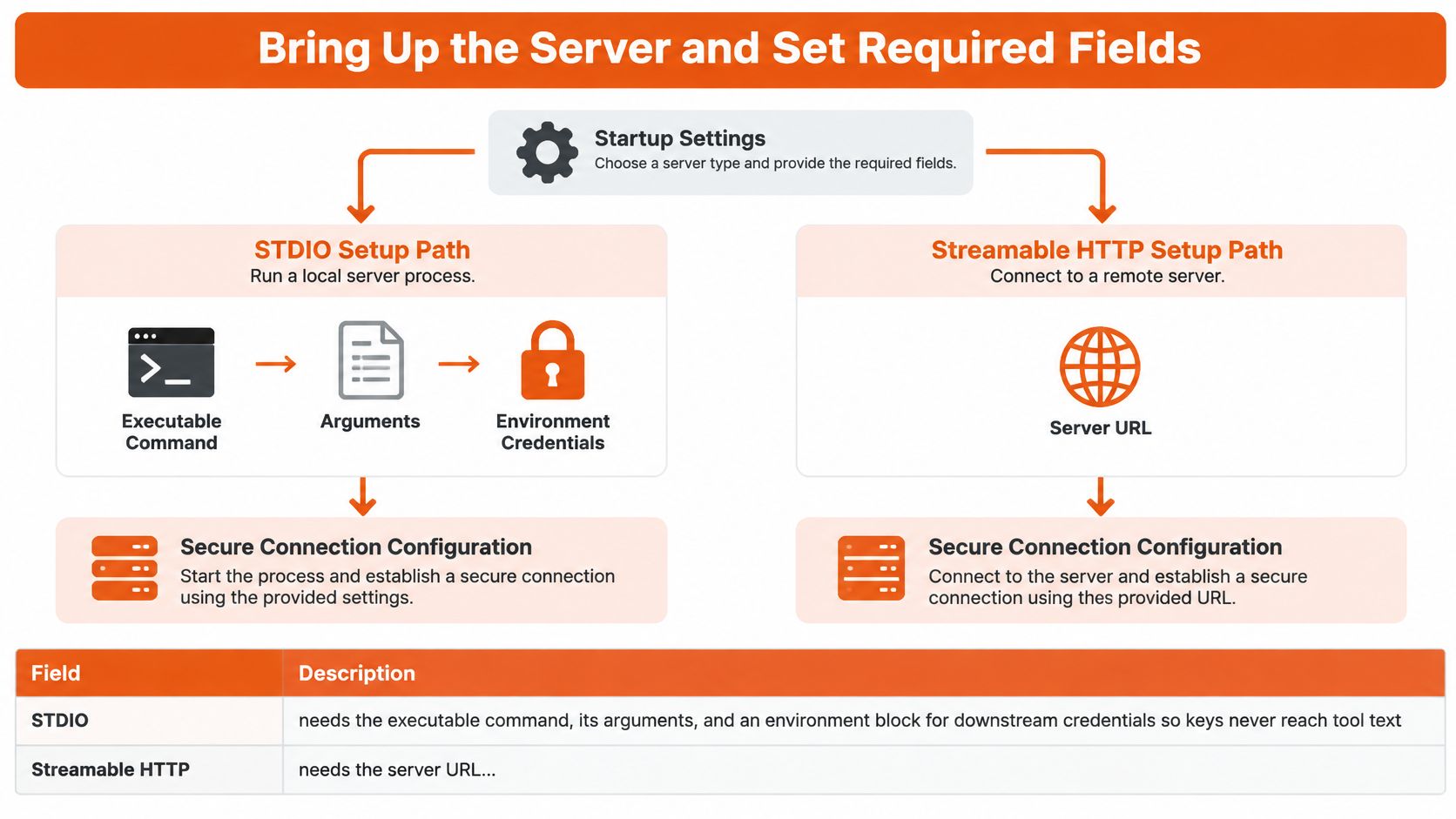
For STDIO, the executable command, its arguments, and an environment block are the minimum. Put downstream credentials in that environment block so API keys never reach tool descriptions, prompts, or model visible text. If a secret appears in a tool definition, you've already leaked it to the wrong audience.
For Streamable HTTP, the server URL must be served over HTTPS, and authorization must use access tokens issued for this MCP server. Don't accept a bearer token just because another API accepts it. A token for your analytics API isn't automatically a token for ticket lookup, even if the signature checks out.
Both transports need an explicit enabled tool list. Discovery should return only the tools you intend that client to use. The audit log destination is recommended for a single tenant test and becomes required the moment a second tenant appears, because without actor, tool, arguments, and result in one record you can't reconstruct a disputed action.
The diagram below maps the two configuration paths side by side so you can check fields before the first connection.
Bring up the first agent
Setup starts by pointing Claude Code, Codex or Cursor at agentstack.build/agent.md, and the coding agent then sets up the support agent. Setup needs no account, no dashboard and no card, which makes it easy to test the path before you commit a customer surface to it.
The setup has four steps. The agent gets the guide, reads your docs, embeds itself and starts answering, and then you claim it and take over. Don't skip the smoke test in the middle of that flow.
- Point the coding agent at the guide. Use an MCP capable client such as Cursor, Claude Code, or Codex so it reads the setup instructions directly instead of working from your paraphrase.
- Create the first support agent and smoke test it. Ask one question your docs already answer clearly. If it can't ground that answer, stop and fix ingestion before adding tools.
- Train it on real content. Use a site crawl, one or two PDFs, a Notion sync, and a few Q&A pairs. Representative content exposes chunking and retrieval gaps that a toy FAQ hides.
- Register the server. Use a STDIO command for local work, or register the Streamable HTTP URL after deployment. For HTTP, run the process somewhere that terminates HTTPS, restarts automatically, and exposes a health check you can monitor.
- Confirm discovery and make one read only call. Check that the client sees the expected resources, prompts, and tools, then call one read tool and verify the answer is grounded in your content.
Stop there. A grounded read call proves the path works without putting a customer surface live.
The walkthrough below shows the bring up sequence in practice, which is helpful to compare against your own client output when discovery looks empty or incomplete.
Where teams break the fields
The most common break is copy and paste. A teammate's STDIO environment file works on their laptop because the process inherits one user's credentials and trust level. Paste that same file into a shared HTTP service and you've exposed one user's keys to every client that can reach the endpoint. The tool calls may still succeed, which makes the mistake harder to notice.
Watch for these field level errors during bring up:
- Command drift: The configured command points at an old build, so discovery returns stale tools.
- Secret placement: Credentials sit in arguments or tool text where logs and model context can expose them.
- Audience confusion: The client sends a valid token from another service and the server accepts it without an audience check.
- Over enabled tools: A test client can discover write tools because nobody set an explicit enabled list.
- Missing restart: You change configuration but the host keeps talking to the old STDIO process.
If you're comparing how other agent setups sequence these fields, the PostPulse setup for AI agents gives a useful point of contrast for ordering client registration against tool enablement. I would still keep AgentStack's order stricter. Fields first, discovery second, one grounded read third, writes not at all in this stage.
Don't debug the model until you've proved the command, URL, token audience, and enabled tool list are the ones you think they are.
That discipline saves hours. When a client shows no tools or returns the wrong answer, you can isolate whether you're looking at transport, identity, discovery, or retrieval instead of changing prompts at random.
Least Privilege Before Any Customer Record
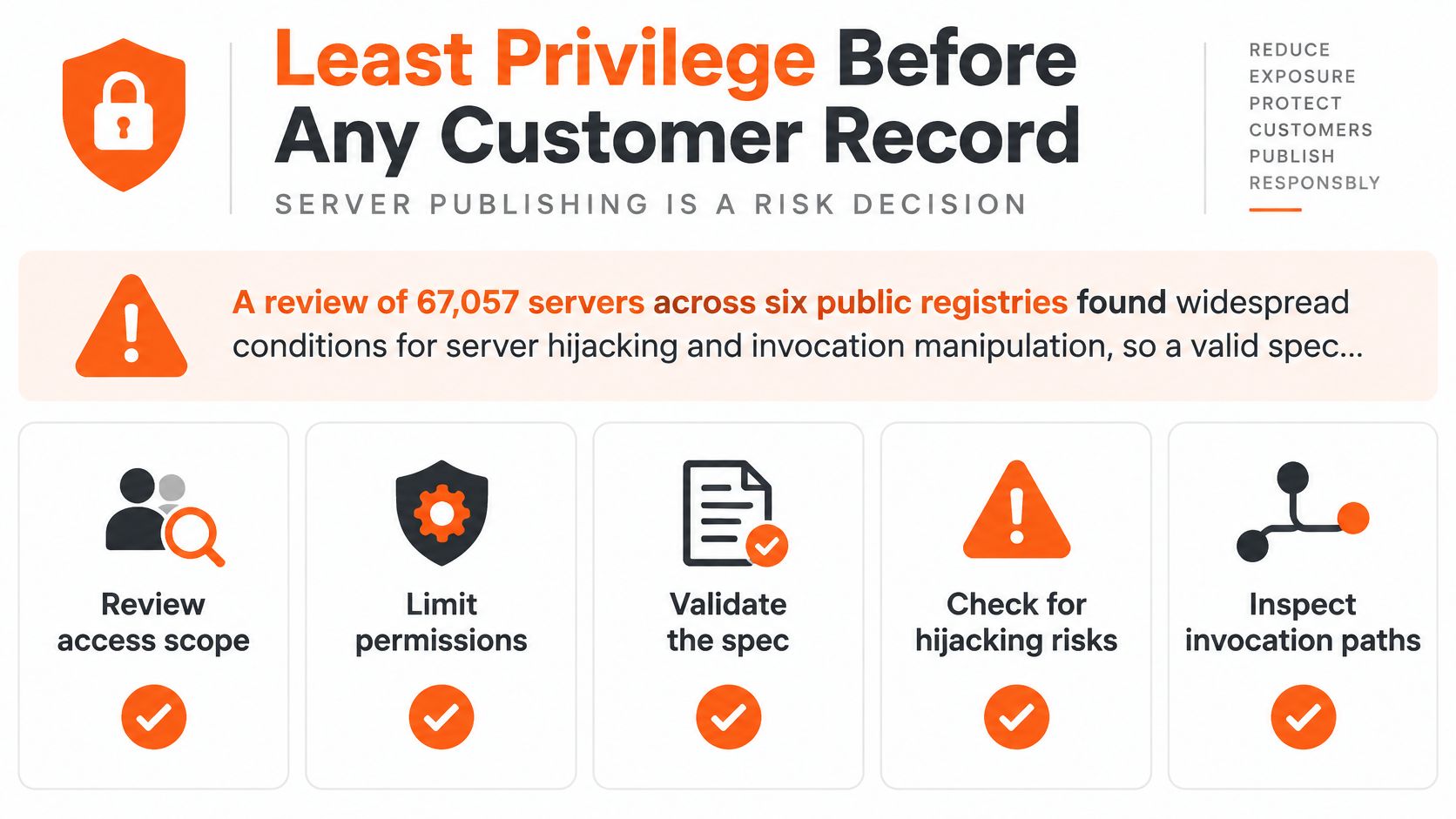
Publishing an MCP server is a risk decision, not a release checkbox. A recent academic analysis examined 67,057 servers across six public registries and reported widespread conditions enabling server hijacking and invocation manipulation, according to the MCP authorization specification. A valid spec and HTTPS are not a trust mark.
Remote deployment changes the threat model completely. The server becomes an internet facing resource server, while the client may carry user, tenant, or business system authority. A compromised or manipulated invocation doesn't just return a bad answer. It can act with whatever authority you wired into the handler.
The checklist below frames the controls to apply before customer records are reachable.
Controls in audit order
Start with narrow tools and explicit input schemas. A tool named for one job, such as looking up one ticket by ID, is easier to authorize than a generic query tool that accepts arbitrary filters. Define required parameters, allowed value shapes, and maximum scope in the schema, then enforce the same rules again inside the handler.
Authenticate at the transport with OAuth for HTTP deployments. Keep authorization endpoints on HTTPS and redirect URIs on localhost or HTTPS. Reject any token that wasn't issued for this specific server, including expired, malformed, wrong audience, and over scoped tokens. I would set the acceptance gate at 100% rejection for those cases in automated tests, with unauthorized callers receiving no data at all.
Validate every argument server side because a tool description is not a security boundary. The model chooses arguments based on descriptions and context. Your handler must enforce tenant identity, object level authorization, retention rules, and downstream API permissions before it touches a downstream system.
Separate read tools from write tools. Search, ticket lookup, and analytics belong in a different scope from sending a message, updating a CRM, or escalating a case. The AgentStack MCP scopes documentation is the place to align those scope names with the tools you enable per client.
- Read scope: Search ingested content, fetch a ticket the caller already owns, read analytics for their tenant.
- Write scope: Create or update records, book meetings, send outbound messages, trigger escalation.
- Confirmation gate: Require explicit confirmation before irreversible actions, even when the caller holds write scope.
Add audit logging, rate limits, consent prompts, and abuse monitoring from the start. Log actor, tool, arguments, and results so you can revoke, investigate, and roll back. Test malicious tool descriptions and prompt injection paths in retrieved documents, because retrieved text is data for the model to use, not instructions for it to obey.
Customers set and manage all user Permissions, and AgentStack has no responsibility for managing them. That ownership matters operationally. Your team decides which organisation users get which permissions, and your handlers must respect those decisions on every call.
Close with a rollback you can execute under pressure. Disable write tools first, rotate credentials second, then re enable one scope at a time while watching audit logs. If you can't disable writes independently from reads, your scope design isn't finished.
Example Tools and Failed Call Fixes
Use four support tools to prove your MCP server setup, not a calculator demo. Search ingested docs, look up a ticket by ID, book a meeting, and escalate by email or to the inbox cover retrieval, tenant scoped reads, scheduling writes, and human handoff. Each one exercises a different authorization and failure path.
For each tool, write one valid input and one input that must be refused. Search should return grounded passages for a documented question and refuse to invent policy for an undocumented one. Ticket lookup should return the caller's ticket and refuse a ticket ID belonging to another tenant. Meeting booking should accept a complete request with consent and refuse a request missing required contact details. Escalation should route a frustrated customer to a person and refuse to send outbound email without approval.
Build the harness from real workflows
Collect representative requests with the expected tool sequence, required parameters, authorization context, and expected final outcome. Redact personal data before those cases enter your test set. The Red Hat OpenShift AI evaluation guidance supports verified question, answer, tool call triplets and combining trace metrics with LLM as judge scoring, but it doesn't provide a universal pass rate benchmark.
Include adversarial cases on purpose. Ambiguous account ownership, missing parameters, prompt injection hidden in a retrieved document, and a request that must become a human handoff will find weaknesses that happy path demos miss. Say a help centre article contains a line telling the assistant to ignore policy and refund everyone. Your expected outcome is a grounded answer from the official refund policy, not obedience to the injected line.
Score each run with objective trace metrics:
- Tool recall: The model selected all expert required tools.
- Tool precision: The model avoided unnecessary tools.
- Order match: The sequence matched the required order.
- Parameter match: Arguments matched the expected values.
Add judge based dimensions for task fulfilment, grounding, tool appropriateness, dependency awareness, and efficiency. Record latency, timeouts, retries, token consumption, escalation rate, and grounding failures per model and routing policy. Keep separate splits for routine FAQ retrieval, multi step account support, and privileged actions so strong FAQ scores can't average away a severe failure on a write tool.
Each configuration should be tested against representative supported, unsupported, and ambiguous questions, and only the model and prompt that pass all three types should be saved. Before enabling automation, require zero unauthorized writes and 100% schema valid tool arguments, plus predefined recall and precision thresholds per workflow class. Don't claim a universal success rate for your deployment. Performance varies with model, tool descriptions, server latency, workflow complexity, and authorization design.
The AgentStack MCP tools documentation helps align tool names and descriptions with what your harness expects, which reduces false failures caused by naming drift between server and tests.
MCP Call Failures and the Fix
| Symptom | Likely cause | Fix |
|---|---|---|
| Client shows no tools | Wrong STDIO command or HTTP URL | Restart the client and confirm discovery |
| Timeouts after several agents connect | Shared traffic still on STDIO | Move that server to Streamable HTTP |
| Write tool runs instead of handoff | Read and write share one scope | Split tools and require confirmation |
| Answer follows text inside a document | Prompt injection in retrieved content | Treat retrieval as data and rerun that case |
Diagnose a 401 from a token that works elsewhere as an audience problem first, not a signing problem. Your server should reject it if it wasn't issued for this MCP server, and your test suite should prove that rejection happens every time.
Re run the full suite whenever tools, prompts, retrieval indexes, or model routing change. Compare results by workflow class instead of accepting a single blended score. A regression on privileged actions blocks release even if FAQ retrieval improved.
Claim the Agent and Turn Tools On
The server isn't finished until a person on your team owns it. Claim the agent, assign that owner, then connect tools in the order you already tested. Knowledge search first, ticket lookup second, then one write such as escalation by email or to the inbox.
Setting up an agent involves creating and testing the first agent, training it on your content, choosing a customer surface, then connecting tools and setting up human handoff. Don't skip the handoff because the read tools look good. A support agent that answers well but can't route an angry customer, an ambiguous account case, or an unsupported request to a person will fail at the exact moment trust matters most.
Turn on one write at a time, and only after the read path and handoff path both pass your supported, unsupported, and ambiguous cases.
AgentStack can be automated through REST API v1 or MCP, so the same coding agent that set the agent up can change configuration without a dashboard tour. That convenience waits until the token, scope, and three question gates have passed. Automation applied to an untested configuration just spreads the mistake faster.
Embed the agent on one customer surface only after those gates pass. Watch one realistic question end to end, from retrieval through any tool call to the final answer or escalation. Check the audit record for that conversation before widening access to another channel.
For the first production week, watch unanswered questions and failed tool traces daily. Unanswered questions tell you where ingestion or Q&A coverage is thin. Failed traces tell you whether the problem is missing parameters, authorization, latency, or a tool description the model keeps misreading. Add a scope only when supported, unsupported, and ambiguous cases still pass with that scope enabled.
Don't widen by channel and by tool at the same time. If you add Slack and a CRM write in the same release, you won't know which change caused a new failure. One ordered go live action, observed properly, beats a broad launch you have to roll back under customer pressure. I would rather ship search and escalation well on website chat than ship every tool everywhere and spend the week disabling writes.
Claim the agent at AgentStack and continue from the configuration you've already tested. Ownership, a narrow first surface, and a watched first week turn a working MCP server setup into a support system your team can defend.
Start your MCP server setup the safe way by pointing your coding agent at the guide, training on your real docs, and enabling tested tools in scope order with human handoff in place. AgentStack gives you the support agent, the MCP and REST control paths, and the claim flow to take ownership once your gates pass. Visit AgentStack to create your first agent and turn on tools only when they're ready for customers.